User guide v5.x
Hot folder tool allows the user to synchronize one or more local folders with others located in the OpenKM repository.
Configuration
Section titled “Configuration”- Go to the notification area of the Windows taskbar.
- Right-click the OKMHotFolder icon.
- Go to the “Server configuration” and “Folder settings” options.
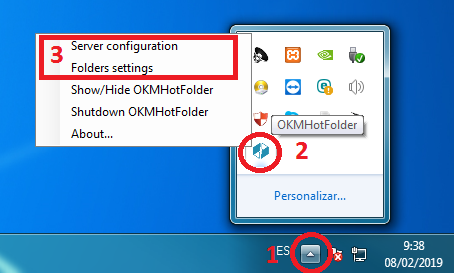
Server Configuration:
Section titled “Server Configuration:”First, you must choose the Server configuration menu item to set your configuration values:
| Property | Type | Description |
|---|---|---|
| Language | Select | User interface language. |
| User | String | User ID for accessing OpenKM. user1 |
| Password | String | The password of the user. pass1 |
| Host | String | OpenKM URL. http://localhost:8080/openkm/ |
| Use personal token | Bool | Authentication will be done using the access token. |
| Personal token | String | The personal access token okmpat-Ky1t16O2Rwx4ttPmOK0R |
Folder Settings:
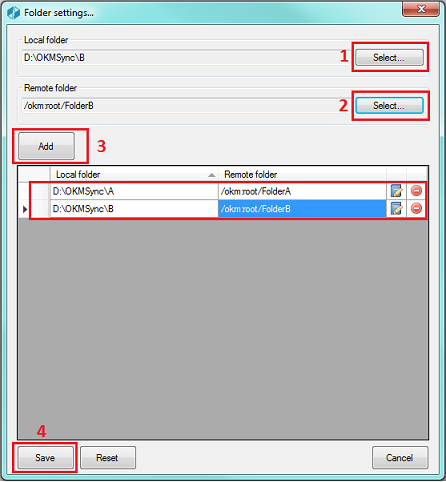
Section titled “ Folder Settings:”- Select a folder from your local disk.
- Select a folder from the OpenKM repository.
- Press the “Add” button (you can also edit or delete items from the list).
- Press the “Save” button.
Upload files to OpenKM
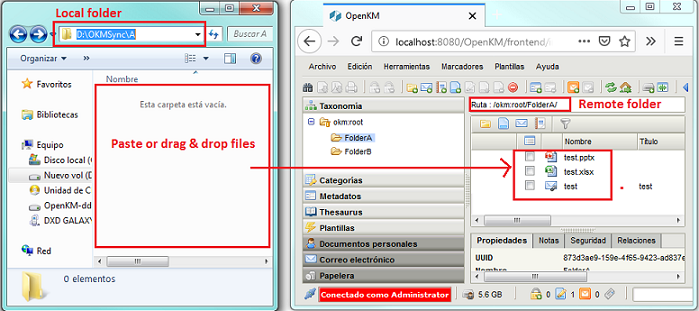
Section titled “ Upload files to OpenKM”- Copy & paste or drag & drop files into the configured local folder.
- The files will be uploaded to the configured OpenKM folder and will be deleted from the local disk.
- When the file already exists in the repository, you will be asked whether to update it.
Alternative configuration of the main file folder
Section titled “Alternative configuration of the main file folder”To configure a custom path for storing key application files such as:
- The log file (openkm.log)
- The configuration file (openkm.xml)
- Temporary files generated during runtime
This configuration is done using the okm.folder.path property, located in the app.properties file within the installation directory.
Example:
okm.folder.path=C:\\New_folder_path
After making the changes, you must restart the app.
In My Documents/OpenKM, there’s a log file called OKMHotFolder.log with a complete log trace.