Complaint management
Overview
Section titled “Overview”The Complaint Management workflow automates the full lifecycle of a customer complaint: from intake, through classification and manual assignment, investigation (with an optional information-request loop back to the claimant), to resolution and final communication. Unlike workflows that start on an existing OpenKM document, this one starts from a pre-launch intake form (run_config) and creates its own case record in the repository as its first step.
Download: complaint-management.okmflow
Supported execution paths:
- Direct resolution: the complaint is classified, assigned, investigated and resolved without needing further input from the claimant.
- Additional-information loop: during investigation, the assignee requests more information from the claimant by email. The case then loops on Register Received Information: either it returns to Investigation to continue, or it is closed without a resolution.
- Closed — no response: if the claimant never replies to the information request, the case is closed through a separate terminal branch, distinguishable in the metadata (
closed_no_response) from a normal resolution.
Diagram
Section titled “Diagram”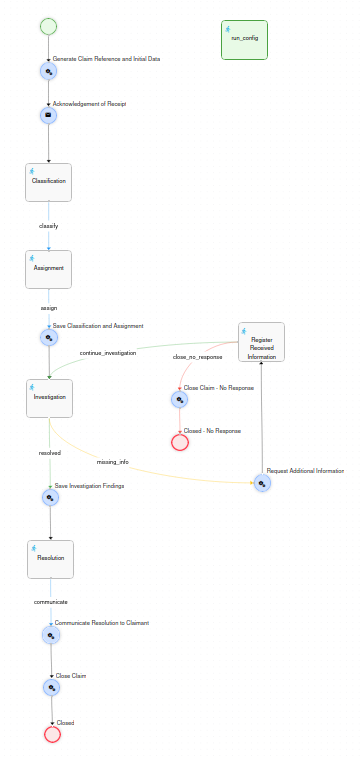
Prerequisites
Section titled “Prerequisites”Before deploying this workflow, the following must exist in OpenKM.
Database
Section titled “Database”A custom counter table is used to generate sequential case references. It is generic and can be shared with other workflows (e.g. Purchase Order, Expense Report Approval) via different counter_key values — only create the table once per environment:
CREATE TABLE IF NOT EXISTS APP_COUNTER (    counter_key   VARCHAR(50)  NOT NULL,    counter_value INT          NOT NULL DEFAULT 1,    CONSTRAINT pk_app_counter PRIMARY KEY (counter_key));
INSERT INTO APP_COUNTER (counter_key, counter_value)VALUES ('complaint', 1);
Users and roles
Section titled “Users and roles”| Identifier | Type | Used in | Description |
|---|---|---|---|
ROLE_CLAIMS_TRIAGE |
Role | Classification | Pool of triage agents who classify each incoming complaint. Any member can self-assign the task. There must be at least one user assigned. |
ROLE_CLAIMS_COORDINATOR |
Role | Assignment | Pool of coordinators who manually dispatch each classified case to a named assignee. There must be at least one user assigned. |
| (chosen at Assignment) | — | Investigation, Register Received Information, Resolution | Whoever is picked in the Assignment task’s Assignee field (any OpenKM user, via the OptionSelectUserList plugin). Every later task in the investigation/resolution chain is re-assigned to the same person via task-history lookup, not re-selected. |
Metadata group
Section titled “Metadata group”The property group okg:complaint must be registered in OpenKM before the first execution. It is applied automatically to the case record by the workflow — the user never fills it in manually (aside from the initial run_config form, which is not a metadata form).
<?xml version="1.0" encoding="UTF-8"?><!DOCTYPE property-groups PUBLIC "-//OpenKM//DTD Property Groups 3.12//EN"    "http://www.openkm.com/dtd/property-groups-3.12.dtd"><property-groups>  <property-group label="Complaint" name="okg:complaint" readonly="true">
    <input label="Claimant name" name="okp:complaint.contact_name">      <validator type="req"/>    </input>    <input label="Contact email" name="okp:complaint.contact_email">      <validator type="req"/>      <validator type="email"/>    </input>    <input label="Contact phone" name="okp:complaint.contact_phone" />    <textarea label="Complaint description" name="okp:complaint.claim_description" dbColumnSize="2048">      <validator type="req"/>    </textarea>    <input label="Case number" name="okp:complaint.case_number" />    <select label="Complaint type" name="okp:complaint.claim_type" type="simple">      <option label="Product" value="product"/>      <option label="Service" value="service"/>      <option label="Billing" value="billing"/>      <option label="Customer service" value="customer_service"/>      <option label="Delivery / lead time" value="delivery"/>      <option label="Other" value="other"/>    </select>    <select label="Priority" name="okp:complaint.priority" type="simple">      <option label="Low" value="low"/>      <option label="Medium" value="medium"/>      <option label="High" value="high"/>    </select>    <select label="Department" name="okp:complaint.department" type="simple">      <option label="Customer Care" value="customer_care"/>      <option label="Quality" value="quality"/>      <option label="Operations" value="operations"/>      <option label="Billing" value="billing"/>      <option label="Legal" value="legal"/>      <option label="Other" value="other"/>    </select>    <input label="Assigned to" name="okp:complaint.assigned_to" />    <textarea label="Investigation findings" name="okp:complaint.investigation_findings" dbColumnSize="2048" />    <select label="Resolution type" name="okp:complaint.resolution_type" type="simple">      <option label="Accepted" value="accepted"/>      <option label="Rejected" value="rejected"/>      <option label="Partially accepted" value="partial"/>    </select>    <input label="Closed date" name="okp:complaint.closed_date" type="date" />    <select label="Status" name="okp:complaint.status" type="simple">      <option label="New" value="new"/>      <option label="Assigned" value="assigned"/>      <option label="Under investigation" value="under_investigation"/>      <option label="Pending additional information" value="pending_info"/>      <option label="Pending resolution" value="pending_resolution"/>      <option label="Resolved" value="resolved"/>      <option label="Closed" value="closed"/>      <option label="Closed - no response" value="closed_no_response"/>    </select>
  </property-group></property-groups>
The group is readonly="true" — all writes are performed programmatically from Action nodes in the workflow.
Repository structure
Section titled “Repository structure”The action Generate Claim Reference and Initial Data (the first node after Start) builds the following structure in the OpenKM repository each time a new workflow instance is launched:
/okm:root/--- Complaints/ --- {year}/ - Folder (type: folder) --- CLM-{year}-{NNN}/ - Record (type: record) - the case itself --- resolution/ - Folder (type: folder) - for the optional resolution documentReference format: CLM-{year}-{NNN} where NNN is a zero-padded 3-digit sequential number (e.g. CLM-2026-001). The counter is read from APP_COUNTER.counter_key = 'complaint', the case number is built from the value read, and the counter is incremented and saved back immediately afterwards.
The workflow process instance is linked to this record via WorkflowUtils.setProcessInstanceNode(context, recordUuid), so the workflow is accessible directly from the document explorer.
Node reference
Section titled “Node reference”run_config — Initiation form
Section titled “run_config — Initiation form”Displayed to the user before the process instance is created. Not connected to the rest of the diagram and has no outgoing transitions — the engine presents it automatically when the workflow is launched.
| Field | Type | Required | Notes |
|---|---|---|---|
| Claimant name | Input | Yes | — |
| Contact email | Input | Yes | Email format validated. |
| Contact phone | Input | No | — |
| Complaint description | Textarea | Yes | — |
Assignment: assignExpr is the literal expression ""; — the pre-launch form is always shown to whoever starts the process; it is not routed through the normal role/user assignment mechanism.
Standard start node. This workflow starts without an associated OpenKM node — there is no record behind the process until the next Action node creates one. Unnamed transition → Generate Claim Reference and Initial Data.
Generate Claim Reference and Initial Data — Action
Section titled “Generate Claim Reference and Initial Data — Action”Runs immediately after Start. Performs all repository initialisation for the new case:
- Reads the current counter value from
APP_COUNTER(counter_key = 'complaint') with a raw SQL query (ws.repository.executeSqlQuery), builds the case number asCLM-{year}-{NNN}from that value, then updates the counter row to the next value. - Reads the values submitted in
run_config(contactName,contactEmail,contactPhone,claimDescription) viaWorkflowUtils.getFormElementValue(context, ...). - Creates the year folder
/okm:root/Complaints/{year}if it does not already exist (ws.folder.createMissingFolders), then creates the case record inside it (ws.record.create), guarding both steps withws.repository.hasNodechecks. - Links the process instance to the record via
WorkflowUtils.setProcessInstanceNode(context, recordUuid). - Writes the
okg:complaintmetadata group with the intake data, the case number andstatus = new, choosingaddGrouporsetPropertiesdepending on whether the group already exists on the record (ws.propertyGroup.hasGroup). - Stores plain-string context variables (
caseNumber,contactName,contactEmail,contactPhone,claimDescription) for later Mail templates and plain-email scripts, plus typedInput/TextAreaobjects (caseNumberData,contactNameData,contactEmailData,claimDescriptionData) so later read-only form fields can pre-fill viadata="...". - Creates a
resolutionsubfolder inside the record and stores anUploaddescriptor (resolutionUploadParams) pointing at it, for later use in the Resolution task.
Acknowledgement of Receipt — Mail
Section titled “Acknowledgement of Receipt — Mail”| Field | Value |
|---|---|
| Recipients | ${contactEmail} |
| Subject | We have received your complaint - Case ${caseNumber} |
| Body | It confirms receipt and states the case number (${caseNumber}), and is addressed to ${contactName}. |
Classification — Task
Section titled “Classification — Task”Assignment: pool of ROLE_CLAIMS_TRIAGE users.
The form shows the case number, claimant name, contact email and complaint description in read-only mode, then collects:
| Field | Type | Required | Notes |
|---|---|---|---|
| Complaint type | Select | Yes | Product, Service, Billing, Customer service, Delivery / lead time, Other. |
| Priority | Select | Yes | Low, Medium (default), High. |
| Department | Select | Yes | Customer Care, Quality, Operations, Billing, Legal, Other. |
| Classification comments | Textarea | No | Free-text notes from the triage agent; re-displayed read-only in Assignment. Not persisted to metadata. |
| Button | Transition | Description |
|---|---|---|
| Classify and continue | classify |
Proceeds to Assignment. |
Assignment — Task
Section titled “Assignment — Task”Assignment: pool of ROLE_CLAIMS_COORDINATOR users.
The form shows the case number, complaint description and classification data (type, priority, department, classification comments) in read-only mode, then collects:
| Field | Type | Required | Notes |
|---|---|---|---|
| Assignee | Select | Yes | OptionSelectUserList plugin — lets the coordinator pick any OpenKM user. The chosen id becomes assigneeId and drives every later task assignment. |
| Assignment comments | Textarea | No | Free-text notes from the coordinator. Not persisted to metadata. |
| Button | Transition | Description |
|---|---|---|
| Assign | assign |
Proceeds to Save Classification and Assignment. |
Save Classification and Assignment — Action
Section titled “Save Classification and Assignment — Action”Runs immediately after Assignment. Reads claimType, priority, department and assignee (all Select objects) from context, stores assignee.getValue() as assigneeId in context, and writes claim_type, priority, department, assigned_to and status = assigned to okg:complaint.
Investigation — Task
Section titled “Investigation — Task”Assignment logic (pool → direct re-assignment via task history):
1. Query task history: WorkflowUtils.getTaskInstances(piId, "Investigation")2. If a previous instance with an assigned actor exists → return that actor (String, direct assignment) (ensures the same investigator handles re-entry after the information-request loop)3. If first time → return assigneeId (the person chosen in "Assignment")The form shows the case number, complaint description and any previously-received additional information in read-only mode, then collects:
| Field | Type | Required | Notes |
|---|---|---|---|
| Investigation notes / findings | Textarea | Yes | Re-displayed read-only in every later task in this branch. |
| Button | Transition | Description |
|---|---|---|
| Investigation complete - move to resolution | resolved |
Proceeds to Save Investigation Findings → Resolution. |
| Missing information from the claimant | missing_info |
Proceeds to Request Additional Information. |
Request Additional Information — Action
Section titled “Request Additional Information — Action”Runs when Investigation is marked as needing more information. Sends a plain email (ws.mail.sendMail, not a Mail node) to contactEmail, including the investigator’s findings so far if any, asking the claimant to reply with the missing details. The sending address is hard-coded (noreply@nomail.com, marked with a TODO comment to replace it with the real one). Routes to Register Received Information.
Register Received Information — Task
Section titled “Register Received Information — Task”Assignment: same task-history lookup pattern as Investigation (queries task instances of "Investigation") — re-assigned to whoever is investigating the case; falls back to assigneeId if no prior actor is found.
The form shows the case number and the prior investigation notes in read-only mode, then collects:
| Field | Type | Required | Notes |
|---|---|---|---|
| Information received from the claimant | Textarea | Yes | Recorded by the investigator after receiving a reply by email, phone, etc. |
| Button | Transition | Description |
|---|---|---|
| Continue investigation | continue_investigation |
Proceeds back to Investigation (loop). |
| Close - no response | close_no_response |
Asks for confirmation, then proceeds to Close Claim - No Response → End “Closed - No Response”. Terminal. |
Save Investigation Findings — Action
Section titled “Save Investigation Findings — Action”Runs when Investigation is marked complete (resolved). Persists investigationFindings to okp:complaint.investigation_findings and sets status = pending_resolution, then routes to Resolution.
Resolution — Task
Section titled “Resolution — Task”Assignment: same task-history lookup pattern, targeting "Investigation" — the person who investigated the case resolves it directly; there is no separate approval step.
The form shows the case number and investigation notes in read-only mode, then collects:
| Field | Type | Required | Notes |
|---|---|---|---|
| Resolution type | Select | Yes | Accepted, Rejected, Partially accepted. |
| Resolution text (will be sent to the claimant) | Textarea | Yes | Used verbatim in the final email body. |
| Resolution document (optional) | Upload | No | Allowed extensions: pdf, doc, docx. Uploaded into the resolution subfolder created at case startup, via the resolutionUploadParams descriptor. |
| Button | Transition | Description |
|---|---|---|
| Finish and notify the claimant | communicate |
Proceeds to Communicate Resolution to Claimant. |
Communicate Resolution to Claimant — Action
Section titled “Communicate Resolution to Claimant — Action”Reads resolutionType and resolutionText from context. Lists the contents of the resolution subfolder (ws.document.getChildren) to check whether a document was uploaded in the previous task. If none was uploaded, sends a plain email (ws.mail.sendMail); if one was uploaded, sends the same email with the document attached via ws.mail.sendMailWithAttachments. The sending address is hard-coded here as well (noreply@nomail.com, same TODO as in Request Additional Information). Routes to Close Claim.
Close Claim — Action
Section titled “Close Claim — Action”Reads resolutionType from context (still available from the Resolution task — nothing overwrites it in between) and writes okp:complaint.resolution_type, status = closed, and closed_date (current timestamp, raw yyyyMMddHHmmss format) to okg:complaint. Routes to End “Closed”.
Close Claim - No Response — Action
Section titled “Close Claim - No Response — Action”Reached only from Register Received Information’s close_no_response branch. Writes status = closed_no_response and closed_date to okg:complaint. Routes to End “Closed - No Response”.
Closed / Closed - No Response — End nodes
Section titled “Closed / Closed - No Response — End nodes”Two named End nodes representing the two final outcomes. Using distinct names allows external systems or audit reports to distinguish a resolved case from one closed for lack of response.
Metadata lifecycle
Section titled “Metadata lifecycle”The okp:complaint.status field is updated automatically at each stage transition. The complete lifecycle is:
new → assigned → pending_resolution → closed (direct path)assigned → assigned (information-request loop, repeatable)assigned → closed_no_response (terminal, via the information-request loop)Status does not change while the information-request loop is repeating; it only advances to pending_resolution once Investigation is finally marked “resolved”.
Key patterns
Section titled “Key patterns”| Pattern | Where applied |
|---|---|
| Counter table for reference numbering | APP_COUNTER with counter_key = 'complaint'. Shared table, reusable across workflows. |
Pre-launch intake form (run_config) feeding record creation |
run_config collects the claimant’s data before the process starts; Generate Claim Reference and Initial Data reads it directly via WorkflowUtils.getFormElementValue and creates the record — no intermediate “confirm your submission” task. |
run_config’s own assignExpr is a literal empty string |
""; — the pre-launch form is shown to whoever starts the process, not routed through role/user assignment logic. |
| Dual plain-string / typed-object context variables from the same source data | Generate Claim Reference and Initial Data stores the intake data twice: as plain Strings (contactEmail, caseNumber, …) for direct ${...} use in Mail nodes and plain-email scripts, and as typed Input/TextArea objects suffixed *Data (contactEmailData, caseNumberData, …) for pre-filling read-only task form fields via data="...". |
| Pool → direct re-assignment via task history | WorkflowUtils.getTaskInstances(piId, "Investigation") — used by Investigation itself (its own re-entry loop), by Register Received Information, and by Resolution, so the same investigator handles the whole case after the initial assignment. |
| Metadata written by Action nodes, not users | okg:complaint is readonly="true". All writes use ws.propertyGroup.setProperties(), or addGroup() guarded by a hasGroup() check on the very first write. |
| Workflow linked to a repository record created mid-flow | WorkflowUtils.setProcessInstanceNode(context, recordUuid) in Generate Claim Reference and Initial Data — the process has no associated node at Start; it gets one as soon as the record is created. |
| Attachment on a final notification email | The native Mail node type does not support attachments. Communicate Resolution to Claimant is an Action node that conditionally calls ws.mail.sendMail or ws.mail.sendMailWithAttachments depending on whether a document was uploaded; Request Additional Information uses the same plain-email approach (without attachments) for the same reason — only Acknowledgement of Receipt is a native Mail node. |
| Dedicated subfolder for an optional upload | The resolution subfolder (created once, at case startup) avoids mixing the optional resolution document with any other content that might later be added to the case record. |
| Metadata kept in sync at every major transition, not only at the end | Save Classification and Assignment and Save Investigation Findings each persist their stage’s data immediately, rather than waiting until Close Claim to write everything at once — keeps the record’s metadata queryable and up to date even mid-process. |