Decision node
Overview
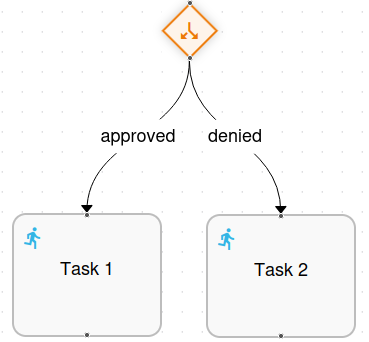
Section titled “Overview”The Decision node enables automated branching in workflow execution based on programmatic logic. When the workflow reaches a Decision node, it executes a script that evaluates conditions and returns the name of the outgoing transition to follow. This allows the workflow to make automated decisions without human intervention.
Node Properties
Section titled “Node Properties”The Decision node configuration includes properties for identification, visual layout, and decision logic:
| Property | Type | Description |
|---|---|---|
| Name | Text | The name that identifies this Decision node. This name should clearly describe the decision being made (e.g., “Check if second recipient exists”, “Validate invoice number”). |
| Id | Number | Unique identifier assigned to the node. This value is automatically generated by the system and uniquely identifies the node within the process definition. |
| Source position | Dropdown | Defines the position from which outgoing transition arrows exit the node. Available options are: - Top - Transitions exit from the top of the node - Bottom - Transitions exit from the bottom of the node - Left - Transitions exit from the left side of the node - Right - Transitions exit from the right side of the node |
| Target position | Dropdown | Defines the position where incoming transition arrows enter the node. Available options are the same as Source position (Top, Bottom, Left, Right). |
| Description | Textarea | Optional field for providing additional details or documentation about the decision logic and purpose of this node. |
| Script definition | Code Editor | The script that contains the decision logic. This script is executed when the workflow reaches this node and must return a string value matching the name of one of the outgoing transitions. |
Transitions
Section titled “Transitions”The Decision node requires specific transition configurations:
- Incoming transitions (Target): One or more transitions can enter the Decision node
- Outgoing transitions (Source): A minimum of two transitions must exit the Decision node. Each outgoing transition must have a unique name that identifies the path it represents
Script Behavior
Section titled “Script Behavior”The script executed by the Decision node has access to the workflow context and all available variables. The script must return a string value that corresponds to the name of one of the outgoing transitions. Based on this return value, the workflow execution will continue along the matching transition path.
Script Example
Section titled “Script Example”The following example demonstrates a Decision node script that checks if a variable exists and returns either “yes” or “no”:
import com.openkm.sdk4j.impl.OKMWebservices;import com.openkm.sdk4j.bean.*;import com.openkm.sdk4j.util.*;import com.openkm.okmflow.util.*;import com.openkm.okmflow.bean.*;import com.openkm.bean.form.*;import com.openkm.util.*;import java.util.*;import org.apache.commons.lang3.StringUtils;
OKMWebservices ws = WebservicesHelper.getInstance();Class baseLibrary = ScriptUtils.evaluateFromNode("library_global_base");def invoiceNumber = baseLibrary.getContextValue(context, "invoiceNumber");
if (StringUtils.isNotBlank(invoiceNumber.getValue())) {    return "yes";} else {    return "no";}
In this example:
- The script retrieves a context variable named “invoiceNumber”
- It checks if the value is not blank using StringUtils
- Returns “yes” if the value exists, or “no” if it doesn’t
- The Decision node must have two outgoing transitions named “yes” and “no” for the workflow to continue correctly
Best Practices
Section titled “Best Practices”- Use descriptive names for outgoing transitions that clearly indicate the path they represent (e.g., “approved”, “rejected”, “pending” instead of “t1”, “t2”, “t3”)
- Always handle all possible cases in your script logic to prevent execution failures
- Use the Description field to document the decision criteria and expected outcomes
- Test your decision logic thoroughly with different context variable values
- Keep script logic simple and focused on the specific decision being made