Purchase order
Overview
Section titled “Overview”The Purchase Order workflow automates the full lifecycle of a purchase requisition: from the initial request submission, through budget validation and management approval, to the formal issuance of the purchase order and email notification of the outcome.
Download: purchase-order.okmflow
Supported execution paths:
- Direct approval: the request passes Budget Validation and Manager Approval without issues and a purchase order is issued.
- Clarification loop: the budget validator returns the request to the requester for corrections. The request can loop back to Budget Validation as many times as needed.
- Rejection at Budget Validation: the budget validator rejects the request — the requester is notified by email and the process ends.
- Rejection at Manager Approval: the manager rejects the request — the requester is notified by email and the process ends.
Diagram
Section titled “Diagram”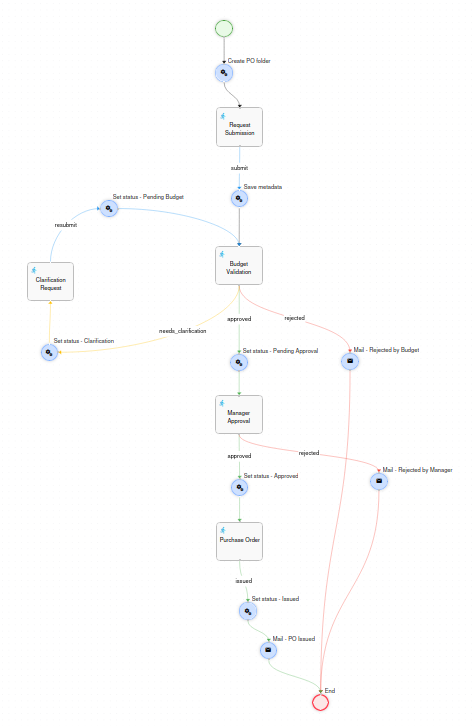
Prerequisites
Section titled “Prerequisites”Before deploying this workflow, the following must exist in OpenKM.
Database
Section titled “Database”A custom counter table must be created in the OpenKM database before the first workflow execution:
CREATE TABLE IF NOT EXISTS APP_COUNTER (    counter_key   VARCHAR(50)  NOT NULL,    counter_value INT          NOT NULL DEFAULT 1,    CONSTRAINT pk_app_counter PRIMARY KEY (counter_key));
INSERT INTO APP_COUNTER (counter_key, counter_value)VALUES ('purchase_order', 1);
The table is generic and can be reused by other workflows by adding new rows with different counter_key values.
Users and roles
Section titled “Users and roles”| Identifier | Type | Used in | Description |
|---|---|---|---|
ROLE_FINANCE |
Role | Budget Validation | Members of this role form the pool of budget validators for requests below €3,000. It must have at least one user assigned. |
financeManager |
User | Budget Validation | Directly assigned to budget validation tasks when the estimated amount is ≥ €3,000. |
itManager |
User | Manager Approval | Assigned when the requesting department is IT. |
financeManager |
User | Manager Approval | Assigned when the requesting department is Finance. |
operationsManager |
User | Manager Approval | Assigned when the requesting department is Operations. |
salesManager |
User | Manager Approval | Assigned when the requesting department is Sales. |
hrManager |
User | Manager Approval | Assigned when the requesting department is HR. |
Metadata group
Section titled “Metadata group”The property group okg:purchase_order must be registered in OpenKM before the first execution. It is applied automatically to the PO record by the workflow — the user never fills it in manually.
<?xml version="1.0" encoding="UTF-8"?><!DOCTYPE property-groups PUBLIC "-//OpenKM//DTD Property Groups 3.12//EN"    "http://www.openkm.com/dtd/property-groups-3.12.dtd"><property-groups>  <property-group label="Purchase Order Request" name="okg:purchase_order" readonly="true">
    <input label="PO Reference"     name="okp:purchase_order.poNumber" />    <input label="Request Title"    name="okp:purchase_order.requestTitle" />    <select label="Department"      name="okp:purchase_order.department" type="simple">      <option label="IT"         value="it"/>      <option label="Finance"    value="finance"/>      <option label="Operations" value="operations"/>      <option label="Sales"      value="sales"/>      <option label="HR"         value="hr"/>    </select>    <input label="Request Date"     name="okp:purchase_order.requestDate" type="date" />    <input label="Estimated Amount" name="okp:purchase_order.estimatedAmount" />    <select label="Currency"        name="okp:purchase_order.currency" type="simple">      <option label="EUR" value="EUR"/>      <option label="USD" value="USD"/>      <option label="GBP" value="GBP"/>    </select>    <input label="Actual Amount"    name="okp:purchase_order.actualAmount" />    <select label="Priority"        name="okp:purchase_order.priority" type="simple">      <option label="Low"    value="low"/>      <option label="Medium" value="medium"/>      <option label="High"   value="high"/>      <option label="Urgent" value="urgent"/>    </select>    <input label="Required By Date"    name="okp:purchase_order.requiredByDate" type="date" />    <input label="Vendor / Supplier"   name="okp:purchase_order.vendor" />    <textarea label="Justification"    name="okp:purchase_order.description" dbColumnSize="1024" />    <input label="Official PO Number"  name="okp:purchase_order.poOfficialNumber" />    <input label="Expected Delivery"   name="okp:purchase_order.deliveryDate" type="date" />    <select label="Status"             name="okp:purchase_order.status" type="simple">      <option label="Pending Budget Validation" value="pending_budget"/>      <option label="Clarification Required"    value="clarification"/>      <option label="Pending Manager Approval"  value="pending_approval"/>      <option label="Rejected - Budget"         value="rejected_budget"/>      <option label="Rejected - Manager"        value="rejected_manager"/>      <option label="Approved"                  value="approved"/>      <option label="Issued"                    value="issued"/>    </select>
  </property-group></property-groups>
The group is readonly="true" — all writes are performed programmatically from Action nodes in the workflow.
Repository structure
Section titled “Repository structure”The action Create PO folder (the first node after Start) builds the following structure in the OpenKM repository each time a new workflow instance is launched:
/okm:root/ - Purchase Order Request/ - {year}/ - Folder (type: folder) - PO-{year}-{NNN}/ - Record (type: record) - the main expediente - others/ - Folder (type: folder) - for non-budget documentsPO Reference format: PO-{year}-{NNN} where NNN is a zero-padded 3-digit sequential number (e.g. PO-2026-001, PO-2026-002). The counter is read from APP_COUNTER.counter_key = 'purchase_order', incremented, and saved back atomically at workflow start.
The PO record (PO-{year}-{NNN}) is the main container for the purchase order. The workflow process instance is linked to this record via WorkflowUtils.setProcessInstanceNode(context, recordUuid), so the workflow is accessible directly from the document explorer.
Document destinations inside the record:
| Upload field | Destination |
|---|---|
| Budget Document (proforma, quote) | Root of the PO record (/PO-{year}-{NNN}/) |
| Other Supporting Documents | others subfolder (/PO-{year}-{NNN}/others/) |
Node reference
Section titled “Node reference”Launches the workflow. No form is presented to the user at this point — the process starts immediately and transitions to the Create PO folder action.
Create PO folder - Action
Section titled “Create PO folder - Action”Runs immediately after Start. Performs all repository initialisation for the new request:
- Reads the current counter value from
APP_COUNTER(counter_key = 'purchase_order'), builds the PO reference string (PO-{year}-{NNN}), and increments the counter. - Creates the year folder
/okm:root/Purchase Order Request/{year}if it does not already exist (folder type). - Creates the PO record
PO-{year}-{NNN}inside the year folder usingws.record.create(fldUuid, poNumber, "", 0)(record type). - Creates the
otherssubfolder inside the record usingws.folder.create(recordUuid, "others"). - Stores the following objects in the workflow context for use by subsequent nodes.
| Context key | Type | Value |
|---|---|---|
poNumber |
Input |
PO reference string, e.g. PO-2026-001. |
poRecordPath |
String |
Full repository path of the PO record. |
poRecordUuid |
String |
UUID of the PO record. |
poOthersFolderUuid |
String |
UUID of the others subfolder. |
budgetDocumentData |
Upload |
Upload descriptor pointing to the PO record root (for the budget document). |
otherDocumentsData |
Upload |
Upload descriptor pointing to the others subfolder. |
Finally, it links the process instance to the PO record via WorkflowUtils.setProcessInstanceNode(context, recordUuid).
Request Submission - Task
Section titled “Request Submission - Task”Assignment: the workflow initiator (initiator.getId()).
The requester fills in the purchase request details and uploads the supporting documents.
| Field | Type | Required | Notes |
|---|---|---|---|
| PO Reference | Text (read-only) | — | Auto-populated from context (poNumber). |
| Request Title | Text | Yes | Short description of what is being purchased. |
| Department | Select | Yes | IT, Finance, Operations, Sales, HR. Drives manager assignment in a later step. |
| Estimated Amount | Number | Yes | Used to determine the budget validator assignment rule (see Budget Validation). |
| Currency | Select | Yes | EUR, USD, GBP. |
| Priority | Select | Yes | Low, Medium, High, Urgent. |
| Required By Date | Date | Yes | Target date for the purchase to be completed. |
| Vendor / Supplier | Text | No | Pre-identified vendor, if known. |
| Justification / Description | Textarea | Yes | Business justification for the purchase. |
| Budget Document | Upload (create) |
Yes | The main financial document (proforma, quote). Uploaded to the root of the PO record. |
| Other Supporting Documents | Upload (create, multiple) |
No | Any additional documents (technical specs, comparisons, etc.). Uploaded to the others subfolder. |
| Button | Transition | Description |
|---|---|---|
| Submit Request | submit |
Saves the form and proceeds to Save metadata. |
Save metadata - Action
Section titled “Save metadata - Action”Runs immediately after Request Submission. Reads all form values from context and writes them as metadata properties on the PO record (okg:purchase_order group).
Notable behaviour:
requestDateis captured automatically usingISO8601.formatBasic(Calendar.getInstance())— it reflects the moment the requester submitted the form, not when the workflow started. This field is designed for reporting.statusis set topending_budget.- After writing the metadata, the action retrieves the UUID of the budget document by calling
ws.document.getChildren(recordUuid).get(0).getUuid()(the record contains exactly one document at this point — the budget file uploaded in the previous task). This UUID is stored asbudgetDocumentUuidin context. - The UUID of the
othersfolder is wrapped as anInputobject and stored asothersFolderUuidin context.
Both budgetDocumentUuid and othersFolderUuid are used as type="folder" read-only fields in Budget Validation, Clarification Request, Manager Approval, and Purchase Order tasks, giving every reviewer direct access to the documents from the task form.
Budget Validation - Task
Section titled “Budget Validation - Task”Assignment logic (smart re-assignment):
1. Query task history: WorkflowUtils.getTaskInstances(piId, "Budget Validation")2. If a previous instance with an assigned actor exists → return that actor (String) (ensures the same person handles the re-entry after a Clarification loop)3. If first time: - estimatedAmount < 3000 → return pool of ROLE_FINANCE users (List<String>) - estimatedAmount >= 3000 → return "financeManager" (String)The < 3,000 threshold routes the task to any available member of ROLE_FINANCE as a pool — any member must self-assign it. For amounts greater than or equal to €3,000, it goes directly to financeManager. To modify the threshold or add additional tiers, update the assignExpr of this node.
The form shows all request details in read-only mode, plus two node reference fields:
| Field | Type | Description |
|---|---|---|
| Budget Document | type="folder" (read-only) |
Clickable link to the uploaded budget document (proforma/quote). |
| Other Documents Folder | type="folder" (read-only) |
Clickable link to the others subfolder inside the PO record. |
| Budget Reviewer Comments | Textarea | Required. The validator’s decision rationale. |
| Button | Transition | Description |
|---|---|---|
| Approve | approved |
Proceeds to Set status - Pending Approval → Manager Approval. |
| Needs Clarification | needs_clarification |
Proceeds to Set status - Clarification → Clarification Request. |
| Reject | rejected |
Proceeds directly to Mail - Rejected by Budget → End. Requires confirmation. |
Set status - Clarification - Action
Section titled “Set status - Clarification - Action”Updates okp:purchase_order.status to clarification on the PO record.
Also prepares the updateBudgetDocument Upload object for the Clarification Request task:
Input budgetDocumentUuidInput = (Input) context.get("budgetDocumentUuid");Upload updateBudgetUpload = new Upload();updateBudgetUpload.setType("update");updateBudgetUpload.setDocumentUuid(budgetDocumentUuidInput.getValue());context.put("updateBudgetDocument", updateBudgetUpload);This allows the requester to upload a new version of the budget document (replacing the original, not creating a duplicate) directly from the Clarification Request form.
Clarification Request - Task
Section titled “Clarification Request - Task”Assignment: the workflow initiator (initiator.getId()).
The requester sees the reviewer’s comments and can correct any aspect of the request before resubmitting. All request fields are editable and pre-populated from context.
Notable features of this task:
- Replace Budget Document (
type="update") — uploads a new version of the budget document that was submitted in Request Submission, replacing it in-place in the repository. The document UUID is the same; only the content changes (new version created). - Other Supporting Documents (
type="create", multiple) — uploads additional files to theotherssubfolder. New files are added alongside any previously uploaded files; nothing is deleted. - The Budget Reviewer Comments field is shown in read-only mode so the requester can see exactly what needs to be corrected.
| Button | Transition | Description |
|---|---|---|
| Resubmit for Validation | resubmit |
Proceeds to Set status - Pending Budget → Budget Validation. |
Set status - Pending Budget - Action
Section titled “Set status - Pending Budget - Action”Updates okp:purchase_order.status to pending_budget on the PO record, then routes back to Budget Validation.
Set status - Pending Approval - Action
Section titled “Set status - Pending Approval - Action”Updates okp:purchase_order.status to pending_approval on the PO record, then routes to Manager Approval.
Manager Approval - Task
Section titled “Manager Approval - Task”Assignment logic (department-based):
| Department | Assigned user |
|---|---|
| IT | itManager |
| Finance | financeManager |
| Operations | operationsManager |
| Sales | salesManager |
| HR | hrManager |
To add a department or change its manager, update the assignExpr of this node.
The form shows the full request in read-only mode, including budget reviewer comments and the two document reference fields (budgetDocumentUuid, othersFolderUuid).
| Button | Transition | Description |
|---|---|---|
| Approve | approved |
Proceeds to Set status - Approved → Purchase Order. |
| Reject | rejected |
Proceeds to Mail - Rejected by Manager → End. Requires confirmation. |
Set status - Approved - Action
Section titled “Set status - Approved - Action”Updates okp:purchase_order.status to approved on the PO record, then routes to Purchase Order.
Purchase Order - Task
Section titled “Purchase Order - Task”Assignment: the same user who handled the Budget Validation task, looked up via task history:
WorkflowUtils.getTaskInstances(piId, "Budget Validation")→ return t.getActor(); // String → direct assignmentThis means the finance team member who validated the budget also formalises the purchase order. If no previous actor is found (should not occur in normal flow), the task falls back to okmAdmin.
The form shows the full request summary in read-only mode (including manager comments and document references), followed by editable fields for the purchase order details:
| Field | Type | Required | Notes |
|---|---|---|---|
| PO Number (official) | Text | Yes | The official purchase order number assigned by the purchasing department or ERP system. |
| Actual Amount | Number | Yes | The final confirmed amount (may differ from the estimate). |
| Vendor Confirmed | Text | Yes | Final confirmed vendor name. |
| Expected Delivery Date | Date | Yes | Stored as yyyyMMddHHmmss; formatted to yyyy-MM-dd before the notification email. |
| PO Notes | Textarea | No | Any additional notes or conditions. |
| Button | Transition | Description |
|---|---|---|
| Issue Purchase Order | issued |
Proceeds to Set status - Issued → Mail - PO Issued → End. |
Set status - Issued - Action
Section titled “Set status - Issued - Action”Updates okp:purchase_order.status to issued on the PO record.
Also converts the deliveryDate field value (stored internally as yyyyMMddHHmmss) to yyyy-MM-dd format for the notification email:
SimpleDateFormat raw = new SimpleDateFormat("yyyyMMddHHmmss");SimpleDateFormat fmt = new SimpleDateFormat("yyyy-MM-dd");Input deliveryDateRaw = (Input) context.get("deliveryDate");Input deliveryDateFmt = new Input();deliveryDateFmt.setValue(fmt.format(raw.parse(deliveryDateRaw.getValue())));context.put("deliveryDate_fmt", deliveryDateFmt);The Mail node accesses the formatted value via ${deliveryDate_fmt.value}.
Mail - Rejected by Budget - Mail
Section titled “Mail - Rejected by Budget - Mail”Sent when the budget validator clicks Reject.
| Field | Value |
|---|---|
| Recipients | ${initiator.email} |
| Subject | Purchase Order {poNumber} - Rejected at Budget Validation |
| Body | Includes PO reference and the reviewer’s comments (${budgetComments.value}). |
Mail - Rejected by Manager - Mail
Section titled “Mail - Rejected by Manager - Mail”Sent when the manager clicks Reject.
| Field | Value |
|---|---|
| Recipients | ${initiator.email} |
| Subject | Purchase Order {poNumber} - Rejected by Manager |
| Body | Includes PO reference and the manager’s comments (${managerComments.value}). |
Mail - PO Issued - Mail
Section titled “Mail - PO Issued - Mail”Sent when the purchasing team issues the purchase order.
| Field | Value |
|---|---|
| Recipients | ${initiator.email} |
| Subject | Purchase Order {poNumber} - Approved and Issued |
| Body | Includes official PO number, confirmed vendor, and expected delivery date in yyyy-MM-dd format (${deliveryDate_fmt.value}). |
Single convergence point for all terminal paths (approved + issued, rejected by budget, rejected by manager).
Metadata lifecycle
Section titled “Metadata lifecycle”The okp:purchase_order.status field is updated automatically at each stage transition. The complete lifecycle is:
pending_budget → clarification → pending_budget (loop, repeatable)pending_budget → rejected_budget (terminal)pending_budget → pending_approvalpending_approval → rejected_manager (terminal)pending_approval → approvedapproved → issued (terminal)The requestDate field is set once at Save metadata and never updated again. It reflects when the requester submitted the form, making it reliable for reporting.
Key patterns
Section titled “Key patterns”| Pattern | Where applied |
|---|---|
| Counter table for PO numbering | APP_COUNTER table with counter_key = 'purchase_order'. Read → format → increment → write in a single action at workflow start. Generic: add rows for other workflows without schema changes. |
| Context key naming to prevent overwrite | Upload descriptors (budgetDocumentData, otherDocumentsData) use names different from form field names (budgetDocument, otherDocuments). This prevents the engine from overwriting the Upload object with the form element object when the task is submitted. |
| Pool → direct re-assignment via task history | WorkflowUtils.getTaskInstances(piId, "Budget Validation") finds the previous actor; returning a String (not a List) creates a direct re-assignment. Used in both Budget Validation (re-entry after clarification) and Purchase Order (assign to same person as budget validator). |
| Amount-based assignment tier | estimatedAmount < 3000 → ROLE_FINANCE pool; >= 3000 → financeManager direct. The threshold is hard-coded in the assignExpr of Budget Validation. |
| Department-based manager assignment | assignExpr of Manager Approval maps each department value to a fixed username. Add or change mappings there without touching the rest of the workflow. |
type="update" upload for document versioning |
In Clarification Request, the budget document upload field uses type="update" + documentUuid to create a new version of the existing document rather than uploading a duplicate. The Upload object is prepared in Set status - Clarification using setType("update") and setDocumentUuid(uuid). |
type="folder" for node references |
Despite its name, type="folder" renders as a clickable repository link for any node type (document, folder, record). Used here to give reviewers direct access to the budget document and others folder from task forms. |
| Date formatting before Mail nodes | date fields store values as yyyyMMddHHmmss. Set status - Issued converts deliveryDate to yyyy-MM-dd and stores it as deliveryDate_fmt. The Mail node accesses it via ${deliveryDate_fmt.value} (FreeMarker syntax). |
| Metadata written by Action nodes, not users | The property group okg:purchase_order is readonly="true". All writes use ws.propertyGroup.setProperties(uuid, "okg:purchase_order", properties) from Action nodes. |
| Workflow linked to repository record | WorkflowUtils.setProcessInstanceNode(context, recordUuid) in Create PO folder links the running process instance to the PO record, making the workflow accessible directly from the document explorer. |