Expense report approval
Overview
Section titled “Overview”The Expense Report Approval workflow automates the full lifecycle of an employee expense claim: from submission and receipt upload, through manager approval and finance validation, to payment. It supports two clarification loops (manager → employee, and manager → finance) and two independent final-rejection paths, so that a rejection originating from the manager and a rejection originating during finance validation are tracked separately.
Download: expense-report-approval.okmflow
Supported execution paths:
- Direct approval: the request passes Manager Approval and Finance Validation without issues and the expense is paid.
- Employee clarification loop: the manager (either from Manager Approval or from Manager Review) returns the request to the employee for corrections. The request can loop back to Manager Approval as many times as needed.
- Finance ↔ Manager loop: Finance Validation rejects the request; it is routed to the same manager who originally approved it (Manager Review) instead of ending the process. From there the manager can request employee clarification, reply directly to Finance, or reject the request definitively.
- Rejection at Manager Approval: the manager rejects the request directly — the employee is notified by email and the process ends.
- Rejection at Manager Review (originated by Finance): the manager rejects the request after a Finance rejection — the employee is notified by email and the process ends via a separate terminal branch.
Diagram
Section titled “Diagram”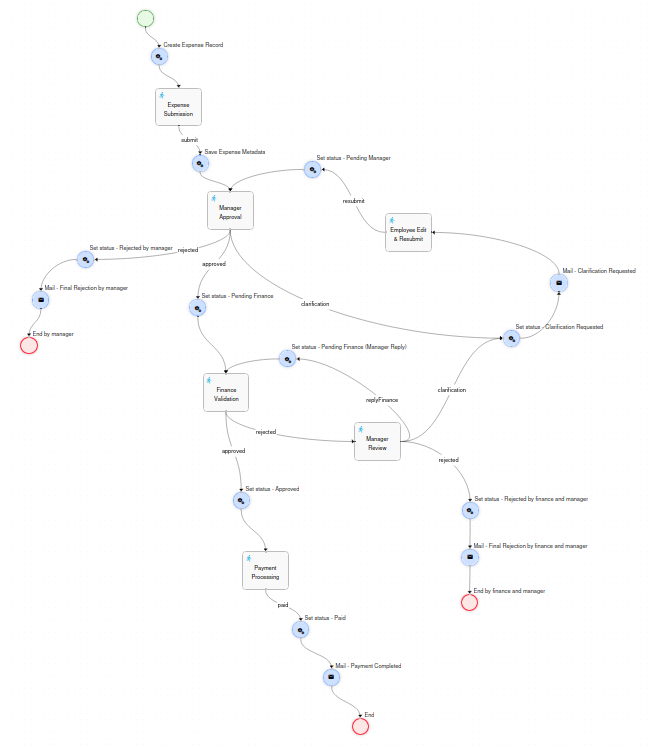
Prerequisites
Section titled “Prerequisites”Before deploying this workflow, the following must exist in OpenKM.
Database
Section titled “Database”A custom counter table is used to generate sequential expense references. It is generic and shared with other workflows (e.g. Purchase Order) via different counter_key values — only create the table once:
CREATE TABLE IF NOT EXISTS APP_COUNTER (    counter_key   VARCHAR(50)  NOT NULL,    counter_value INT          NOT NULL DEFAULT 1,    CONSTRAINT pk_app_counter PRIMARY KEY (counter_key));
INSERT INTO APP_COUNTER (counter_key, counter_value)VALUES ('expense_report', 1);
Users and roles
Section titled “Users and roles”| Identifier | Type | Used in | Description |
|---|---|---|---|
ROLE_FINANCE |
Role | Finance Validation | Pool of finance validators. Any member can self-assign the task the first time it runs. There must be at least one user assigned. |
itManager |
User | Manager Approval | Assigned when the requesting department is IT. |
financeManager |
User | Manager Approval | Assigned when the requesting department is Finance. |
operationsManager |
User | Manager Approval | Assigned when the requesting department is Operations. |
salesManager |
User | Manager Approval | Assigned when the requesting department is Sales. |
hrManager |
User | Manager Approval | Assigned when the requesting department is HR. |
paymentManager |
User | Payment Processing | Single user who processes all payments. Fixed direct assignment (not role/department based). |
| (workflow initiator) | — | Expense Submission, Employee Edit & Resubmit | The employee who started the workflow; resolved dynamically via context.get("initiator"), not a fixed username. |
Metadata group
Section titled “Metadata group”The property group okg:expense_report must be registered in OpenKM before the first execution. It is applied automatically to the expense record by the workflow — the user never fills it in manually.
<?xml version="1.0" encoding="UTF-8"?><!DOCTYPE property-groups PUBLIC "-//OpenKM//DTD Property Groups 3.12//EN"    "http://www.openkm.com/dtd/property-groups-3.12.dtd"><property-groups>  <property-group label="Expense Report" name="okg:expense_report" readonly="true">
    <input label="Expense Reference" name="okp:expense_report.expenseNumber" />    <input label="Employee"          name="okp:expense_report.employee" />    <select label="Department"       name="okp:expense_report.department" type="simple">      <option label="IT"         value="it"/>      <option label="Finance"    value="finance"/>      <option label="Operations" value="operations"/>      <option label="Sales"      value="sales"/>      <option label="HR"         value="hr"/>    </select>    <input label="Expense Date"      name="okp:expense_report.expenseDate" type="date" />    <select label="Category"         name="okp:expense_report.category" type="simple">      <option label="Travel"          value="travel"/>      <option label="Meals"           value="meals"/>      <option label="Accommodation"   value="accommodation"/>      <option label="Office Supplies" value="office_supplies"/>      <option label="Other"           value="other"/>    </select>    <input label="Amount"            name="okp:expense_report.amount" />    <select label="Currency"         name="okp:expense_report.currency" type="simple">      <option label="EUR" value="EUR"/>      <option label="USD" value="USD"/>      <option label="GBP" value="GBP"/>    </select>    <textarea label="Description"      name="okp:expense_report.description" dbColumnSize="1024" />    <textarea label="Manager Comments" name="okp:expense_report.managerComments" dbColumnSize="1024" />    <textarea label="Finance Comments" name="okp:expense_report.financeComments" dbColumnSize="1024" />    <input label="Payment Date"      name="okp:expense_report.paymentDate" type="date" />    <input label="Payment Reference" name="okp:expense_report.paymentReference" />    <select label="Status"           name="okp:expense_report.status" type="simple">      <option label="Pending Manager Approval"      value="pending_manager_approval"/>      <option label="Clarification Requested"       value="clarification_requested"/>      <option label="Pending Finance Validation"     value="pending_finance_validation"/>      <option label="Rejected - Manager"             value="rejected_manager"/>      <option label="Rejected - Finance"             value="rejected_finance"/>      <option label="Rejected - Finance and Manager" value="rejected_by_finance_and_manager"/>      <option label="Approved"                       value="approved"/>      <option label="Paid"                           value="paid"/>    </select>
  </property-group></property-groups>
The group is readonly="true" — all writes are performed programmatically from Action nodes in the workflow.
Repository structure
Section titled “Repository structure”The action Create Expense Record (the first node after Start) builds the following structure in the OpenKM repository each time a new workflow instance is launched:
/okm:root/--- Expense Report Approval/ --- {year}/ - Folder (type: folder) --- RECEIPTS-{year}-{NNNNN}/ - Record (type: record) - the main expedienteReference format: RECEIPTS-{year}-{NNNNN} where NNNNN is a zero-padded 5-digit sequential number (e.g. RECEIPTS-2026-00001). The counter is read from APP_COUNTER.counter_key = 'expense_report', incremented, and saved back atomically at workflow start.
The workflow process instance is linked to this record via WorkflowUtils.setProcessInstanceNode(context, recordUuid), so the workflow is accessible directly from the document explorer.
Node reference
Section titled “Node reference”Launches the workflow. No form is presented to the user at this point — the process starts immediately and transitions to the Create Expense Record action.
Create Expense Record - Action
Section titled “Create Expense Record - Action”Runs immediately after Start. Performs all repository initialisation:
- Reads and increments the counter from
APP_COUNTER(counter_key = 'expense_report'), buildsRECEIPTS-{year}-{NNNNN}. - Creates the year folder
/okm:root/Expense Report Approval/{year}if it does not already exist. - Creates the expense record inside the year folder using
ws.record.create(fldUuid, expenseNumber, "", 0). - Stores
expenseNumber,expenseRecordPath,expenseRecordUuidand anUploaddescriptor (receiptsUploadData, pointing at the record root) in the workflow context. - Links the process instance to the record via
WorkflowUtils.setProcessInstanceNode(context, recordUuid).
No metadata is written yet — the record does not have a metadata group at this point.
Expense Submission - Task
Section titled “Expense Submission - Task”Assignment: the workflow initiator (initiator.getId()).
| Field | Type | Required | Notes |
|---|---|---|---|
| Department | Select | Yes | IT, Finance, Operations, Sales, HR. Drives manager assignment. |
| Expense Date | Date | Yes | — |
| Category | Select | Yes | Travel, Meals, Accommodation, Office Supplies, Other. |
| Amount | Text (numeric, > 0) | Yes | — |
| Currency | Select | Yes | EUR, USD, GBP. |
| Description | Textarea | Yes | — |
| Receipts | Upload (create, multiple) |
No | Uploaded directly to the record root. |
| Button | Transition | Description |
|---|---|---|
| Submit | submit |
Proceeds to Save Expense Metadata. |
Save Expense Metadata - Action
Section titled “Save Expense Metadata - Action”Runs immediately after Expense Submission. Reads all form values from context, resolves the employee’s display name from initiator.getName(), and writes the first version of okg:expense_report (using addGroup, since the group does not exist yet). Sets status = pending_manager_approval.
Manager Approval - Task
Section titled “Manager Approval - Task”Assignment logic (department-based):
| Department | Assigned user |
|---|---|
| IT | itManager |
| Finance | financeManager |
| Operations | operationsManager |
| Sales | salesManager |
| HR | hrManager |
The form shows the full expense in read-only mode, a clickable link to the expense record (type="folder"), and a single free-text Manager Comments field used across every outcome (approval note, clarification reason, or rejection reason).
| Button | Transition | Description |
|---|---|---|
| Approve | approved |
Proceeds to Set status - Pending Finance → Finance Validation. |
| Request Clarification | clarification |
Proceeds to Set status - Clarification Requested → Mail - Clarification Requested → Employee Edit & Resubmit. |
| Reject | rejected |
Proceeds to Set status - Rejected by manager → Mail - Final Rejection by manager → End by manager. Terminal. |
Set status - Pending Finance - Action
Section titled “Set status - Pending Finance - Action”Updates okp:expense_report.status to pending_finance_validation and stores the manager’s approval note (managerComments), then routes to Finance Validation.
Finance Validation - Task
Section titled “Finance Validation - Task”Assignment logic (pool → direct re-assignment via task history):
1. Query task history: WorkflowUtils.getTaskInstances(piId, "Finance Validation")2. If a previous instance with an assigned actor exists → return that actor (String, direct assignment) (ensures the same finance user handles re-entry after the "Reply to Finance" loop)3. If first time → return the pool of all ROLE_FINANCE users (List<String>), any of whom must self-assignThe form shows the expense in read-only mode, the manager’s reply if this is a re-entry (pre-loaded from managerComments), and an editable Finance Comments field.
| Button | Transition | Description |
|---|---|---|
| Approve | approved |
Proceeds to Set status - Approved → Payment Processing. |
| Reject | rejected |
Proceeds to Manager Review (not a terminal state — routed back to the approving manager). |
Set status - Approved - Action
Section titled “Set status - Approved - Action”Updates okp:expense_report.status to approved and stores financeComments, then routes to Payment Processing.
Manager Review - Task
Section titled “Manager Review - Task”Reached only when Finance Validation is rejected. This is not a new department-based assignment: it is always routed to the same person who completed Manager Approval, via task-history lookup (see Key patterns), because that manager already vetted the request once and is best placed to judge whether Finance’s objection needs the employee’s input or can be resolved directly.
The form shows the expense in read-only mode, Finance’s rejection reason (read-only), and an editable Manager Comments field.
| Button | Transition | Description |
|---|---|---|
| Request Employee Clarification | clarification |
Proceeds to Set status - Clarification Requested → Mail - Clarification Requested → Employee Edit & Resubmit (same shared path used by Manager Approval). |
| Reject | rejected |
Proceeds to Set status - Rejected by finance and manager → Mail - Final Rejection by finance and manager → End by finance and manager. Terminal, separate from a direct Manager Approval rejection. |
| Reply to Finance | replyFinance |
Proceeds to Set status - Pending Finance (Manager Reply) → back to Finance Validation (re-assigned to the same finance user). |
Set status - Clarification Requested - Action
Section titled “Set status - Clarification Requested - Action”Shared by both Manager Approval and Manager Review. Updates okp:expense_report.status to clarification_requested and stores managerComments, then routes to Mail - Clarification Requested. Centralising this in one node means the metadata-write logic for “clarification requested” only exists once, regardless of which task triggered it.
Mail - Clarification Requested - Mail
Section titled “Mail - Clarification Requested - Mail”| Field | Value |
|---|---|
| Recipients | ${initiator.email} |
| Subject | Clarification requested for expense report {expenseNumber} |
| Body | Includes the expense reference and the manager’s comments (${managerComments.value}). |
Employee Edit & Resubmit - Task
Section titled “Employee Edit & Resubmit - Task”Assignment: the workflow initiator (initiator.getId()).
Shows the manager’s clarification request (read-only) and every field from Expense Submission, pre-filled and editable (same field names as the original submission, so the values the employee resubmits overwrite the originals in context). Also allows uploading additional receipts to the same record (previously uploaded files are preserved).
| Button | Transition | Description |
|---|---|---|
| Resubmit | resubmit |
Proceeds to Set status - Pending Manager → Manager Approval. |
Set status - Pending Manager - Action
Section titled “Set status - Pending Manager - Action”Re-reads the (possibly edited) form fields from context and re-writes the full metadata set (department, expense date, category, amount, currency, description), plus status = pending_manager_approval. This is what makes the resubmission loop actually persist the employee’s edits to the record, not just to the in-memory workflow context.
Set status - Pending Finance (Manager Reply) - Action
Section titled “Set status - Pending Finance (Manager Reply) - Action”Updates okp:expense_report.status to pending_finance_validation and stores the manager’s reply (managerComments), then routes back to Finance Validation (which re-assigns to the same finance user via task history).
Payment Processing - Task
Section titled “Payment Processing - Task”Assignment: direct, fixed to a single user, paymentManager.
Shows the full expense in read-only mode, with “Pay to (Employee)” as the first field so the payer immediately knows the recipient, plus editable Payment Date and Payment Reference fields.
| Button | Transition | Description |
|---|---|---|
| Mark as Paid | paid |
Proceeds to Set status - Paid → Mail - Payment Completed → End. |
Set status - Paid - Action
Section titled “Set status - Paid - Action”Updates okp:expense_report.status to paid, and stores paymentDate (raw yyyyMMddHHmmss) and paymentReference. Separately formats paymentDate to yyyy-MM-dd and stores it in context as paymentDate_fmt, exclusively for display in the notification email — the stored metadata property always keeps the raw format.
Mail - Payment Completed - Mail
Section titled “Mail - Payment Completed - Mail”| Field | Value |
|---|---|
| Recipients | ${initiator.email} |
| Subject | Your expense report {expenseNumber} has been paid |
| Body | Payment date (${paymentDate_fmt.value}) and payment reference (${paymentReference.value}). |
Set status - Rejected by manager / Mail - Final Rejection by manager / End by manager
Section titled “Set status - Rejected by manager / Mail - Final Rejection by manager / End by manager”Direct-rejection terminal branch from Manager Approval. Updates okp:expense_report.status to rejected_manager and stores managerComments, emails the employee, and ends the process.
Set status - Rejected by finance and manager / Mail - Final Rejection by finance and manager / End by finance and manager
Section titled “Set status - Rejected by finance and manager / Mail - Final Rejection by finance and manager / End by finance and manager”Terminal branch from Manager Review (i.e. rejection that started at Finance Validation). Kept as an independent branch from the one above so the two rejection origins can be distinguished and reported on separately.
Metadata lifecycle
Section titled “Metadata lifecycle”The okp:expense_report.status field is updated automatically at each stage transition. The complete lifecycle is:
pending_manager_approval → clarification_requested → pending_manager_approval (loop, repeatable)pending_manager_approval → rejected_manager (terminal)pending_manager_approval → pending_finance_validationpending_finance_validation → pending_finance_validation (via Manager Review → Reply to Finance loop)pending_finance_validation → clarification_requested → pending_manager_approval (via Manager Review)pending_finance_validation → rejected_by_finance_and_manager (terminal, via Manager Review)pending_finance_validation → approvedapproved → paid (terminal)Key patterns
Section titled “Key patterns”| Pattern | Where applied |
|---|---|
| Counter table for reference numbering | APP_COUNTER with counter_key = 'expense_report'. Shared table, reusable across workflows. |
| No upload subfolder when everything is one document type | Unlike Purchase Order (others subfolder), receipts are stored directly at the record root — simpler when there is no need to separate document categories. |
| Raw date format for metadata properties | Date fields must be written to okg:* property groups exactly as stored in context (yyyyMMddHHmmss). Reformatting to yyyy-MM-dd before setProperties/addGroup throws a validation error. Formatting to yyyy-MM-dd is only valid for values placed in context for Mail node display (e.g. paymentDate_fmt), never for the property itself. |
| Pool → direct re-assignment via task history | WorkflowUtils.getTaskInstances(piId, "Finance Validation") — used in Finance Validation for its own re-entry loop. |
| Cross-task re-assignment via task history | WorkflowUtils.getTaskInstances(piId, "Manager Approval") in Manager Review — always routes back to the same manager who handled the original approval, regardless of department mapping. |
| Single shared “set status” action for multiple entry points | Set status - Clarification Requested is targeted by a clarification transition from both Manager Approval and Manager Review — avoids duplicating the metadata-write logic. |
| Department-based manager assignment | assignExpr of Manager Approval maps each department value to a fixed username. |
| Fixed single-user assignment | Payment Processing uses return "paymentManager"; — no role, no department logic, always the same person. |
| Independent terminal branches for the same conceptual outcome | Rejection from Manager Approval and rejection from Manager Review use separate Action/Mail/End node triples, so the two origins remain distinguishable by which End node was reached, even though (at the time of writing) the status value written is not yet distinct — see the note under Manager Review’s rejection branch above. |
type="folder" for node references |
Read-only clickable link to the expense record, used in every review-style task form. |
| All-fields-editable resubmission | Employee Edit & Resubmit reuses the exact field names from Expense Submission with data="..." pointing at the same context keys, so the form is pre-filled and the resubmitted values naturally overwrite the originals on submit. |
| Metadata written by Action nodes, not users | okg:expense_report is readonly="true". All writes use ws.propertyGroup.setProperties() / addGroup() from Action nodes. |
| Workflow linked to repository record | WorkflowUtils.setProcessInstanceNode(context, recordUuid) in Create Expense Record links the running process instance to the expense record, making the workflow accessible directly from the document explorer. |