Vacation request
Overview
Section titled “Overview”The Vacation Request workflow automates the full lifecycle of an employee’s vacation request: from initial date selection, through one or two levels of management review, to final email notification of the outcome.
Download: vacation-request.okmflow
Supported execution paths:
- Direct approval by the first-level manager (ROLE_RRHH pool).
- Escalation to a second-level reviewer when the manager considers it necessary.
- Request for changes at either level — returns the request to the employee, then routes back to the same reviewer who originally requested the changes.
- Denial at either level, with automatic email notification to the employee.
Diagram
Section titled “Diagram”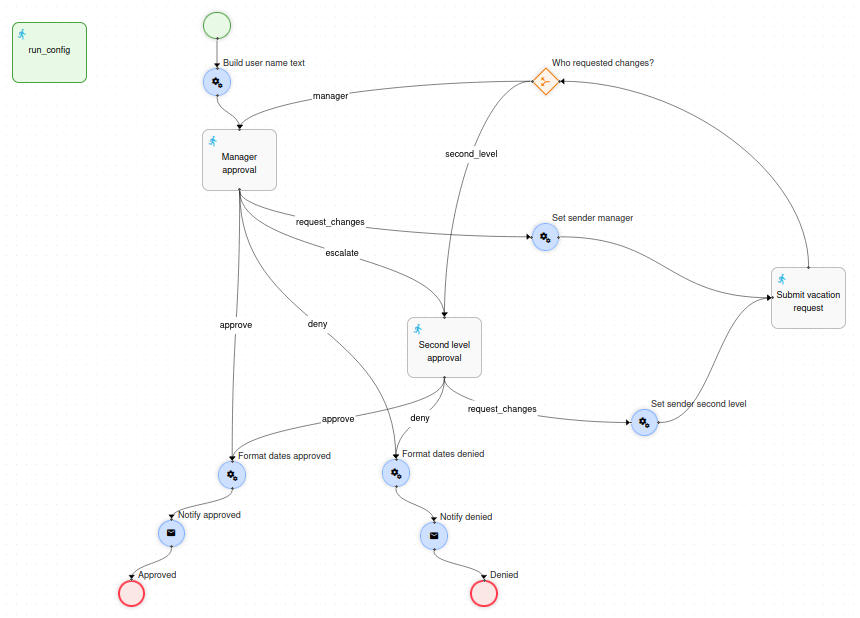
Prerequisites
Section titled “Prerequisites”Before deploying this workflow, the following must exist in the OpenKM user and role directory:
| Requirement | Description |
|---|---|
Role ROLE_RRHH |
Must exist and have at least one user assigned. All members of this role form the pool of first-level reviewers. The task is assigned to the pool on first entry; on re-entry it is reassigned directly to whoever handled it before. |
User rrhhSupervisor |
Must exist in OpenKM. This is the fixed user directly assigned to the second-level approval task. |
Node reference
Section titled “Node reference”run_config - Initiation form
Section titled “run_config - Initiation form”Displayed to the employee before the workflow starts. Collects the vacation period dates. Not connected to the diagram — the engine presents it automatically when the workflow is launched.
| Field | Type | Required | Notes |
|---|---|---|---|
| Start date | Date | Yes | Stored in context as yyyyMMddHHmmss (e.g. 20260601000000). |
| End date | Date | Yes | Stored in context as yyyyMMddHHmmss. |
Build user name text - Action
Section titled “Build user name text - Action”Runs immediately after Start. Creates a Text form element containing the employee’s name formatted as HTML, and stores it in context so the approval task forms can show it as a dynamic header.
import com.openkm.okmflow.bean.*;
Actor actor = context.get("initiator");String userName = actor.getName();Text userText = new Text();userText.setName("user_text");userText.setLabel("The user <span class=\"font-weight-bold\">" + userName + "</span> has requested vacations");context.put("user_text", userText);
The Text object is then consumed by the approval forms:
<text label="" name="user_description" data="user_text" />When data="user_text" is set, the engine loads the Text object from context and renders its label property as HTML inside the form. This is how workflows display dynamic, person-specific content in task forms without hardcoding values.
Manager approval - Task (first level)
Section titled “Manager approval - Task (first level)”Assigned to the pool of users in ROLE_RRHH on first entry. On re-entry after the employee corrects the request, it is reassigned directly to whoever handled it previously — bypassing the pool so the same reviewer continues the review.
Smart re-assignment using task history:
import com.openkm.okmflow.util.*;import com.openkm.okmflow.rest.dto.*;import java.util.*;
def procIns = context.get("processInstance");long piId = procIns.getId();
// Check if this task has been handled before in this process instanceList<TaskInstanceDTO> prevTasks = WorkflowUtils.getTaskInstances(piId, "Manager approval");if (prevTasks != null && !prevTasks.isEmpty()) {    for (TaskInstanceDTO t : prevTasks) {        if (t.getActor() != null && !t.getActor().isEmpty()) {            return t.getActor(); // String → direct assignment (not a pool)        }    }}
// First entry: assign to pool of ROLE_RRHH usersOKMWebservices ws = WebservicesHelper.getInstance();List<String> users = new ArrayList();for (CommonUser user : ws.auth.getUsersByRole("ROLE_RRHH")) { users.add(user.getId());}return users; // List → pool assignment| Button | Transition | Description |
|---|---|---|
| Approve | approve |
Request approved — proceeds to date formatting and email notification. |
| Request changes | request_changes |
Returns the request to the employee for correction. |
| Escalate | escalate |
Forwards to the second-level reviewer. |
| Deny | deny |
Request denied. Requires confirmation dialog before firing. |
Set sender manager - Action
Section titled “Set sender manager - Action”Triggered when the manager selects request_changes. Stores the routing key and propagates the reviewer’s comment to the shared correction task.
// Store routing key so the Decision node can route back to Manager approvalInput sender = new Input();sender.setValue("manager");context.put("request_sender", sender);
// Propagate the comment — use def (no explicit cast) to handle any form element typedef managerComment = context.get("manager_comment");context.put("reviewer_comment", managerComment);Second level approval - Task
Section titled “Second level approval - Task”Assignment: return "rrhhSupervisor";
Reached when the first-level manager escalates the request. Shows the manager’s comment in read-only mode so the second-level reviewer has full context before deciding.
| Button | Transition | Description |
|---|---|---|
| Approve | approve |
Request approved. |
| Request changes | request_changes |
Returns the request to the employee for correction. |
| Deny | deny |
Request denied. Requires confirmation dialog. |
Set sender second level - Action
Section titled “Set sender second level - Action”Mirrors the logic of Set sender manager, but writes "second_level" as the routing key and copies the second-level comment into reviewer_comment.
Input sender = new Input();sender.setValue("second_level");context.put("request_sender", sender);
def secondComment = context.get("second_level_comment");context.put("reviewer_comment", secondComment);
Submit vacation request - Task (shared correction task)
Section titled “Submit vacation request - Task (shared correction task)”Assignment: return ((Actor) context.get("initiator")).getId();
Single shared node used for corrections from both the first and second level. The employee can adjust the dates and always sees the comment from whoever requested the changes, regardless of review level.
<workflow-form> <input label="Start date" name="start_date" type="date" timeFormat="none" data="start_date"> <validator type="req"/> </input> <input label="End date" name="end_date" type="date" timeFormat="none" data="end_date"> <validator type="req"/> </input> <textarea label="Reviewer comment" name="reviewer_comment" data="reviewer_comment" readonly="true"/> <button name="btn_submit" label="Submit" transition="" color="primary" style="yes" validate="true"/></workflow-form>The data="reviewer_comment" attribute loads whichever comment was written by the preceding Action node (Set sender manager or Set sender second level). The two Action nodes write different objects to the same context key, so the form always displays the relevant reviewer’s comment without branching logic.
Who requested changes? - Decision
Section titled “Who requested changes? - Decision”Routes the corrected request back to the appropriate reviewer based on the request_sender context variable.
import com.openkm.bean.form.*;
def sender = context.get("request_sender");return sender.getValue(); // returns "manager" or "second_level"| Transition | Target |
|---|---|
manager |
Manager approval |
second_level |
Second level approval |
Format dates approved / Format dates denied - Actions
Section titled “Format dates approved / Format dates denied - Actions”Two symmetric nodes are executed immediately before each Mail node. They convert the raw date format (yyyyMMddHHmmss) to a human-readable format (dd/MM/yyyy) and store the results as new Input objects for use in the email body template.
import com.openkm.bean.form.*;import java.text.*;
SimpleDateFormat raw = new SimpleDateFormat("yyyyMMddHHmmss");SimpleDateFormat fmt = new SimpleDateFormat("dd/MM/yyyy");
Input startRaw = context.get("start_date");Input endRaw   = context.get("end_date");
Input startFmt = new Input();startFmt.setValue(fmt.format(raw.parse(startRaw.getValue())));context.put("start_date_fmt", startFmt);
Input endFmt = new Input();endFmt.setValue(fmt.format(raw.parse(endRaw.getValue())));context.put("end_date_fmt", endFmt);
The Mail node body accesses these values using the FreeMarker .value accessor: ${start_date_fmt.value}, ${end_date_fmt.value}.
Notify approved - Mail
Section titled “Notify approved - Mail”Sends an approval email to the workflow initiator.
| Field | Value |
|---|---|
| Recipients | ${initiator.email} |
| Subject | Your vacation request has been approved |
| Body | Includes formatted start and end dates: ${start_date_fmt.value}, ${end_date_fmt.value}. |
Notify denied - Mail
Section titled “Notify denied - Mail”Sends a denial email to the workflow initiator. Shared by denials from both the first and second level.
| Field | Value |
|---|---|
| Recipients | ${initiator.email} |
| Subject | Your vacation request has been denied |
| Body | Includes formatted dates and the reviewer’s reason: ${reviewer_comment.value}. |
Approved / Denied - End nodes
Section titled “Approved / Denied - End nodes”Two named End nodes represent the two final outcomes. Using distinct names allows external systems or audit reports to distinguish whether a process instance ended in approval or denial.
Key patterns
Section titled “Key patterns”| Pattern | Where applied |
|---|---|
| Pool → direct re-assignment via task history | WorkflowUtils.getTaskInstances(piId, taskName) finds the previous actor; returning a String (not a List) creates a direct re-assignment. |
Text form element as dynamic HTML header |
Action node creates new Text() with setLabel(html); task form binds it with <text data="user_text"/>. |
| Single shared correction task | Submit vacation request is used after both first and second level request_changes. The reviewer_comment key is unified by the two preceding Action nodes. |
def for type-neutral context copy |
def comment = context.get("manager_comment"); avoids ClassCastException when the exact form element type is not critical. |
| Date format conversion for email bodies | date fields store values as yyyyMMddHHmmss; parse and reformat to dd/MM/yyyy before using in Mail node templates. |
Mail node ${element.value} accessor |
FreeMarker syntax to read a form element’s value inside a Mail node body. Use ${key.value}, not .getValue(). |
| Two named End nodes | Approved and Denied — distinguishable termination paths for reporting. |