Checkout source code from Subversion
Go to File / New / Other and select Maven / Checkout Maven Projects from SCM:
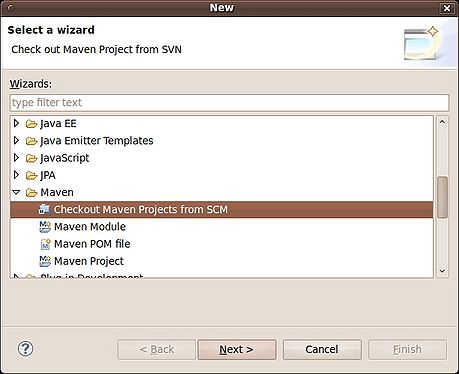
| Version | Url | Command line |
|---|---|---|
| 6.3.x | http://svn.code.sf.net/p/openkm/code/branches/6.3/ | bash<br>$ svn co http://svn.code.sf.net/p/openkm/code/branches/6.3/<br> |
| 6.2.x | http://svn.code.sf.net/p/openkm/code/branches/6.2/openkm | bash<br>$ svn co http://svn.code.sf.net/p/openkm/code/branches/6.2/openkm<br> |
| 5.1.x | http://svn.code.sf.net/p/openkm/code/branches/5.1/openkm | bash<br>$ svn co http://svn.code.sf.net/p/openkm/code/branches/5.1/openkm<br> |
| 4.1.x | http://svn.code.sf.net/p/openkm/code/branches/4.1/openkm | bash<br>$ svn co http://svn.code.sf.net/p/openkm/code/branches/4.1/openkm<br> |
| 4.0.x | http://svn.code.sf.net/p/openkm/code/branches/4.0/openkm | bash<br>$ svn co http://svn.code.sf.net/p/openkm/code/branches/4.0/openkm<br> |
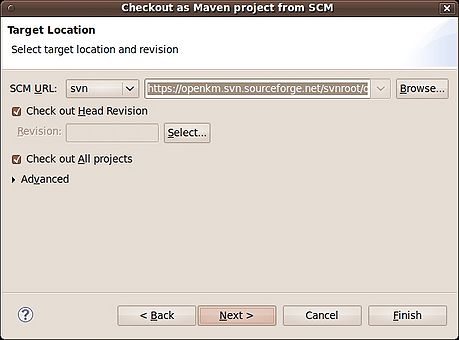
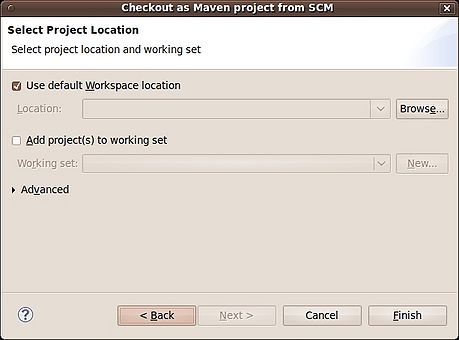
Be patient, first time you downloading OpenKM from svn, you’re downloading all libraries to your maven repository. It could take several minutes depending your Internet connection.
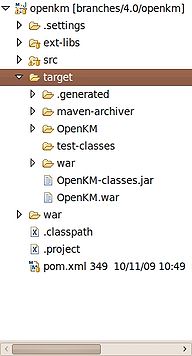
OpenKM will be downloaded, and automatically compiled.