Configuring SQL Server
Database creation
Section titled “Database creation”Create a database and user
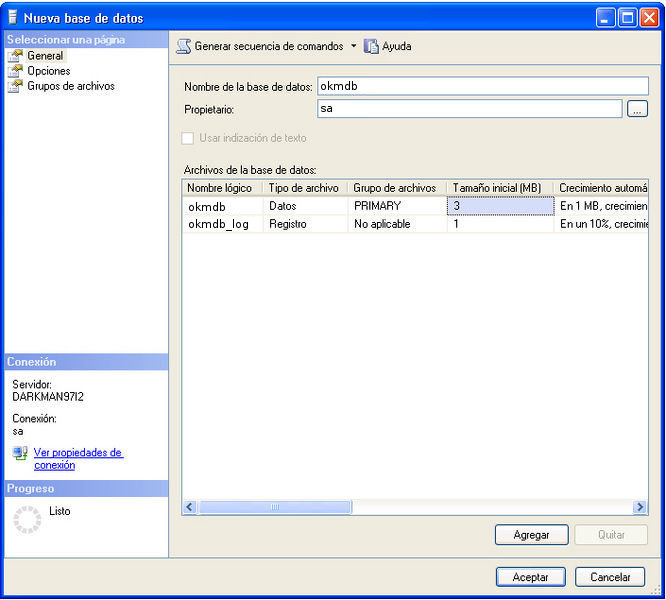
Section titled “Create a database and user”Start SQL Server Management Studio Express and create a database called okmdb.
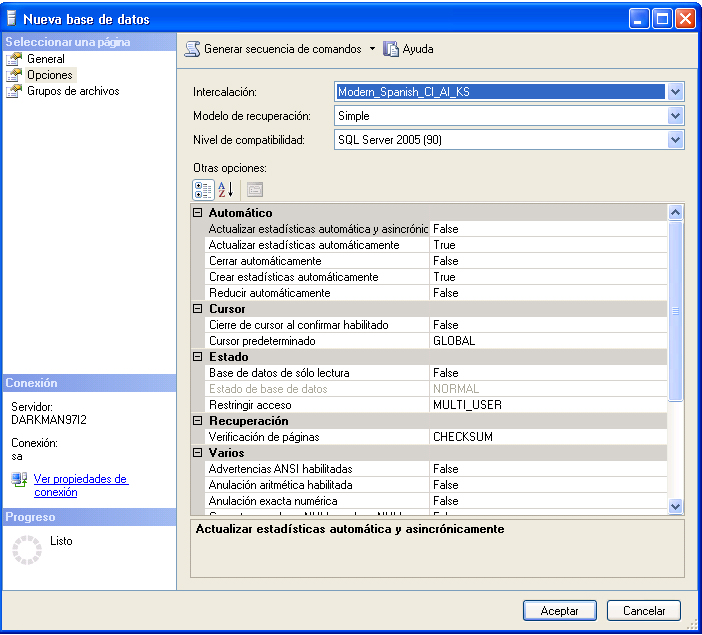
Select your appropriate database collate.
Configure your OpenKM.cfg
Section titled “Configure your OpenKM.cfg”Edit the file $TOMCAT_HOME/OpenKM.cfg
hibernate.dialect=org.hibernate.dialect.SQLServerDialecthibernate.hbm2ddl=createConfigure Tomcat data sources
Section titled “Configure Tomcat data sources”Edit the file $TOMCAT_HOME/conf/server.xml and enable the resource named jdbc/OpenKMDS
<Resource name="jdbc/OpenKMDS" auth="Container" type="javax.sql.DataSource" maxActive="100" maxIdle="30" maxWait="10000" validationQuery="select 1" username="sa" password="***" driverClassName="com.microsoft.sqlserver.jdbc.SQLServerDriver" url="jdbc:sqlserver://localhost:1433;databaseName=okmdb"/>Configure application login
Section titled “Configure application login”Edit the file $TOMCAT_HOME/OpenKM.xml
<security:authentication-manager alias="authenticationManager"> <security:authentication-provider> <security:password-encoder hash="md5"/> <security:jdbc-user-service data-source-ref="dataSource" users-by-username-query="select usr_id, usr_password, 1 from OKM_USER where usr_id=? and usr_active='T'" authorities-by-username-query="select ur_user, ur_role from OKM_USER_ROLE where ur_user=?"/> </security:authentication-provider></security:authentication-manager>Check for JDBC Driver
Section titled “Check for JDBC Driver”Go to $TOMCAT_HOME/lib and check for JDBC sqljdbc4.jar Driver.
If it is not present, download SQL Server JDBC driver from Microsoft SQL Server Driver Page and move it.
Run application
Section titled “Run application”As a process into the OpenKM startup, the application will create automatically an empty database structure.
Troubleshooting
Section titled “Troubleshooting”You can not connect to MS SQL Server
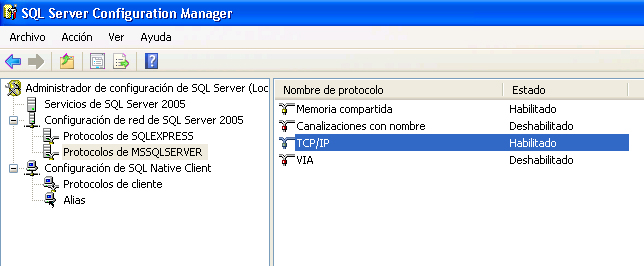
Section titled “You can not connect to MS SQL Server”Ensure you’ve got TCP protocol enabled ( by default is disabled )
Connection lost after some time
Section titled “Connection lost after some time”We have observed in some SQL Server editions what seems a new behaviour what passed some hours the connection is closed ( might be some extra configuration parameter in the latest SQL server editions what comes enabled by default or similar ). There’s a new configuration attribute name autoReconnect what solves it.
<Resource name="jdbc/OpenKMDS" auth="Container" type="javax.sql.DataSource" maxActive="100" maxIdle="30" maxWait="10000" validationQuery="select 1" username="sa" password="***" driverClassName="com.microsoft.sqlserver.jdbc.SQLServerDriver" url="jdbc:sqlserver://localhost\SQL;databaseName=okmdb;autoReconnect=true"/>Not able to login into OpenKM
Section titled “Not able to login into OpenKM”When first-time OpenKM login it fails with right username and password ( okmAdmin / admin ), you should check database configuration.
Check if the database is configured to be case-sensitive, might be one of the reasons why you are not able to login.