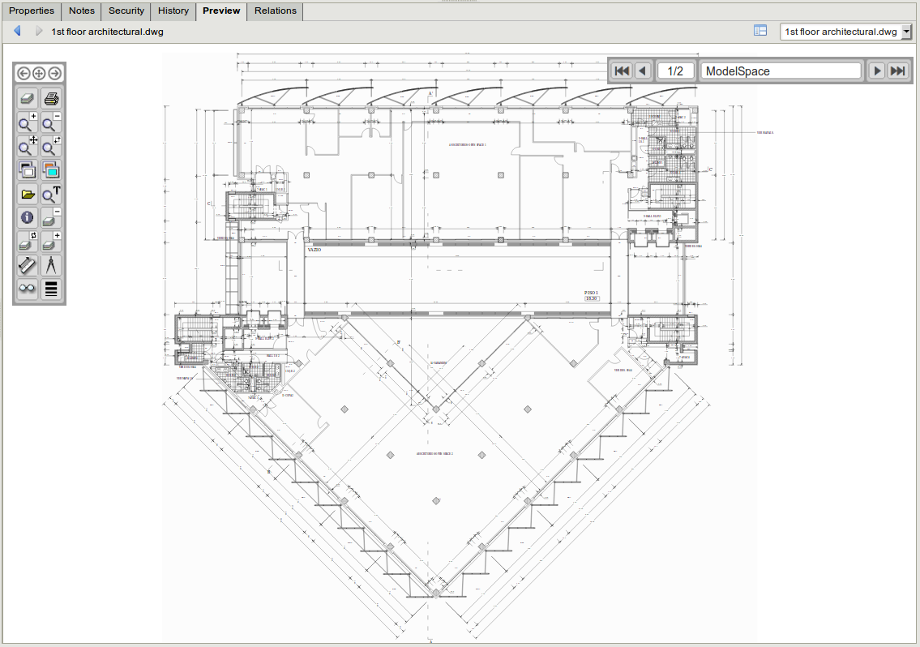
AutoCAD preview extension
The AutoCAD previewer allows users to perform basic operations like zooming in and out, rotating, showing/hiding layers, and printing. The AutoCAD preview extension allows viewing AutoCAD files using SVG and JavaScript to display and manipulate graphics.
Toolbar
Section titled “Toolbar”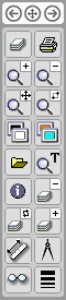
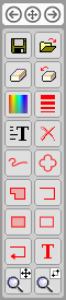
| Feature | Description | |
|---|---|---|
 |
Change Icon Page | Allows you to change to the previous or next icon page. |
 |
Layer List | List of layers in the drawing. |
 |
Print the document. | |
 |
Zoom In | Zooms in. |
 |
Zoom Out | Zooms out. |
 |
Zoom Extents | Allows you to move the zoom-in zone. |
 |
Zoom Window | Allows you to draw a window to zoom in. |
 |
Toggle Black/White | Allows you to toggle black-and-white colors in the drawing. |
 |
Background Color | Allows you to select a specific color for the background of the drawing. |
 |
File Load | Not implemented yet. |
 |
Search Text | Allows you to search for an individual text string in the drawing. |
 |
About | Information about the CADViewer JS version. |
 |
Layer Off | Turns the layer off. |
 |
Swap Layers | Allows you to swap between layers. |
 |
All Layers On | Turns all layers on. |
 |
Measurement | Allows you to select two points in the drawing to measure the distance between them. Measurement needs to be calibrated first. |
 |
Calibrate Measurement | Allows you to calibrate measurements to define units of measure in the drawing. |
 |
Toggle Birds-Eye Window | Opens the bird’s-eye window. |
 |
Adjust Line Thickness | Adjusts the line thickness in the drawing. |
 |
Save Redline | Saves current red lines. |
 |
Load Redline | Allows you to load previously saved red lines. |
 |
Delete Single Redline | Allows you to delete a single red line by selecting it in the drawing. |
 |
Delete Last Redline | Deletes the last red line. |
 |
Redline Color | Allows you to change the color of the red line. |
 |
Redline Thickness | Allows you to change the thickness of the red line. |
 |
Make Sticky Note | Allows you to insert a sticky note. |
 |
Clear Visible Redlines | Clears all visible red lines. |
 |
Freehand Redline | Allows you to insert a freehand red line. |
 |
Redline Cloud | Allows you to insert a red line with a cloud shape. |
 |
Redline Filled Polygon | Allows you to insert a red line with a filled polygon shape. |
 |
Redline Polyline | Allows you to insert a red line with a polyline shape. |
 |
Redline Filled Rectangle | Allows you to insert a red line with a filled rectangle shape. |
 |
Redline Rectangle | Allows you to insert a rectangular red line. |
 |
Redline Arrow | Allows you to insert a red line with an arrow. |
 |
Redline Text | Allows you to write text and select where to place it in the drawing. |
|
Zoom Extents | Allows you to move the zoom-in zone. |
|
Zoom Window | Allows you to draw a window to zoom in. |

| Feature | Description | |
|---|---|---|
 |
First Page | Go to the first page in the drawing. |
 |
Previous Page | Go to the previous page in the drawing. |
 |
Next Page | Go to the next page in the drawing. |
 |
Last Page | Go to the last page in the drawing. |
Default preview
Section titled “Default preview”