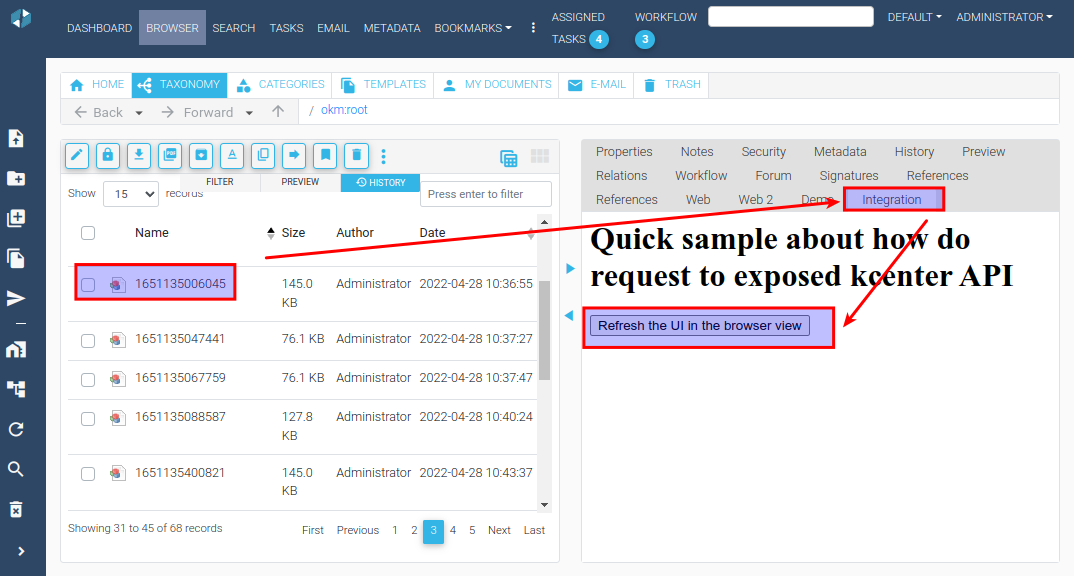
Tab UI content extension using KCenter methods
The following sample demonstrates how to access KCenter API methods from an external application with JavaScript.
Step 1 - create a sample HTML file
Section titled “Step 1 - create a sample HTML file”Create the following sample HTML file and copy it to the webapps/openkm folder named test.html
<html>  <head>    <script type="text/javascript" src="kcenter/api/common.js"></script>    <script type="text/javascript" src="kcenter/api/browser.js"></script>  </head>  <body>    <h1>Quick sample about how do request to exposed KCenter API</h1>
    <button onclick="_refreshUI()">      Refresh the UI in the browser view    </button>  </body></html>
Step 2 - Configure the external tab document extension
Section titled “Step 2 - Configure the external tab document extension”- Configure extra tab document extension with the following values:
| Field / Property | Type | Description |
|---|---|---|
| extension.external.tab.document | List | Integration; /openkm/test.html |
- Select a document from the browser view.
- Click on the Integration tab.
- Click on the Refresh the UI in the browser view button. The KCenter UI will be refreshed.