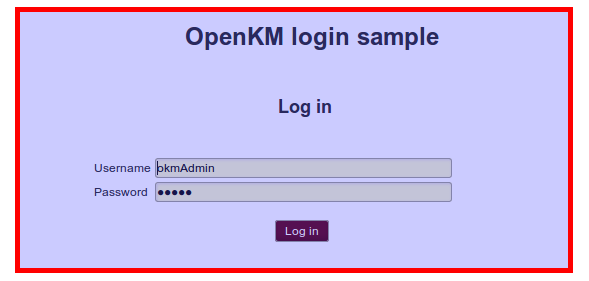
Change default login screen
Configuring an external Tomcat resource
Section titled “ Configuring an external Tomcat resource”- Stop Tomcat.
- Edit the “$TOMCAT/conf/server.xml” file and add into the XML “
… ” section the following line:
<Context docBase="${catalina.base}/custom" path="/openkm/custom" reloadable="true"/>The XML Host section should look like this:
<Host name="localhost" appBase="webapps" unpackWARs="true" autoDeploy="true">
<!-- SingleSignOn valve, share authentication between web applications Documentation at: /docs/config/valve.html --> <!-- <Valve className="org.apache.catalina.authenticator.SingleSignOn" /> -->
<!-- Access log processes all example. Documentation at: /docs/config/valve.html Note: The pattern used is equivalent to using pattern="common" --> <Valve className="org.apache.catalina.valves.AccessLogValve" directory="logs" prefix="localhost_access_log." suffix=".txt" pattern="%h %l %u %t "%r" %s %b" />
<!-- External resources --> <Context docBase="${catalina.base}/custom" path="/openkm/custom" reloadable="true"/></Host>- Unzip the custom.zip file.
- Start Tomcat.
Change the default login web page
Section titled “Change the default login web page”Go to Administration > Configuration parameters and edit the parameter:
| Property | Type | Description |
|---|---|---|
| custom.login | String | /custom/login.jsp |
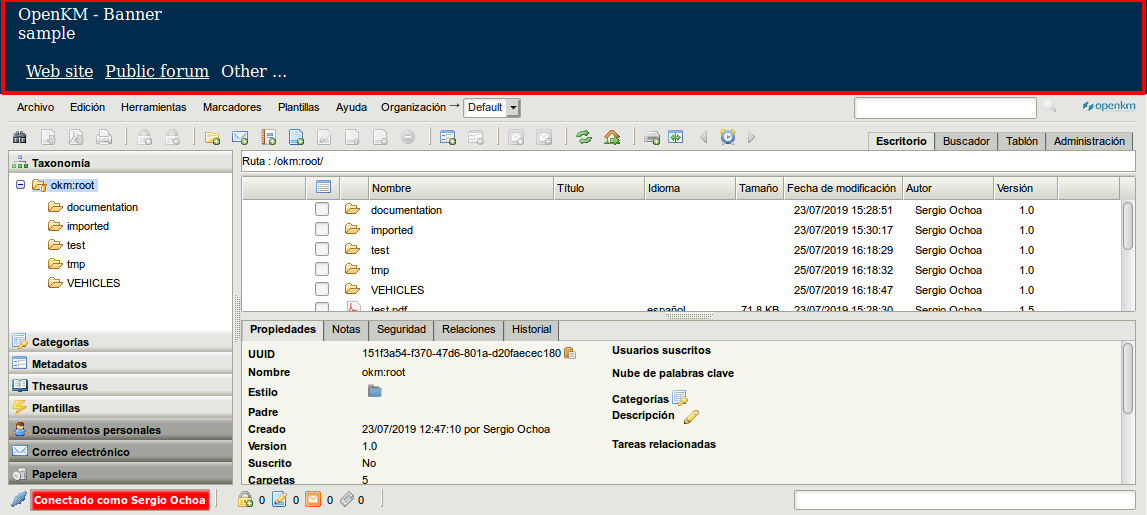
Enable the frontend top banner section
Section titled “Enable the frontend top banner section”Go to Administration > Configuration parameters and edit the parameters:
| Property | Type | Description |
|---|---|---|
| custom.header.height | Integer | 95 |
| custom.header.source | String | /openkm/custom/header.jsp |