RedHat and CentOS issues
CentOS 8: OpenKM not starting as a service automatically
Section titled “CentOS 8: OpenKM not starting as a service automatically”In CentOS 8, the OpenKM service does not start automatically. This is because the security system (SELinux) blocks services that are not recognized as native.
To enable it, we must perform the following steps:
- Create the openkm.service file within the path (/usr/lib/systemd/system/openkm.service)
$ nano /usr/lib/systemd/system/openkm.service[Unit]Description=OpenKM daemon[Service]Type=simpleExecStart=/home/openkm/tomcat-8.5.34/bin/startup.shRemainAfterExit=yes[Install]WantedBy=multi-user.target* ExecStart contains a sample value; the correct path is the location of the startup.sh file.
- Refresh, enable the service, and activate the service.
$ systemctl daemon-reload$ systemctl enable openkm.service$ systemctl start openkm.serviceWith the following command, we can check the status of the service:
$ systemctl status openkm.service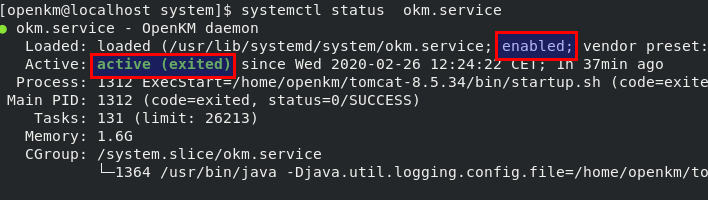
- Modify the SELinux configuration file:
$ nano /etc/sysconfig/selinux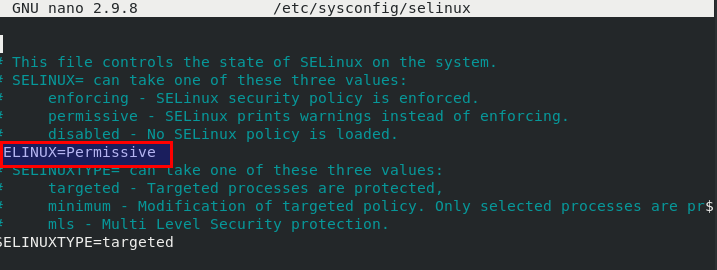
- Finally, restart the server.
$ rebootImageMagick in CentOS 8
Section titled “ImageMagick in CentOS 8”This new CentOS version does not come with the ImageMagick package in the repositories, but we can install a fork called GraphicsMagick from the EPEL repository:
$ dnf install https://dl.fedoraproject.org/pub/epel/epel-release-latest-8.noarch.rpm -y$ dnf install GraphicsMagickKeep in mind that there is no “convert” utility, but there is a general “gm” executable that can be used this way:
$ gm convert <params>More info at GraphicsMagick convert documentation.