Ejemplo de crontab - Importador básico de documentos del sistema de archivos
El script importa archivos desde el sistema de archivos del servidor.
package com.openkm.plugin.cron;
import java.io.File;import java.io.FileInputStream;
import org.slf4j.Logger;import org.slf4j.LoggerFactory;
import com.openkm.api.OKMDocument;import com.openkm.api.OKMFolder;import com.openkm.core.ItemExistsException;import com.openkm.module.db.stuff.DbSessionManager;import com.openkm.util.ContextWrapper;
import net.xeoh.plugins.base.annotations.PluginImplementation;
@PluginImplementationpublic class SystemDocumentImporter extends BaseCronPlugin implements CronAdapter {
    private Logger log = LoggerFactory.getLogger(SystemDocumentImporter.class);
    private OKMDocument document = ContextWrapper.getContext().getBean(OKMDocument.class);    private OKMFolder folder = ContextWrapper.getContext().getBean(OKMFolder.class);    private String token = DbSessionManager.getInstance().getSystemToken();
    @Override    public String getName() {        return "System Document Importer";    }
    @Override    public String getCronExpression() {        return "0 5 * * * *";    }
    @Override    public void execute() {        String okmPath = "/okm:root/Scans/";        File file = new File("/home/opemkm/import");        autoImport(okmPath, file);    }
    private void autoImport(String okmPath, File fldpath) {        try {            log.info("Scanning " + fldpath.getName());            for (File file : fldpath.listFiles()) {                log.info("Importing " + file.getName());                try {                    if (file.isDirectory()) {                        try {                            folder.createSimple(token, okmPath + file.getName());                        } catch (ItemExistsException ie) {                            log.error("folder already exists<br>");                            // Folder already exists - just ignore exception                        }                        autoImport(okmPath + file.getName() + "/", file);                    } else {                        // Check if file is still being written to                        long length = file.length();                        Thread.sleep(1000);                        if (file.length() > length) {                            continue; // Skip file this time                        }                        FileInputStream fis = new FileInputStream(file);                        document.createSimple(token, okmPath + file.getName(), fis);                        fis.close();                    }                    log.info("Created " + okmPath + file.getName());                } catch (Exception e) {                    log.info("Exception:" + e);                    // Something bad happened to prevent import. Skip to next file.                    continue;                }                file.delete();            }        } catch (Exception e) {            log.error(e.getMessage());        }    }
}
Registrar un nuevo plugin
Sección titulada «Registrar un nuevo plugin»- Para instalar un plugin nuevo, cree un archivo JAR y cópielo en su carpeta $TOMCAT/plugins. Más información en Crear un archivo JAR con Eclipse (también puede construir sus archivos JAR con Maven).
- Vaya a Administration > Utilities > Plugins y haga clic, arriba a la derecha, en el botón
 Reload plugins.
 - En la tabla de plugins se mostrará el nuevo plugin.
Imágenes
Sección titulada «Imágenes»Tarea de crontab
Sección titulada «Tarea de crontab»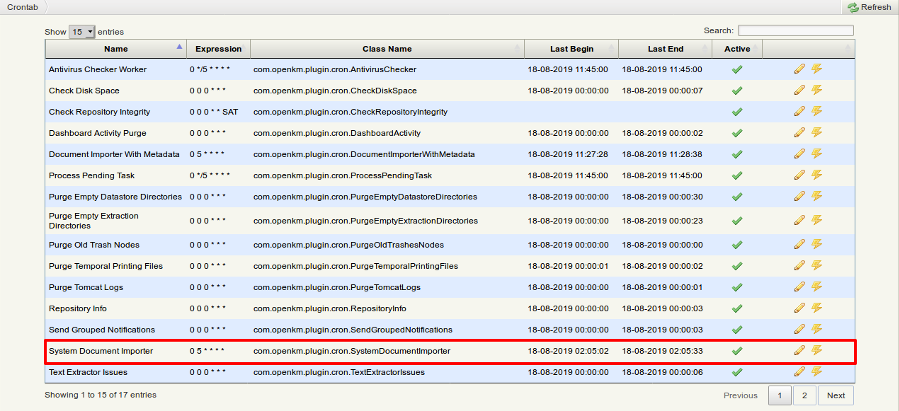
Archivos en el servidor de aplicaciones
Sección titulada «Archivos en el servidor de aplicaciones»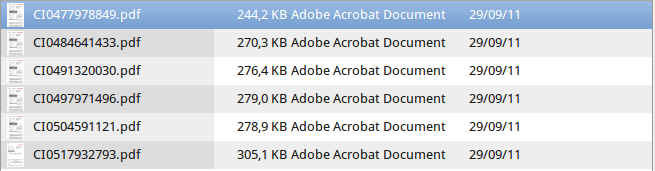
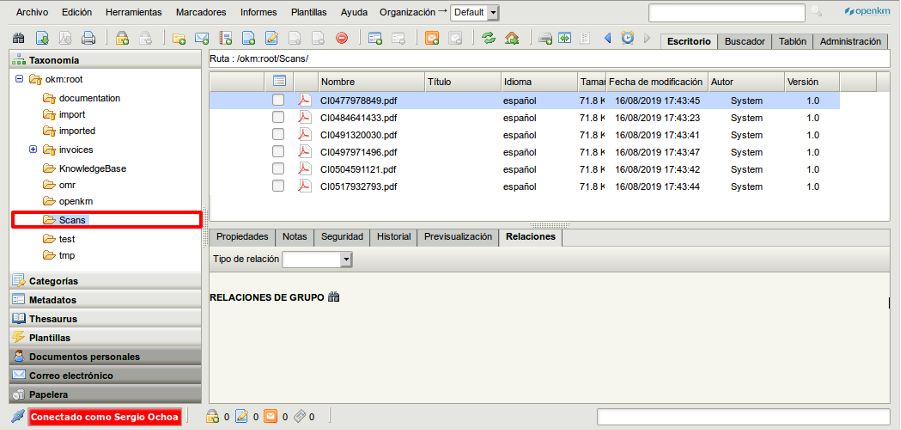
Resultado
Sección titulada «Resultado»