Replicación de instancias
Para mejorar la disponibilidad de OpenKM puede tener dos instancias de la aplicación ejecutándose en servidores diferentes. Si el servidor principal cae por un fallo de hardware, puede cambiar al servidor espejo y seguir trabajando.
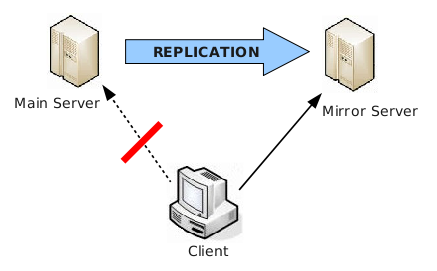
En este esquema, asumimos que:
- Cada nodo tiene su propio repositorio de documentos y su propia base de datos.
- Se supone que la instancia de respaldo es un clon de la instancia principal.
- Si la instancia principal está caída, debe enviar las peticiones de los clientes a la instancia de respaldo.
Cuando el servidor principal está caído, el de respaldo se convierte en el nuevo servidor principal, por lo que el antiguo servidor principal pasa a ser el de respaldo (cuando vuelva a estar disponible).
Esta es la configuración de cada servidor:
Servidor principal
- OpenKM se configura de forma normal.
- La base de datos se configura para enviar las modificaciones a la instancia de respaldo.
- Rsync se configura para enviar las modificaciones del datastore cada pocos minutos al servidor de respaldo.
Servidor espejo
- OpenKM se configura en modo de solo lectura.
- La base de datos se configura para aceptar las modificaciones de la instancia principal.
- Los archivos del datastore se actualizan periódicamente con la herramienta Rsync desde el servidor principal.
Implementaciones diferentes
Sección titulada «Implementaciones diferentes»La solución proporcionada no es la única, pero sí la más sencilla.
Una mejora sobre este primer enfoque es utilizar un servidor de archivos externo (conectado por NFS) para que no sea necesario Rsync. Se trata de utilizar una solución NAS que mejora la copia de seguridad y la disponibilidad de los datos. Se recomienda encarecidamente si la información almacenada es crítica para su negocio.
Otra mejora está relacionada con la base de datos. Algunas bases de datos pueden configurarse en modo maestro/esclavo, que es el modo necesario para esta configuración de servidor. También puede desplegar la base de datos en un servidor dedicado (que también debería replicarse) o utilizar proveedores como Oracle, que ofrecen soluciones específicas de clúster de bases de datos que conviene tener en cuenta.
Ejemplo de implementación en Linux
Sección titulada «Ejemplo de implementación en Linux»El siguiente script propagará los cambios del repositorio del servidor principal al servidor espejo:
#!/bin/bashTOMCAT_HOME="/home/openkm/tomcat-8.5.69"REMOTE_HOST="root@192.168.1.102"MYSQL_PASS="*****"
echo -e "### BEGIN: $(date +"%x %X") ###\n"
# Stop local OpenKM/etc/init.d/openkm stop
# Stop remote OpenKMssh $REMOTE_HOST '/etc/init.d/openkm stop'
# Sync OpenKM repositoriesrsync -avh --stats --delete --exclude repository/.system.key --exclude logs $TOMCAT_HOME ${REMOTE_HOST}:/home/openkm
# Dump and copy databasemysqldump -u root -p${MYSQL_PASS} okmdb | ssh $REMOTE_HOST "mysql -u root -p${MYSQL_PASS} okmdb"
# Start local OpenKM/etc/init.d/openkm start
# Start remote OpenKMssh $REMOTE_HOST '/etc/init.d/openkm start'
echo -e "\n### END: $(date +"%x %X") ###"
Copie el siguiente SQL en el archivo $TOMCAT_HOME/start.sql remoto del servidor.
update OKM_CONFIG set 'true' where CFG_KEY='system.readonly';