Cluster configuration
This kind of aquitecture provides server load spreading as well as high availability. Let’s take a look at the proposed architecture. There are several OpenKM server and one (or several) HAProxy server which will distribute the user petitions to these OpenKM servers. HAProxy can be also configured to detect which OpenKM server is down and avoid sending petitions until it is up again. Optionally you can configure several replicated database servers (also handled by another HAProxy) which prevent the service from being interrupted in case of a database node goes down. By default OpenKM stores the documents in disk to maximise performance, so you need these files replicated across your OpenKM servers. An option is GlusterFS which is a software solution to create distributed filesystems, but NFS is quite good in most situations and easier to setup in case of Linux servers.
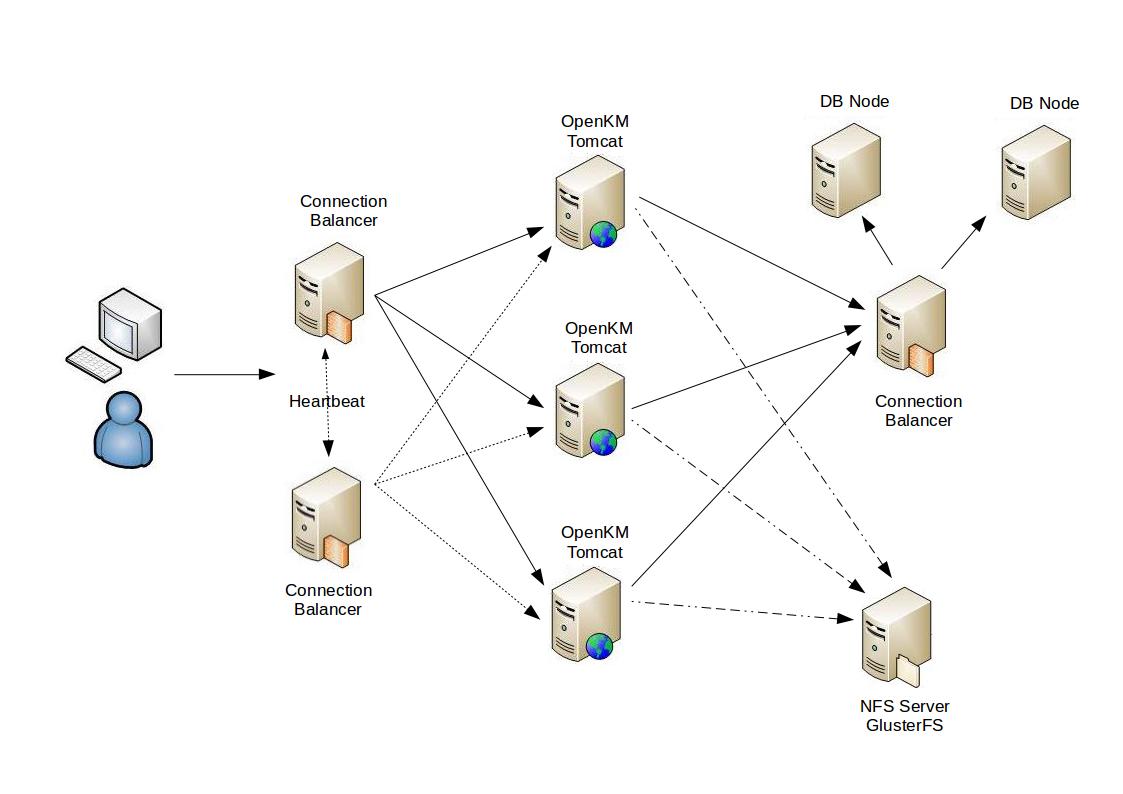
Keep on mind that this is only a proposal and you are free to implement whatever infrastructure you want to achieve the same results. In order to avoid an excesive and difficult configuration, we are going to describe a simplified architecture which will be provide the same objective: the master node, the database and the NFS server are in the same machine.
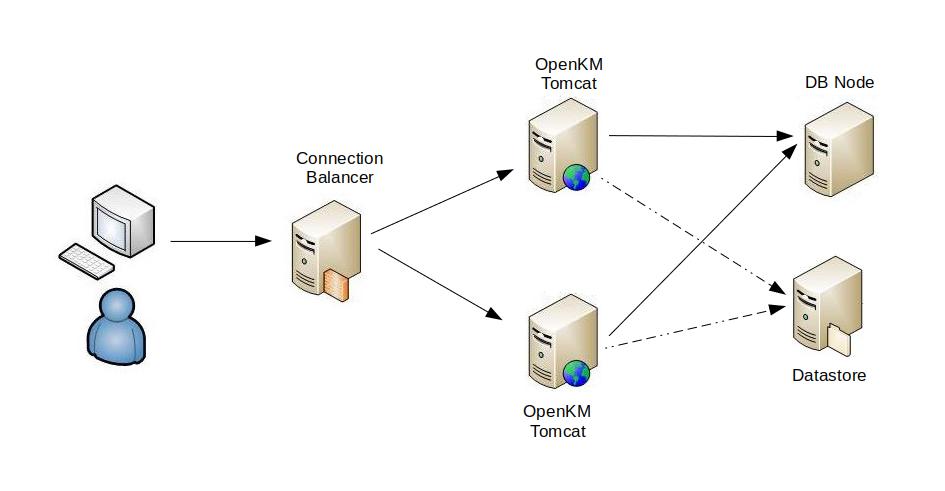
If you look into the TOMCAT_HOME/repository directory you can see these others:
- cache: These are generated files used mostly in preview. In case of being deleted they will be re-created again.
- datastore: There files are the binary content of the documents stored in OpenKM. You should take care of them, and a backup is always recommended.
- index: Where Lucene stores the indexes used in document and metadata search. In case of deletion you can re-index the repository from Administration > Utilities.
According to this information, you can place cache and datastore folders in another server as shared resources. In average, 80% of user actions are read documents and only 20% write (create or update documents). The problematic one is the index folder because an Lucene indexes can’t be shared between several OpenKM instances. So, what can we do? The solution is that each OpenKM instance has his own index and they send messages between them to keep their local index updated. If a node need to update the index, it also send a the message to the other nodes which will process the modification locally.
ActiveMQ
Section titled “ActiveMQ”Actually, the messages are not sent to the nodes, but to a queue which stores all these messages which are consumed by the other nodes. We will use Apache ActiveMQ to manage this queue, which is a well-known message broker and JMS provider. So, download Apache ActiveMQ and install it. Later you will have to configure in the nodes (in file server.xml) where the broker instance is running. Once you have uncompressed and started it:
$ tar xzvf apache-activemq-5.13.4-bin.tar.gz$ cd apache-activemq-5.13.4$ ./bin/activemq consoleYou can access the administration console by this URL http://master:8161/admin (default user: admin, password: admin)
Obiously you should configure Apache ActiveMQ as a service, so it will start and stop when the server boot or shuts down. Thanksfully it comes with a init script which can be configured in a couple of steps:
$ sudo ln -s /path/to/activemq-5.13.4/bin/activemq /etc/init.d/activemq$ sudo update-rc.d activemq defaultsNow the service will be online whenever the server starts. Another ways of doing it is using the Java Service Wrapper which comes in the installation. Instructions about this configuration are available at Installing ActiveMQ as a service on Linux.
In case of Windows you can find a script to register as a service at $ACTIVEMQ_HOME/bin/win64/InstallService.bat which, once executed will create the service.
Advisory messages
Section titled “Advisory messages”ActiveMQ supports advisory messages which allows you to see what happens in the system. Current implementation supports information about:
- Consumers, producers and connections starting and stopping.
- Temporary destinations being created and destroyed.
- Messages expiring on topics and queues.
- Brokers sending messages to destinations with no consumers.
- Connections starting and stopping.
These kind of messages are a sort of administrative channel where you can receive información about what’s happening on the JMS provider, and other information related to producers, consumers and destinations. OpenKM creates a topic called “OpenKM.Cluster” so, all these advisory are created by default:
| Advisory Topics | Description |
|---|---|
| ActiveMQ.Advisory.Connection | Connection start and stop messages |
| ActiveMQ.Advisory.MasterBroker | A broker is now the master in a master/slave configuration |
| ActiveMQ.Advisory.Producer.Topic.OpenKM.Cluster | Producer start and stop messages on a Topic |
| ActiveMQ.Advisory.Consumer.Topic.OpenKM.Cluster | Consumer start and stop messages on a Topic |
| ActiveMQ.Advisory.MessageDLQd.Topic.OpenKM.Cluster | Message sent to DLQ (Dead Letter Queue) |
More info about advisory messages at ActiveMQ Documentation.
Note: If a message can’t be delivered the system tries to resent it. When the redelivery attempts exceeds a configured maximum, this message is considered problematic and is sent to the Dead Letter Queue. The default Dead Letter Queue is called ActiveMQ.DLQ. If you want these messages to be discarded, configure the related policyEntry this way:
<deadLetterStrategy> <discarding/></deadLetterStrategy>More information about DLQ at Message Redelivery and DLQ Handling.
Proxy node
Section titled “Proxy node”This is the only node which should be accesible by the users and will dispatch the petitions between the slave nodes. The most important part is the HAProxy configuration. This configuration format works on HAProxy v1.5
frontend LB  bind 192.168.0.220:80  reqadd X-Forwarded-Proto:\ http  default_backend LB
backend LB 192.168.0.220:80  mode http  stats enable  stats hide-version  stats uri /stats  stats realm HAProxy\ Statistics  stats auth admin:admin  balance roundrobin  option httpchk  option httpclose  option forwardfor  cookie LB insert  server node1 192.168.0.222:8080 cookie node1 check  server node2 192.168.0.223:8080 cookie node2 check
Accooding to this configuration, user petitions will be balanced using the round-robin algorithm between the two OpenKM servers. In case of any of the OpenKM server fails the petitions will be only forwarded to the working one. At http://proxy/stats (default user: admin, password: admin) you will be able to see the nodes status and other statistics. A complete manual of HAProxy is available at http://cbonte.github.io/haproxy-dconv/configuration-1.5.html. If you use another HAProxy version some options may have changed.
Master node
Section titled “Master node”This kind of node is not very different from the slaves. The only real difference is it can run crontab task among other administration actions. As we said previously to simplify the configuration this master node will also store the cache and datastore files.
Let’s create these directories:
$ sudo mkdir /mnt/okm_extraction$ sudo mkdir /mnt/okm_cache$ sudo mkdir /mnt/okm_dstore$ sudo chown openkm:openkm /mnt/okm_*We are expose these directories by NFS so we need to install support:
$ sudo apt-get install nfs-kernel-serverOnce installed, edit the /etc/exports file and add these lines:
/mnt/okm_extraction *(rw,sync,no_root_squash,no_subtree_check)/mnt/okm_cache *(rw,sync,no_root_squash,no_subtree_check)/mnt/okm_dstore *(rw,sync,no_root_squash,no_subtree_check)After saving it, you have to execute this command (every time you modify this file you should execute it):
$ sudo exportfs -raNow let’s make the symbolic links:
$ sudo ln -s /mnt/okm_cache TOMCAT_HOME/repository/cache$ sudo ln -s /mnt/okm_dstore TOMCAT_HOME/repository/datastore$ sudo ln -s /mnt/okm_extraction TOMCAT_HOME/repository/extraction$ sudo chown -h openkm:openkm TOMCAT_HOME/repository/cache$ sudo chown -h openkm:openkm TOMCAT_HOME/repository/datastore$ sudo chown -h openkm:openkm TOMCAT_HOME/repository/extractionInstead of making links you can configure OpenKM to create these directories into other locations:
repository.extraction.home=/mnt/okm_extractionrepository.datastore.home=/mnt/okm_dstorerepository.cache.home=/mnt/okm_cacheIn case of Windows you can mount a shared or use the mklink utility:
C:\> mklink /D c:\okmrepo \\SERVER\path\to\sharedTo enable this configuration edit the TOMCAT_HOME/OpenKM.cfg and uncomment this part:
# Cluster - Mastercluster.backend=jmscluster.node=masterEdit TOMCAT_HOME/conf/server.xml and uncomment this part:
<!-- Cluster - Master & Slave --><Resource auth="Container" name="jms/ConnectionFactory" type="org.apache.activemq.ActiveMQConnectionFactory" description="JMS Connection Factory" factory="org.apache.activemq.jndi.JNDIReferenceFactory" brokerURL="tcp://localhost:61616" brokerName="HibernateSearchBroker"/>Edit TOMCAT_HOME/conf/context.xml and uncomment this part:
<!-- Cluster - Master & Slave --><ResourceLink global="jms/ConnectionFactory" name="jms/ConnectionFactory" type="javax.jms.ConnectionFactory"/>Slave nodes
Section titled “Slave nodes”These nodes can write to cache and datastore folders. Here we also need to create the shared directories which be used as mount point:
$ sudo mkdir /mnt/okm_cache$ sudo mkdir /mnt/okm_dstore$ sudo mkdir /mnt/okm_extraction$ sudo chown openkm:openkm /mnt/okm_*Install NFS client support:
$ sudo apt-get install nfs-commonWe want them to be mounted automatically, so edit the /etc/fstab file and append:
# Clustermaster:/mnt/okm_extraction /mnt/okm_extraction nfs auto,noatime,rsize=8192,wsize=8192,timeo=14,intrmaster:/mnt/okm_cache /mnt/okm_cache nfs auto,noatime,rsize=8192,wsize=8192,timeo=14,intrmaster:/mnt/okm_dstore /mnt/okm_dstore nfs auto,noatime,rsize=8192,wsize=8192,timeo=14,intrNow let’s mount them:
$ sudo mount -aLet’s make the symbolic links:
$ sudo ln -s /mnt/okm_cache TOMCAT_HOME/repository/cache$ sudo ln -s /mnt/okm_dstore TOMCAT_HOME/repository/datastore$ sudo ln -s /mnt/okm_extraction TOMCAT_HOME/repository/extraction$ sudo chown -h openkm:openkm TOMCAT_HOME/repository/cache$ sudo chown -h openkm:openkm TOMCAT_HOME/repository/datastore$ sudo chown -h openkm:openkm TOMCAT_HOME/repository/extractionInstead of making links you can configure OpenKM to create these directories into other locations:
repository.extraction.home=/mnt/okm_extractionrepository.datastore.home=/mnt/okm_dstorerepository.cache.home=/mnt/okm_cacheIn case of Windows you can mount a shared or use the mklink utility:
C:\> mklink /D c:\okmrepo \\SERVER\path\to\sharedTo enable this configuration edit the TOMCAT_HOME/OpenKM.cfg and uncomment this part:
# Cluster - Slavecluster.backend=jmscluster.node=slaveEdit TOMCAT_HOME/conf/server.xml and uncomment this part:
<!-- Cluster - Master & Slave --><Resource auth="Container" name="jms/ConnectionFactory" type="org.apache.activemq.ActiveMQConnectionFactory" description="JMS Connection Factory" factory="org.apache.activemq.jndi.JNDIReferenceFactory" brokerURL="tcp://master:61616" brokerName="HibernateSearchBroker"/>Edit TOMCAT_HOME/conf/context.xml and uncomment this part:
<!-- Cluster - Master & Slave --><ResourceLink global="jms/ConnectionFactory" name="jms/ConnectionFactory" type="javax.jms.ConnectionFactory"/>