Enable WebDAV
Once WebDAV is enabled, you can access the OpenKM repository with this URL:
http://your-domain.com:8080/OpenKM/webdavGo to Administration > Configuration parameters:
| Field / Property | Type | Description |
|---|---|---|
| system.webdav.server | Boolean | Enable WebDAV service. By default it is disabled. true |
| system.webdav.fix | Boolean | Character “:” may cause problems with some WebDAV clients, Enabling this parameter will replace in the URL the character “:” by “_”. By default is disabled. It’s recommended enabling this parameter to prevent compatibility problems with some WebDAV clients. A path like /okm:root/myfile.txt will be translated to /okm_root/myfile.txt true |
From Linux you can use:
For example, in Ubuntu or any Debian based Linux distro you can install this utility this way:
$ sudo aptitude install davfs2Make a mount point:
$ sudo mkdir ~/okmdavAnd mount it:
$ sudo mount.davfs "http://your-domain.com:8080/OpenKM/webdav" ~/okmdavTo ease the process, add this entry to your /etc/fstab:
http://your-domain.com:8080/OpenKM/webdav /home/username/webdav davfs noauto,user,rw 0 0And then in the user’s home directory, look for ./davfs2/davfs2.conf. There you’ll find a if_match_bug 1 line. Uncomment it.
See also:
Windows
Section titled “Windows”Install a WebDAV client for Windows.
Here you have several options:
- http://www.netdrive.net/ (Free for home use but does not handle document versioning properly)
- http://www.webdrive.com/ (The recommended option and will create a new document version when you save the modifications)
- WebDAV Clients on Windows XP
WebDrive
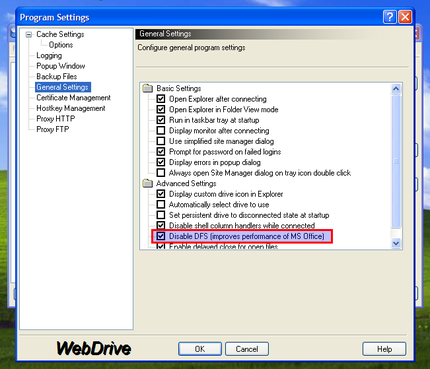
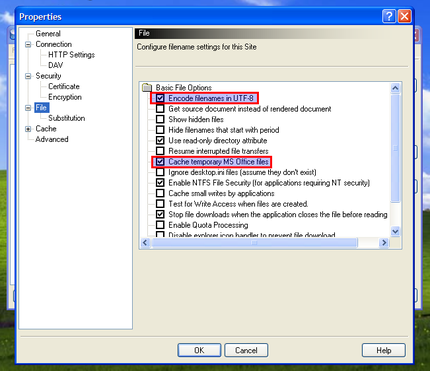
Section titled “WebDrive”Probably this is the best choice if you are under Windows, because of its stability and ease of configuration. WebDrive 10 (Version 10.00, Build 2521) has been roughly tested with OpenKM to enhance compatibility effort. This is the supported configuration to work with OpenKM WebDAV connector:
Windows Web Folders
Section titled “ Windows Web Folders”Perform the following steps in Internet Explorer:
- Select File -> Open.
- Fill in URL like http://your-domain.com:8080/OpenKM/webdav
- Check “Open as Web Folder”.
- Click OK.
Windows XP’s “My Network Places”
Section titled “Windows XP’s “My Network Places””Windows XP supports ‘Network Places’ in the standard File dialog:
- Open networking.
- Connect as network resource.
- Write url http://your-domain.com:8080/OpenKM/webdav
- Set user and password.
- Open the Registry Editor utility (regedit.exe).
- Go to HKEY_LOCAL_MACHINE\SYSTEM\CurrentControlSet\Services\WebClient\Parameters, look for TypeUseBasicAuth and replace the default value “1” by “2” allowing BasicAuth through NON SSL connections.
- Map your drive using this address: \\your-domain.com:8080/OpenKM/repository/default/okm_root/
More information at our OpenKM Forum.
Other tools
Section titled “Other tools”Install any WebDAV client for Mac, here you have some options:
- http://cyberduck.ch/
- http://www.webdrive.com/ (There is a version for Macintosh OS/X)
Mac OS X finder.
Section titled “Mac OS X finder.”- Select in the Finder “Go” and “Connect to Server…”.
- Fill in the WebDAV URL http://your-domain:8080/OpenKM/webdav
- Enter a username and password.
- And the document repository is accessible!
Troubleshooting
Section titled “Troubleshooting”Slow WedDAV performance on Windows
Section titled “Slow WedDAV performance on Windows”If you have a slow webdav connection in windows 7 please follow the instructions in Fix Slow WebDAV Performance in Windows 7. It turns out to be a windows issue, not OpenKM.
Furthermore in Windows 7/Vista you need to add your certificate (if its not issued by a verified CA) into windows if you plan to use Webdav over SSL (and,like me, do not compensate with digest auth):
- Get the certificate from the server administrator in CER format or download it from Firefox.
- Start windows Certificate Manager: in command line type certmgr.msc
- Select on the left Trusted Root Certification Authorities.
- In the menu Actions > All Tasks select Import and then Next.
- Browse for the location of certificate file you saved earlier on your computer and click Open.
- You will get a few more warning messages. Just say to go through with it until the certificate is accepted.
Then map webdav content as a network drive without any other software. The folder should be: http://your-domain:8080/OpenKM/webdav
To make sure that everything is ok with certificates, open the address using IE. If no warning pops up is shown, then is right.
Turn off file locking
Section titled “Turn off file locking”If you need to write access over a network drive you need to disable File Locking (windows does not support webdav file lock).
Execute registry editor tool, in command line type regedit. Modify or create this configuration parameter:
[HKEY_LOCAL_MACHINE\SYSTEM\CurrentControlSet\Services\WebClient\Parameters]"SupportLocking"=dword:00000000