Development tips
Tomcat application deployment
Section titled “Tomcat application deployment”For faster development we recommend not deploying OpenKM.war directly, file and create in $TOMCAT_HOME/webapps a folder alias of target/OpenKM:
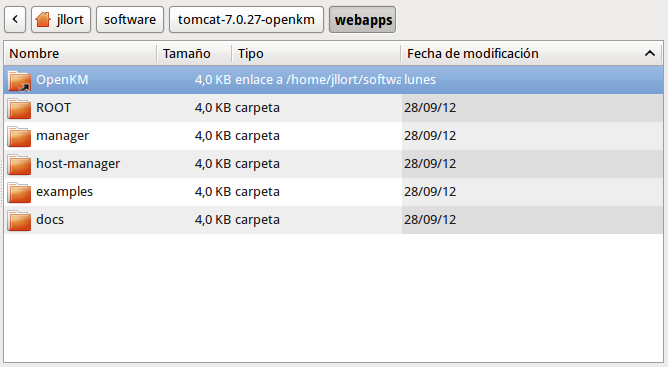
Compile only GWT frontend module
Section titled “Compile only GWT frontend module”To compile GWT modules individually execute the command:
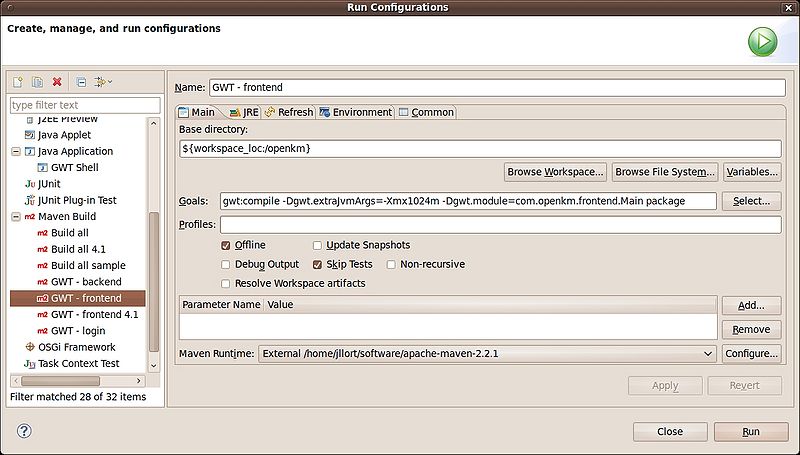
$ mvn gwt:compile -Dgwt.module=com.openkm.frontend.MainConfigure GWT build from eclipse
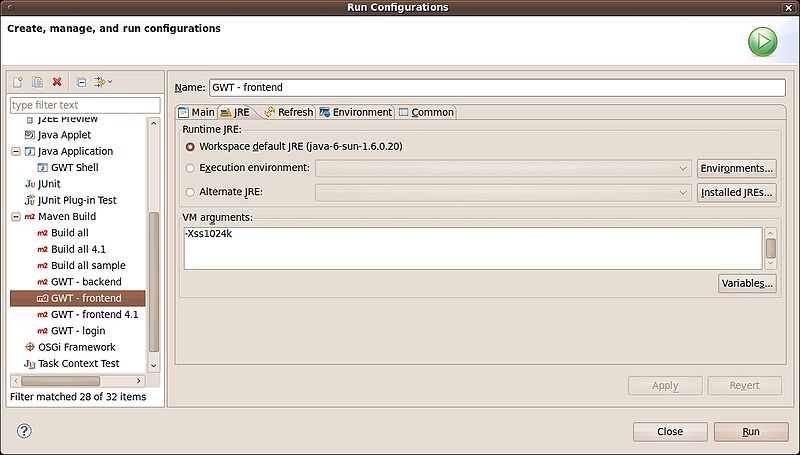
Section titled “Configure GWT build from eclipse”Go to “Run configurations”, choose “Maven build” and click on “right mouse button” to “add” new maven buil.
Compile only one GWT frontend permutation
Section titled “Compile only one GWT frontend permutation”GWT by default compiles six permutations, each one for distinct browsers. Each permutation consumes a lot of hardware resources ( RAM and CPU’s).
Enable only firefox permutation
Section titled “Enable only firefox permutation”Edit the main.gwt.xml OpenKM project file:
<!-- Compile for Firefox only --><set-property name="user.agent" value="gecko1_8"/>Enable only chrome permutation
Section titled “Enable only chrome permutation”Edit the main.gwt.xml OpenKM project file:
<!-- Compile for Firefox only --><set-property name="user.agent" value="safari"/>Enable only IE permutation
Section titled “Enable only IE permutation”Edit the main.gwt.xml OpenKM project file:
<!-- Compile for Firefox only --><set-property name="user.agent" value="ie8"/>Configure number of CPU’s to be used for compiling GWT frontend
Section titled “Configure number of CPU’s to be used for compiling GWT frontend”GWT compilation process can use more than one cpu. You can set the number of cpu to be used with “localworkers” parameter.
Edit the pom.xml project file.
<plugins> <plugin> <groupId>org.codehaus.mojo</groupId> <artifactId>gwt-maven-plugin</artifactId> <version>${gwt.version}</version> <executions> <execution> <goals> <goal>compile</goal> <!-- <goal>generateAsync</goal> --> <!-- <goal>test</goal> --> </goals> </execution> </executions> <configuration> <runTarget>com.openkm.frontend.Main/index.html</runTarget> <modules> <module>com.openkm.frontend.Main</module> </modules> <localWorkers>4</localWorkers> </configuration> </plugin>Deploying script sample
Section titled “Deploying script sample”You can use a deploying script:
#!/bin/bash# @author: Kenneth Walter
#Cleans and re-compiles the source filesmvn -Dmaven.test.skip=true clean gwt:compile install $*
#Set the TARGET_DIRECTORY to the path of your tomcat installationTARGET_DIRECTORY=~/Downloads/tomcat-7.0.27/FILE_TO_MOVE=target/OpenKM.war#This will only attempt to replace the existing WAR if the new WAR existsif [ -f $FILE_TO_MOVE ]then   echo 'Deploying WAR to Tomcat Directory'   cp -v $FILE_TO_MOVE $TARGET_DIRECTORY/webapps/.   echo 'Done'fi