Configuring SQL Server
Database creation
Section titled “Database creation”Create a database and user
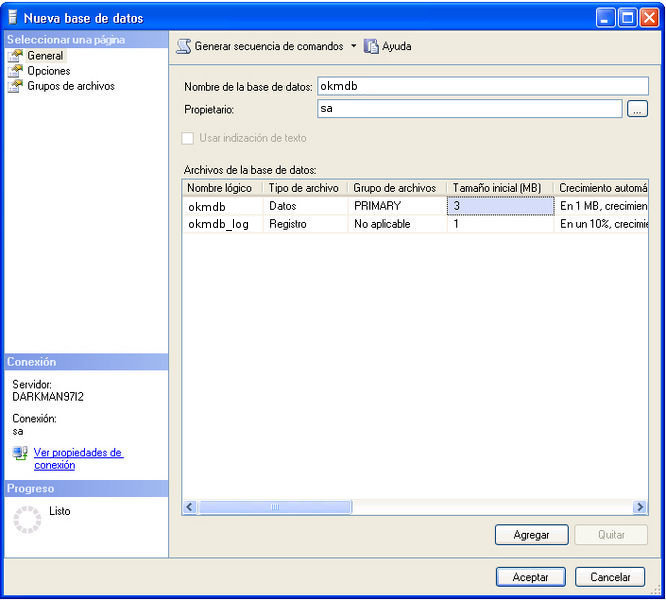
Section titled “Create a database and user”Start SQL Server Management Studio Express and create a database called okmdb.
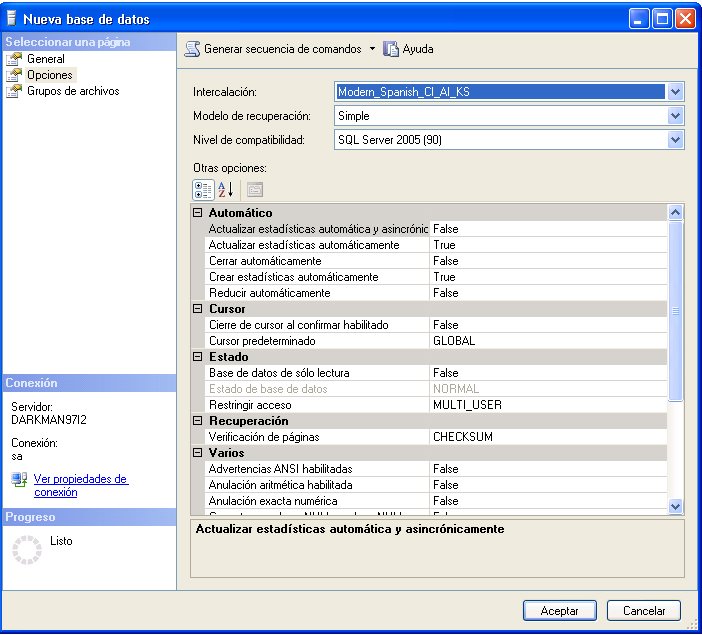
Select the appropriate database collation.
Configure your openkm.properties
Section titled “Configure your openkm.properties”Edit the file $TOMCAT_HOME/openkm.properties
spring.jpa.hibernate.ddl-auto=create-onlyspring.jpa.properties.hibernate.dialect=com.openkm.db.dialect.SQLServerDialectConfigure Tomcat data sources
Section titled “Configure Tomcat data sources”Edit the file $TOMCAT_HOME/openkm.properties and enable the resources
spring.datasource.driver-class-name=com.microsoft.sqlserver.jdbc.SQLServerDriverspring.datasource.url=jdbc:sqlserver://localhost:1433;databaseName=okmdbspring.datasource.username=openkmspring.datasource.password=*secret*spring.datasource.validationQuery=SELECT 1Configure application login
Section titled “Configure application login”Edit the file $TOMCAT_HOME/openkm.xml
authentication.openkm.database=trueRun application
Section titled “Run application”During OpenKM startup, the application will automatically create an empty database structure.
Configure integrated security
Section titled “Configure integrated security”You must add the “integratedSecurity=true” parameter to the JDBC connection URL to enable Integrated Security. For example:
spring.datasource.driver-class-name=com.microsoft.sqlserver.jdbc.SQLServerDriverspring.datasource.url=jdbc:sqlserver://localhost:1433;databaseName=okmdb;autoReconnect=true;integratedSecurity=truespring.datasource.username=spring.datasource.password=You must also download the driver package from https://go.microsoft.com/fwlink/?linkid=2122434 and copy the sqljdbc_auth.dll file to the TOMCAT_HOME/bin folder.
More info at:
Troubleshooting
Section titled “Troubleshooting”Can’t connect to SQL Server
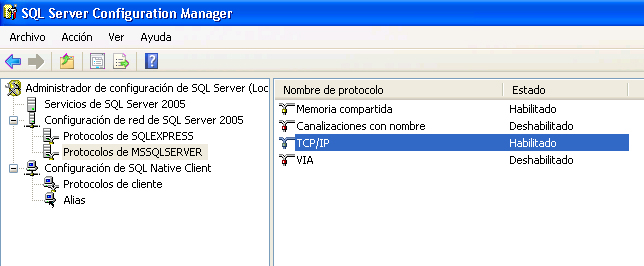
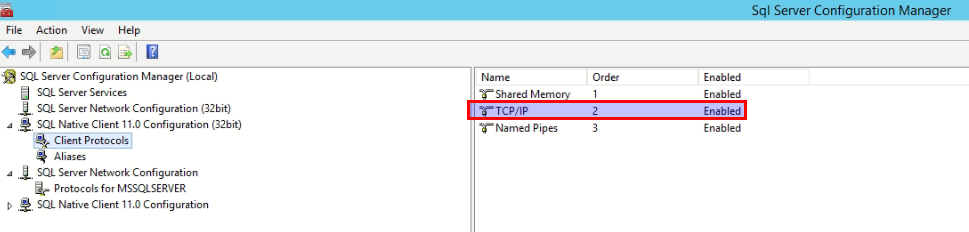
Section titled “Can’t connect to SQL Server”Ensure you have the TCP protocol enabled (it is disabled by default).
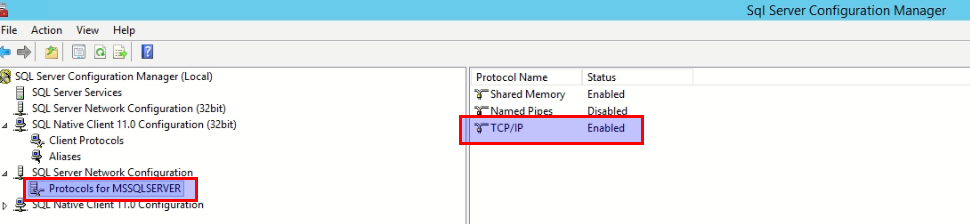
The connection was lost after some time.
Section titled “The connection was lost after some time.”We have observed in some SQL Server editions what seems to be new behavior whereby, after some hours, the connection is closed (it might be an extra configuration parameter in the latest SQL Server editions that is enabled by default or similar). There is a new configuration attribute named autoReconnect that solves this.
spring.datasource.driver-class-name=com.microsoft.sqlserver.jdbc.SQLServerDriverspring.datasource.url=jdbc:sqlserver://localhost:1433;databaseName=okmdb;autoReconnect=truespring.datasource.username=openkmspring.datasource.password=*secret*spring.datasource.validationQuery=SELECT 1Not able to log in to OpenKM
Section titled “Not able to log in to OpenKM”When the first-time OpenKM login fails with the correct username and password (okmAdmin / admin), you should check the database configuration.
Check whether the database is configured to be case-sensitive; it might be one reason you cannot log in.
Unable to connect via TCP/IP to localhost SQL, port 1433, when using an instance in the JDBC connection URL
Section titled “Unable to connect via TCP/IP to localhost SQL, port 1433, when using an instance in the JDBC connection URL”If you use the database instance name in the connection, you must use “\\” in the spring.datasource.URL configuration parameter. The sample below uses a database instance named SampleSQL.
spring.datasource.url=jdbc:sqlserver://localhost\\SampleSQL;databaseName=okmdb;autoReconnect=trueDeadlock issues
Section titled “Deadlock issues”These errors appear in the log this way:
o.h.engine.JDBC.spi.SqlExceptionHelper : SQL Error: 1205, SQLState: 40001o.h.engine.JDBC.spi.SqlExceptionHelper: Transaction (Process ID 56) was deadlocked on lock resources with another process and has been chosen as the deadlock victim. Rerun the transaction.Modify the database to avoid these issues:
ALTER DATABASE okmdb SET READ_COMMITTED_SNAPSHOT ON WITH ROLLBACK IMMEDIATESource How to Solve Database Deadlock on Microsoft SQL Server.
SSL connection error
Section titled “SSL connection error”If you see this error:
The driver could not establish a secure connection to SQL Server by using Secure Sockets Layer (SSL) encryption.The problem can be fixed by adding the “encrypt=false” parameter to the JDBC URL:
spring.datasource.url=jdbc:sqlserver://sqlserver:1433;databaseName=okmdb;encrypt=false;This is due to a change in the latest version of the SQL Server Java JDBC driver.
More info at:
The driver could not establish a secure connection to SQL Server by using Secure Sockets Layer (SSL) encryption
Section titled “The driver could not establish a secure connection to SQL Server by using Secure Sockets Layer (SSL) encryption”That may happen when the SQL Server only allows SSL connections.
The problem can be fixed by adding the “encrypt=true” and “trustServerCertificate=true” parameters to the JDBC URL:
spring.datasource.url=jdbc:sqlserver://sqlserver:1433;databaseName=okmdb;encrypt=true;trustServerCertificate=true;Alter SQL Server compatibility level
Section titled “Alter SQL Server compatibility level”To set SQL Server compatibility level to 2016 (the minimum required)
ALTER DATABASE okmdb SET COMPATIBILITY_LEVEL = 130;