Reports with parameters
When you execute a report from OpenKM, a form might be shown requiring the user to enter values for filtering purposes. The most common case is filtering by a range of dates.
Understanding filtering
Section titled “Understanding filtering”To understand the form filter, we will use the UsersLogin.rep report (download the UsersLogin.zip).
Params XML file
Section titled “Params XML file”In the sample, two filtering fields have been set:
| Field | Type | Description |
|---|---|---|
| from_date | Input | Field used to filter the start date. |
| to_date | Input | Field used to filter the end date. |
The params.xml file:
<?xml version="1.0" encoding="UTF-8"?><!DOCTYPE report-parameters PUBLIC "-//OpenKM//DTD Report Parameters 2.1//EN" "http://www.openkm.com/dtd/report-parameters-2.1.dtd"><report-parameters> <input label="From" name="from_date" type="date"> <validator type="req"/> </input> <input label="To" name="to_date" type="date"> <validator type="req"/> </input></report-parameters>Using fields in the report
Section titled “Using fields in the report”Two parameters are created in the report:
| Parameter | Class | Description |
|---|---|---|
| from_date | java.util.Date | Start date. |
| to_date | java.util.Date | End date. |
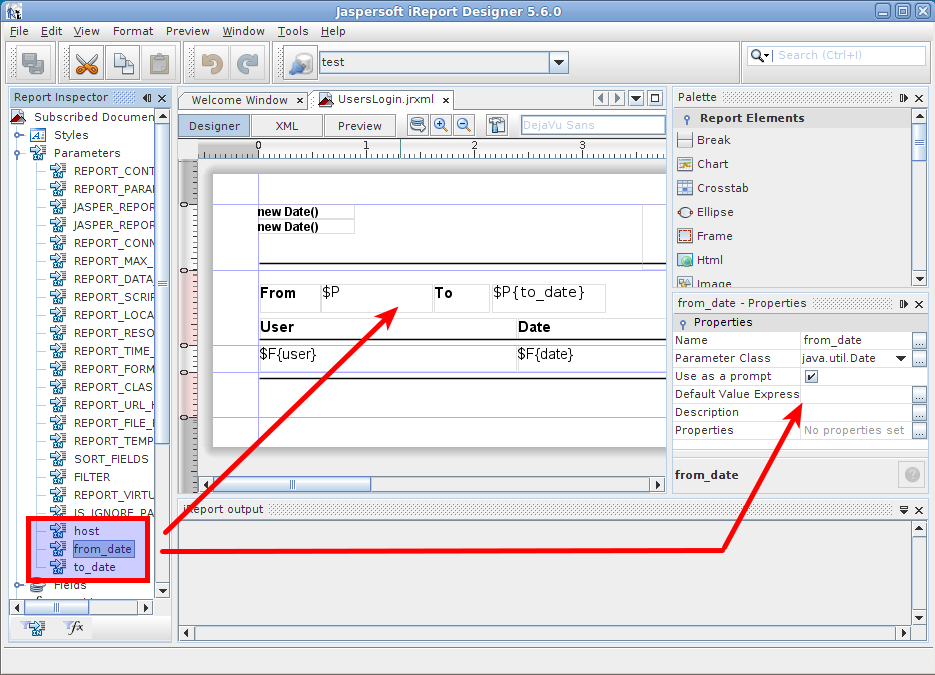
The parameters are also used in SQL or Java reports.
Java sample
Section titled “Java sample”- Click on
 the report query button.
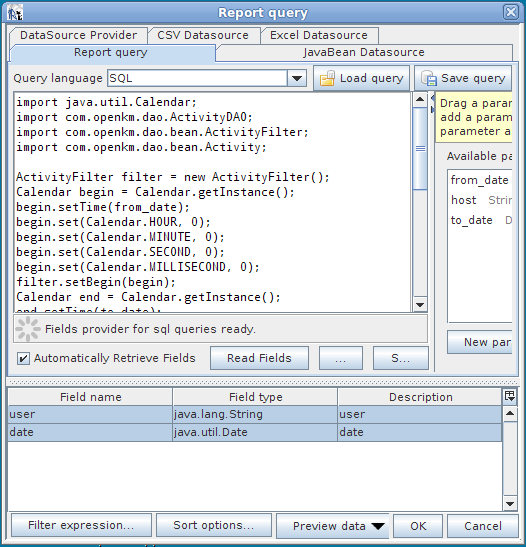
The from_date and to_date variables are injected into code execution and can be used directly, as in the sample below.
import org.springframework.web.context.WebApplicationContext;import com.openkm.db.service.ActivitySrv;import com.openkm.db.bean.*;import com.openkm.util.*;import java.util.*;
WebApplicationContext cc = (WebApplicationContext) ContextWrapper.getContext();ActivitySrv activitySrv = cc.getBean(ActivitySrv.class);ActivityFilter filter = new ActivityFilter();Calendar begin = Calendar.getInstance();begin.setTime(from_date);begin.set(Calendar.HOUR, 0);begin.set(Calendar.MINUTE, 0);begin.set(Calendar.SECOND, 0);begin.set(Calendar.MILLISECOND, 0);filter.setBegin(begin);Calendar end = Calendar.getInstance();end.setTime(to_date);end.set(Calendar.HOUR, 0);end.set(Calendar.MINUTE, 0);end.set(Calendar.SECOND, 0);end.set(Calendar.MILLISECOND, 0);filter.setEnd(end);filter.setAction("LOGIN");List al = new ArrayList();for (Iterator it = activitySrv.findByFilter(filter).iterator(); it.hasNext();) {    Activity act = (Activity) it.next();    Map actMap = new HashMap();    actMap.put("user", act.getUser());    actMap.put("date", act.getDate().getTime());    al.add(actMap);}
return al;
SQL sample
Section titled “SQL sample”Click on the report query button.
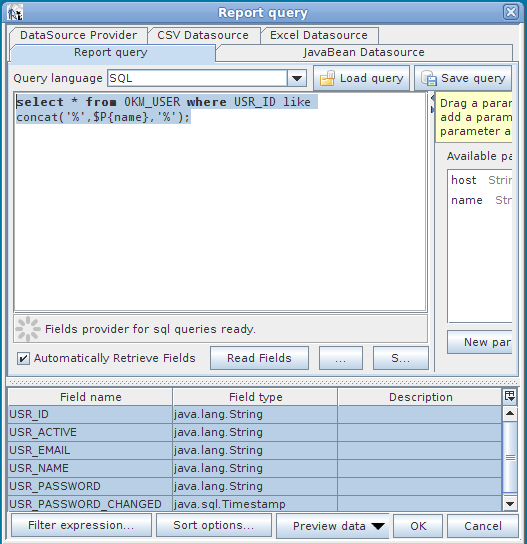
In the sample, there is a parameter named “name” of class “java.lang.String” used for filtering the user list.
select * from OKM_USER where USR_ID like concat('%',$P{name},'%')