Creating LibreOffice templates
Preliminaries
Section titled “Preliminaries”Register the Metadata group definition at Administration > Metadata.
<?xml version="1.0" encoding="UTF-8"?><!DOCTYPE property-groups PUBLIC "-//OpenKM//DTD Property Groups 3.10//EN" "http://www.openkm.com/dtd/property-groups-3.10.dtd"><property-groups> <property-group label="Sample Template" name="okg:tpl"> <input label="Name" name="okp:tpl.name"/> <input label="Birth Date" name="okp:tpl.birth_date" type="date" /> <select label="Language" name="okp:tpl.language" type="simple"> <option label="Java" value="java"/> <option label="Python" value="python"/> <option label="PHP" value="php" /> </select> </property-group></property-groups>In order to make a relation between the template form field and the property group, you have to name them following a naming convention: replace “:” and “.” with “_”. Here you can see the matching between the two fields:
| Metadata field name | Template field name | Template field value |
|---|---|---|
| okp:tpl.name | okp_tpl_name | ${okp_tpl_name!} |
| okp:tpl.birth_date | okp_tpl_birth_date | ${okp_tpl_birth_date?date!} |
| okp:tpl.language | okp_tpl_language | ${okp_tpl_language!} |
Creating the template
Section titled “Creating the template”The field that will be replaced with the value of a variable passed to the template can be specified using the standard FreeMarker expression notation by typing the variable name into the document as plain text as follows:
Hi ${name}!However, mixing processing instructions and normal text into the document may become confusing and clutter the layout. So JODReports provides an alternative way of inserting fields. You can insert a visual field in LibreOffice Writer from the menu Insert / Fields / Other… (or just press Ctrl+F2), then click on the Functions tab and select Input field. Change the field Reference to JOOScript. In the Content field, enter the variable name (e.g. “$name”). This field will typically be displayed by Writer as a grayed rectangle with the variable name, and moving the mouse over it will reveal the field reference.
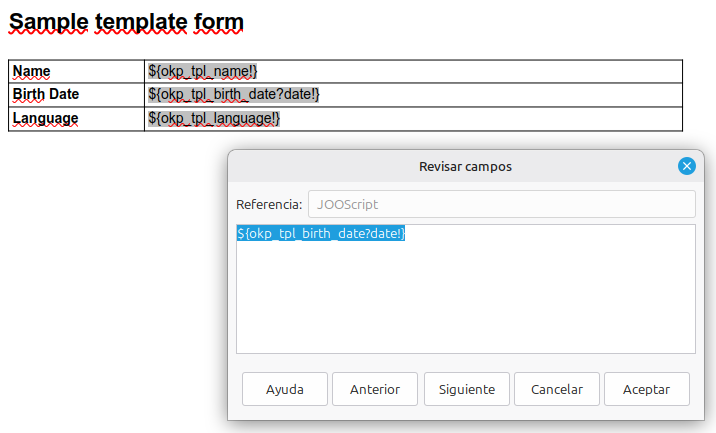
This is the LibreOffice document used in this sample tpl.odt.
Read about LibreOffice templates at JODReports.
Date format
Section titled “Date format”JODReports uses FreeMarker internally, so you can take advantage of FreeMarker’s formatting flexibility. For example, you can set date formats in this way:
${okp_tpl_birth_date?string("yyyy-MM-dd")}If the date may be null, then you need to check this (in the case of ODT templates you should use #if between “[” and “]”):
[#if okp_tpl_birth_date??]${okp_tpl_birth_date?string("yyyy-MM-dd")}[/#if]Learn more about FreeMarker formatting at Built-in Reference.
Dynamic tables
Section titled “Dynamic tables”You can even use the template feature to generate dynamic tables. Let’s see an example.
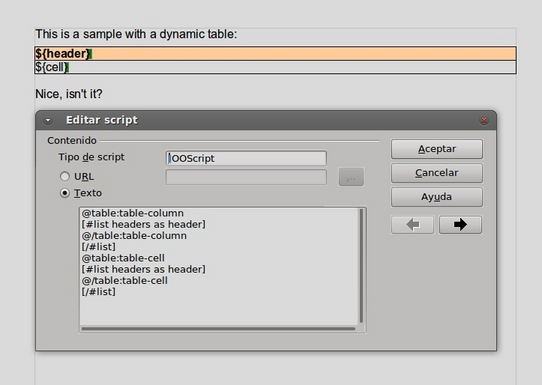
In the screenshot you can see a document with a table. The header has a colored background and is also bold. The script shows the options to generate the table headers.
This is the LibreOffice document used in this sample: dynamic_table.odt
Learn more about this feature at: