Server configuration
The packet for the query is too large (MySQL)
Section titled “The packet for the query is too large (MySQL)”If you get an error like this:
The packet for the query is too large (1708726 > 1048576).You can change this value on the server by setting the 'max_allowed_packet' variable.You need to modify your MySQL server configuration file and increase the value of the max_allowed_packet property. Don’t forget to restart MySQL after any change in this file. In Debian-based distributions like Ubuntu, this configuration file is located at /etc/mysql/my.cnf.
Unable to connect from another computer on the network
Section titled “Unable to connect from another computer on the network”If you expose the Tomcat port 8080, ensure it is bound to your IP; the “address” parameter value should be “0.0.0.0” in $TOMCAT_HOME/conf/server.xml:
<Connector port="8080" address="0.0.0.0" protocol="HTTP/1.1" connectionTimeout="20000" redirectPort="8443" />MySQL error HOUR_OF_DAY: 2 -> 3
Section titled “MySQL error HOUR_OF_DAY: 2 -> 3”To determine the problem, execute this query:
SELECT * FROM OKM_CRON_TAB WHERE HOUR(CT_LAST_BEGIN) >= 2 and HOUR(CT_LAST_BEGIN) < 3 OR HOUR(CT_LAST_END) >= 2 and HOUR(CT_LAST_END) < 3;Once we can see the affected crontab entries, they can be fixed by executing the following statements:
-- UPDATE OKM_CRON_TAB SET CT_LAST_BEGIN = ADDTIME(CT_LAST_BEGIN, '1:00'), CT_LAST_END = ADDTIME(CT_LAST_END, '1:00')-- WHERE HOUR(CT_LAST_BEGIN) >= 2 and HOUR(CT_LAST_BEGIN) < 3 OR HOUR(CT_LAST_END) >= 2 and HOUR(CT_LAST_END) < 3;
UPDATE OKM_CRON_TAB SET CT_LAST_BEGIN = ADDTIME(CT_LAST_BEGIN, '1:00') WHERE HOUR(CT_LAST_BEGIN) >= 2 and HOUR(CT_LAST_BEGIN) < 3;
UPDATE OKM_CRON_TAB SET CT_LAST_END = ADDTIME(CT_LAST_END, '1:00') WHERE HOUR(CT_LAST_END) >= 2 and HOUR(CT_LAST_END) < 3;
Error downloading document as PDF
Section titled “Error downloading document as PDF”This error is usually caused by LibreOffice not being installed or by an incomplete package installation.
IMAP SSL certificate error
Section titled “IMAP SSL certificate error”First, obtain the certificate with the openssl command, and then import the certificate with the following:
$ keytool -import -alias mail.yourcompany.com -keystore //usr/lib/jvm/java-11-openjdk-amd64/lib/security/cacerts -file imapd.pemOpenKM server has no direct Internet connection.
Section titled “OpenKM server has no direct Internet connection.”If you need a proxy to access the Internet, edit your “/etc/bash.bashrc” file as root and put these lines at the end of your “/etc/bash.bashrc” file:
export http_proxy=http://username:password@proxyserver.net:port/export ftp_proxy=http://username:password@proxyserver.net:port/You can omit the username and password if your proxy server does not require authentication.
Problems with character encodings
Section titled “Problems with character encodings”If your language has non-ASCII characters and they are displayed as garbage, you have a problem with encodings.
Check the $TOMCAT/bin/setenv.sh or $TOMCAT/bin/setenv.bat file. You should set the JVM parameter “-Dfile.encoding=utf-8”.
PermGen errors
Section titled “PermGen errors”If you see this error:
java.lang.OutOfMemoryError: PermGen spaceEdit your “$TOMCAT_HOME/bin/setenv.sh” (or “$TOMCAT_HOME/bin/setenv.bat” if using Windows) and increase the value of the JVM parameter “-XX:MaxPermSize”:
JAVA_OPTS="-Xms256m -Xmx2048m -XX:PermSize=128m -XX:MaxPermSize=512m"See also Presenting the Permanent Generation.
LDAP Size limit exceeded
Section titled “LDAP Size limit exceeded”This is caused because the bindDN has a size limit for each LDAP query.
In OpenLDAP, the solution is to increase the limit for the bindDN; for example (to change the size limit for the user used by the OpenKM LDAP connection):
limits dn.exact="cn=reader,ou=accounts,ou=admins,dc=example,dc=com" size=100000See also OpenLDAP Limits.
Behind the IIS proxy, you may get error 404 or 404.15
Section titled “Behind the IIS proxy, you may get error 404 or 404.15”When using IIS as a web server, by default it limits the length of the query string sent to the server. If the limit is exceeded, you will see an error screen on the client side:
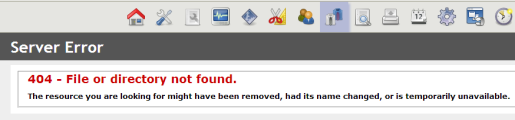
On the server side, we get a more detailed error:
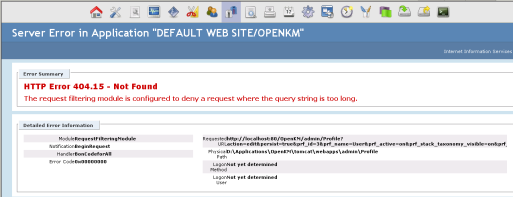
To solve this issue, we need to increase the maximum size of the query string on the web server:
- Open Internet Information Services (IIS) Manager.
- In the Connections pane, go to the connection > site > application or directory for which you want to modify your request filtering settings.
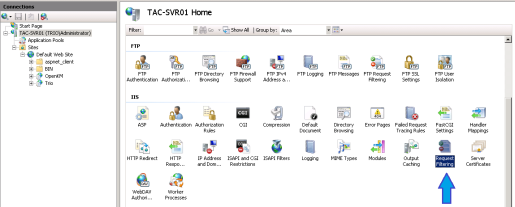
- In the Home pane, double-click Request Filtering.
Click Edit Feature Settings… in the Actions pane.
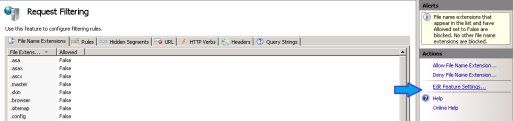
Change the maximum query string length:
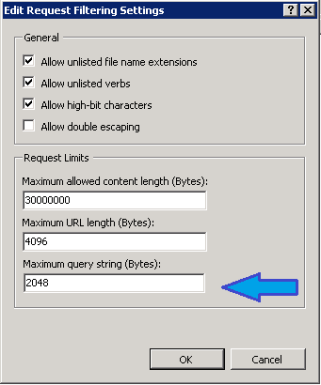
More information is available at the OpenKM forum.
IIS gets IOException: Internal Server Error while uploading file or HTTP 413 Request Entity Too Large Error
Section titled “IIS gets IOException: Internal Server Error while uploading file or HTTP 413 Request Entity Too Large Error”This error may appear when uploading a large document to OpenKM.
Solution one
Section titled “Solution one”Change the “Maximum allowed content length (Bytes)” in your IIS configuration settings:
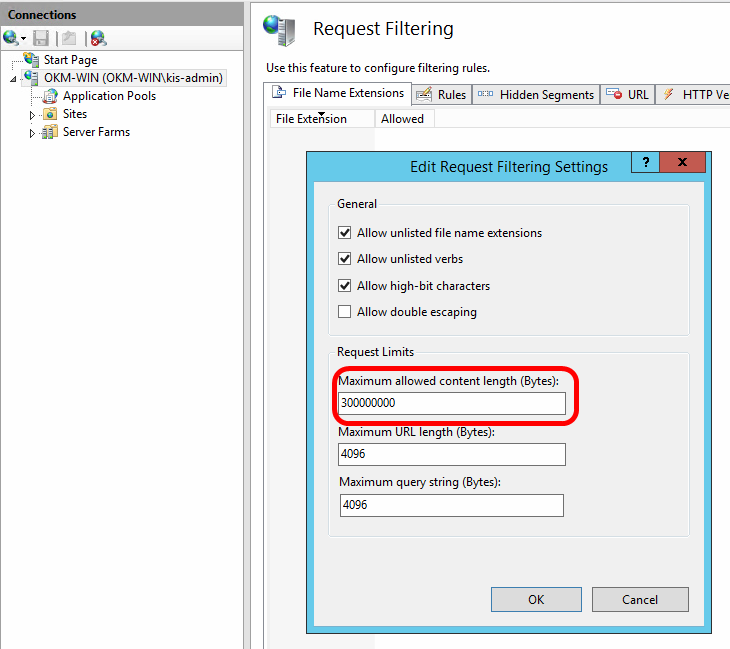
Solution two
Section titled “Solution two”- Go to the webapps folder
- Edit the web.config file and add the following under
where “2097151” is the maximum allowed in IIS:
<system.web> <httpRuntime maxRequestLength="2097151" /></system.web>If there is no web.config, create one from a text file and add the following:
<configuration> <system.web> <httpRuntime maxRequestLength="2097151" /> </system.web></configurationWARN net.sf.ehcache.hibernate.strategy.AbstractReadWriteEhcacheAccessStrategy
Section titled “WARN net.sf.ehcache.hibernate.strategy.AbstractReadWriteEhcacheAccessStrategy”If you see this message:
A soft-locked cache entry was expired by the underlying Ehcache.If this happens regularly you should consider increasing the cache timeouts and/or capacity limitAre you experiencing any performance or usability problems due to this warning? If not, then you should treat it as a warning.
Otherwise, it looks like the solution is to increase the size of maxElementsInMemory to account for the difference in what is cached versus what is being used.