Profiling application
You can profile local and remote Java applications using Java VisualVM.
Edit Tomcat startup scripts
Section titled “Edit Tomcat startup scripts”Edit the $TOMCAT_HOME/bin/setenv.* files (setenv.sh for Linux and setenv.bat for Windows).
CATALINA_OPTS="$CATALINA_OPTS -Dcom.sun.management.jmxremote=true"CATALINA_OPTS="$CATALINA_OPTS -Dcom.sun.management.jmxremote.port=9090"CATALINA_OPTS="$CATALINA_OPTS -Dcom.sun.management.jmxremote.ssl=false"CATALINA_OPTS="$CATALINA_OPTS -Dcom.sun.management.jmxremote.authenticate=false"CATALINA_OPTS="$CATALINA_OPTS -Djava.rmi.server.hostname=127.0.0.1"Authentication
Section titled “Authentication”To enhance security, enable authentication. Edit the $TOMCAT_HOME/bin/setenv.* files (setenv.sh for Linux and setenv.bat for Windows).
CATALINA_OPTS="$CATALINA_OPTS -Dcom.sun.management.jmxremote.authenticate=true"CATALINA_OPTS="$CATALINA_OPTS -Dcom.sun.management.jmxremote.password.file=$CATALINA_HOME/conf/jmxremote.password"CATALINA_OPTS="$CATALINA_OPTS -Dcom.sun.management.jmxremote.access.file=$CATALINA_HOME/conf/jmxremote.access"Edit the access control file $CATALINA_HOME/conf/jmxremote.access:
monitorRole readonlycontrolRole readwriteEdit the password file $CATALINA_BASE/conf/jmxremote.password:
monitorRole tomcatcontrolRole tomcatRestrict access to these files:
$ chmod 600 $CATALINA_HOME/conf/jmxremote.access$ chmod 600 $CATALINA_HOME/conf/jmxremote.passwordMonitoring Remote JVM Over SSH
Section titled “Monitoring Remote JVM Over SSH”The easiest way to connect to the remote JMX is to use a SOCKS proxy.
$ ssh user@external.server.ip -D 8888Configure VisualVM to use this proxy. Go to Tools > Options > Network and edit Manual Proxy Settings. Configure the SOCKS proxy at localhost and port 8888.
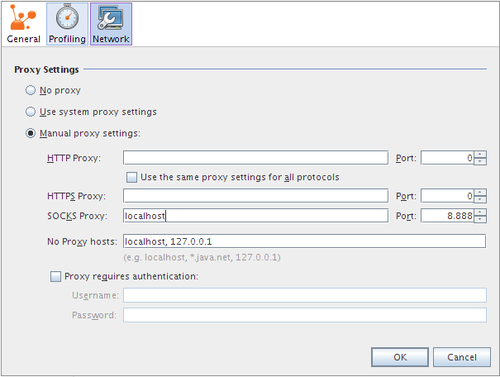
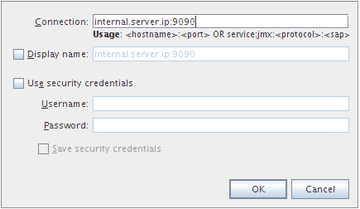
Now you can connect VisualVM to the remote target. Go to File > Add JMX Connection… and type the IP or hostname of the remote machine and the configured JMX port (in our sample configuration, 9090).
Java includes HPROF, a profiler which collects application runtime information. HPROF is capable of presenting CPU usage, heap allocation statistics, and monitor contention profiles.
For example, it can collect CPU usage information by sampling threads.
Edit the $TOMCAT_HOME/bin/setenv.sh file (or setenv.bat if using Windows):
CATALINA_OPTS="$CATALINA_OPTS -agentlib:hprof=cpu=samples"