Reports pack
Template reports
Section titled “Template reports”| Name | Uses Activity log | Requires parameters | Description |
|---|---|---|---|
| JavaReportPattern.jrxml | No. | No. | Template pattern that uses Java to retrieve data. |
| SQLReportPattern.jrxml | No. | No. | Template pattern that uses SQL to retrieve data. |
| subreport-sample.rep | No. | No. | Subreport sample. Support for subreports is available starting from version 8.1.15. |
Authentication
Section titled “Authentication”| Name | Uses Activity log | Requires parameters | Description |
|---|---|---|---|
| UsersLogin.rep | Yes. | Yes. | User logins, filtered by date range. |
| UsersLogout.rep | Yes. | Yes. | User logouts, filtered by date range. |
| UsersSessionExpiration.rep | Yes. | Yes. | Users whose sessions expired, filtered by date range. |
Documents
Section titled “Documents”| Name | Uses Activity log | Requires parameters | Description |
|---|---|---|---|
| DocumentCanceledCheckout.rep | Yes. | Yes. | Lists documents for which editing was canceled, filtered by date range. |
| DocumentCheckin.rep | Yes. | Yes. | Lists documents that were updated, filtered by date range. |
| DocumentCheckout.rep | Yes. | Yes. | Lists documents that are being edited, filtered by date range. |
| DocumentCreate.rep | Yes. | Yes. | Lists documents that were created, filtered by date range. |
| DocumentDelete.rep | Yes. | Yes. | Lists documents that were deleted, filtered by date range. |
| DocumentGetChildren.rep | Yes. | Yes. | Shows when users listed documents in a folder or record. Results are filtered by date range. To list documents in a folder, an internal method named “getChildren” is called. |
| DocumentContent.rep | Yes. | Yes. | Shows when users retrieved the content of a document. Results are filtered by date range. For example, when a user downloads or previews a document (among other actions), they are retrieving the document’s content. |
| DocumentContentByVersion.rep | Yes. | Yes. | Shows when users retrieved a specific version of a document’s content. Results are filtered by date range. |
| DocumentGetProperties.rep | Yes. | Yes. | Shows when a user retrieved the properties of a document. Results are filtered by date range. For example, when a document is selected, an internal method named “getProperties” is called to fill the contents of the properties tab in the user interface. |
| DocumentGetVersionHistory.rep | Yes. | Yes. | Shown when users retrieve the list of all versions of a document. Results are filtered by date range. |
| DocumentGetPropertyGroupProperties.rep | Yes. | Yes. | Shows when the fields of a metadata group have been retrieved. For example, when a metadata group is shown in the user interface, an internal method named “getPropertyGroupProperties” is called to fill the metadata group values. |
| DocumentLock.rep | Yes. | Yes. | Lists documents that were updated, filtered by date range. |
| DocumentMove.rep | Yes. | Yes. | Lists documents that were moved, filtered by date range. |
| DocumentPurge.rep | Yes. | Yes. | Lists documents that were purged, filtered by date range. When a document is purged, it will permanently disappear from the application repository. |
| DocumentRenamed.rep | Yes. | Yes. | Lists documents that were renamed, filtered by date range. |
| DocumentUnlock.rep | Yes. | Yes. | Lists documents that were unlocked, filtered by date range. |
| DocumentsAccessibleByUserOrdered.jrxml | No. | No. | Retrieves a list of available documents (security filtered) ordered by folder name. Optimized for CSV format. Not recommended for large repositories; it can take a long time. |
| DuplicatedFiles-v-7.1.23.jrxml | No. | No. | This report can only be used with version 7.1.23 or higher. List of duplicated files in the application repository, based on document checksum. |
| DuplicatedFiles.jrxml | No. | No. | This report can only be used with version 7.1.22 or lower. List of duplicated files in the application repository, based on document checksum. |
| ListDocumentsWithChecksum.rep | No. | Yes. | List of all documents in some folders and subfolders with checksum values. |
Folders
Section titled “Folders”| Name | Uses Activity log | Requires parameters | Description |
|---|---|---|---|
| FolderCopy.rep | Yes. | Yes. | Lists folders copied, filtered by date range. |
| FolderCreate.rep | Yes. | Yes. | Lists folders created, filtered by date range. |
| FolderDelete.rep | Yes. | Yes. | Lists folders deleted, filtered by date range. |
| FolderGetChildren.rep | Yes. | Yes. | Shows when users listed folders in a folder or record. Results are filtered by date range. To list folders in a folder, an internal method named “getChildren” is called. |
| FolderGetContentInfo.rep | Yes. | Yes. | Shown when the internal method named “getContentInfo” has been executed. To perform some operations, it is necessary to calculate folder depth, for example before starting a folder ZIP download. There’s an internal method named “getContentInfo” that does it. |
| FolderGetProperties.rep | Yes. | Yes. | Shows when a user retrieved the properties of a folder. Results are filtered by date range. For example, when a folder is selected, an internal method named “getProperties” is called to fill the contents of the properties tab in the user interface. |
| FolderMove.rep | Yes. | Yes. | Lists folders that were moved, filtered by date range. |
| FolderPurge.rep | Yes. | Yes. | Lists folders that were purged, filtered by date range. When a folder is purged, it will permanently disappear from the application repository. |
| FolderRename.rep | Yes. | Yes. | Lists folders that were renamed, filtered by date range. |
| FolderSecurity.rep | No. | Yes. | Lists folders and subfolders showing security settings regarding roles and/or users. |
| FolderGetSize.rep | No. | Yes. | Lists folders and subfolders showing the size of each one. |
| Name | Uses Activity log | Requires parameters | Description |
|---|---|---|---|
| MailCreate.rep | Yes. | Yes. | Lists mails that were created, filtered by date range. |
| MailGetProperties.rep | Yes. | Yes. | Shown when a user retrieves the properties of a mail. Results are filtered by date range. For example, when a mail is selected, an internal method named “getProperties” is called to fill the contents of the properties tab in the user interface. |
| MailPurge.rep | Yes. | Yes. | Lists mails that were purged, filtered by date range. When a mail is purged, it will permanently disappear from the application repository. |
| MailRename.rep | Yes. | Yes. | Lists mails that were renamed, filtered by date range. |
| MailMove.rep | Yes. | Yes. | Lists mails that were moved, filtered by date range. |
| MailCopy.rep | Yes. | Yes. | Lists mails that were copied, filtered by date range. |
| MailGetChildren.rep | Yes. | Yes. | Shows when users listed mails in a folder or record. Results are filtered by date range. To list mails in a folder, an internal method named “getChildren” is called. |
Others
Section titled “Others”| Name | Uses Activity log | Requires parameters | Description |
|---|---|---|---|
| TenantUserQuota.jrxml | No. | No. | Document size (in MB) by user and tenant. |
| WorkflowWorkload.jrxml | No. | No. | Each workflow task and the time spent on it. |
| RegisteredUsers.jrxml | No. | No. | Registered users. |
Subreports
Section titled “Subreports”Restrictions:
Section titled “Restrictions:”-
The name of the subreport must always start with “subreport-”, for example, subreport-roles.jrxml.
-
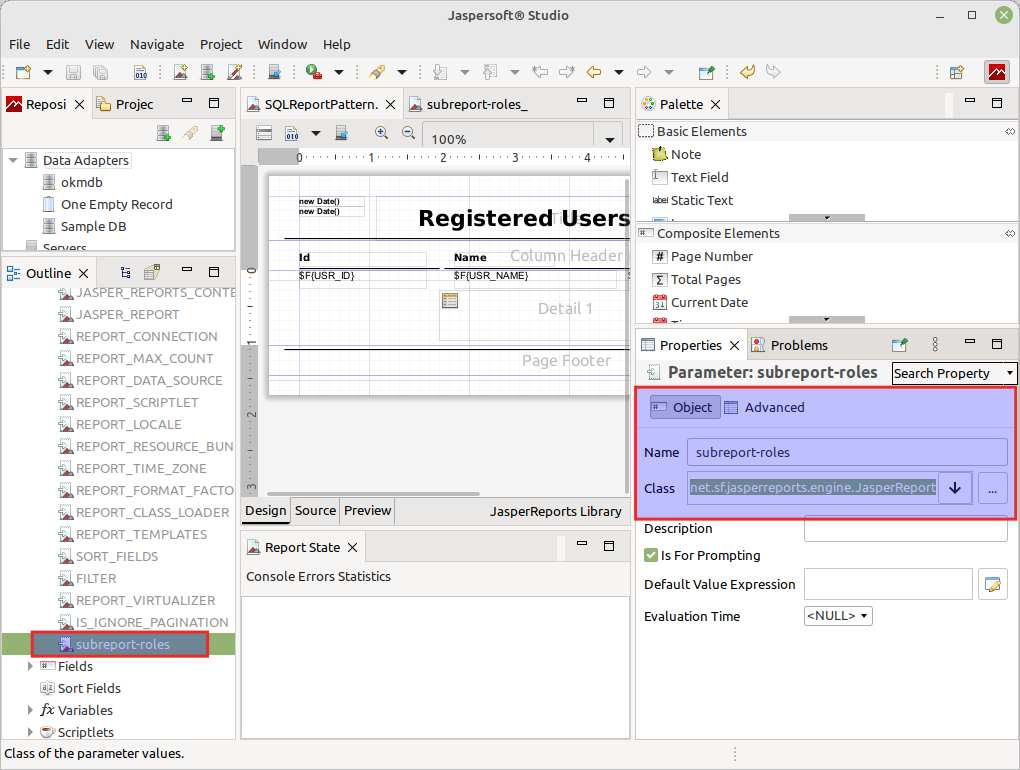
In the main report, you must create a parameter with the same name as the subreport (without the extension). For example, if the subreport is named subreport-roles.jrxml, the parameter should be named subreport-roles, and the associated class should be net.sf.jasperreports.engine.JasperReport.
-
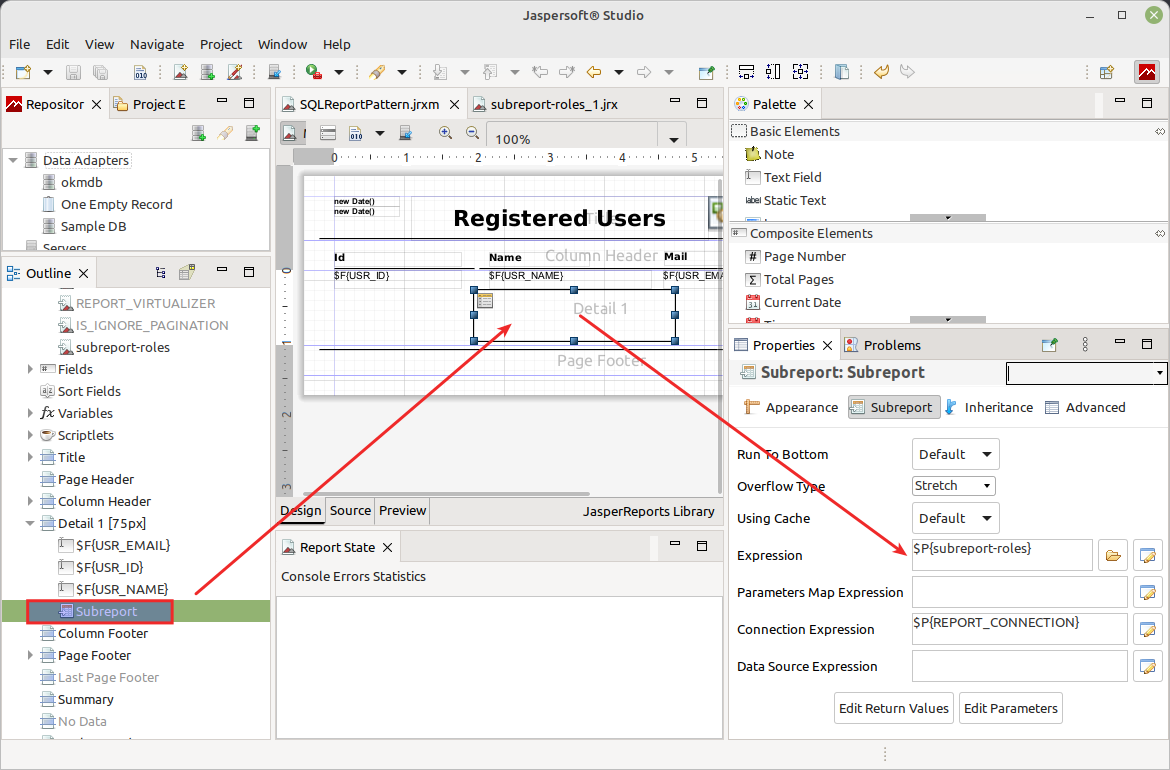
The expression in the subreport must correspond to the value of the created parameter. Following the example from the previous point, it should be $P{subreport-roles}.
-
Both reports must share the same database connection.
XML sections sample
Section titled “XML sections sample”In the main JRXML, define the subreport parameter:
<parameter name="subreport-roles" class="net.sf.jasperreports.engine.JasperReport"/>Then in the subreport element, use the parameter reference:
<subreport> <reportElement x="0" y="0" width="200" height="100"/> <subreportExpression><![CDATA[$P{subreport-roles}]]></subreportExpression></subreport>The key points are:
- The parameter name must match the filename without the extension used in the REP (ZIP file).
- Parameter type must be JasperReport.
- Use $P{parameter-name} in the subreportExpression.
- Remove any file path references from the subreportExpression.
How it works in the background:
- The OpenKM core loads the subreport from the REP (ZIP file).
- It adds it to the params map with the correct name.
- JasperReports finds it via the parameter reference instead of a file path.
Screenshots
Section titled “Screenshots”Subreport parameter
Subreport expression
Suggestions during development
Section titled “Suggestions during development”The dynamic configuration of subreports through parameters will work once the report is deployed in OpenKM, but it will not work in the Jasper Studio application. On the other hand, configuring subreports with file system paths will work in Jasper Studio but will likely not work in OpenKM (we do not recommend using paths).
During development, you will likely want to test the report from the Jasper Studio application before deploying it to production. For this reason, we recommend setting the report path directly (file system path) during this phase of development, and once completed, modify it to use dynamic access via the parameter mentioned earlier.