Crear una plantilla PDF
Puede crear formularios de plantilla PDF con varias aplicaciones:
Preliminares
Sección titulada «Preliminares»Registre la definición del grupo de metadatos en Administration > Metadata.
<?xml version="1.0" encoding="UTF-8"?><!DOCTYPE property-groups PUBLIC "-//OpenKM//DTD Property Groups 2.1//EN" "http://www.openkm.com/dtd/property-groups-2.1.dtd"><property-groups> <property-group label="Sample Template" name="okg:tpl"> <input label="Name" name="okp:tpl.name"/> <input label="Birth Date" name="okp:tpl.birth_date" type="date" /> <select label="Language" name="okp:tpl.language" type="simple"> <option label="Java" value="java"/> <option label="Python" value="python"/> <option label="PHP" value="php" /> </select> </property-group></property-groups>Para establecer la relación entre el campo del formulario de la plantilla y el grupo de propiedades, debe nombrarlos siguiendo una convención de nomenclatura: sustituya “:” y “.” por “_”. Aquí puede ver algunos ejemplos de conversión:
| Nombre del campo de metadatos | Nombre del campo de la plantilla | Valor del campo de la plantilla |
|---|---|---|
| okp:tpl.name | okp_tpl_name | ${okp_tpl_name!} |
| okp:tpl.birth_date | okp_tpl_birth_date | ${okp_tpl_birth_date!} |
| okp:tpl.language | okp_tpl_language | ${okp_tpl_language!} |
Crear la plantilla
Sección titulada «Crear la plantilla»Para crear una plantilla en OpenOffice.org, vaya a View > Toolbars > Form Controls.
Aparecerá un nuevo cuadro de diálogo y podrá añadir elementos de formulario al documento. Este cuadro contiene elementos como etiquetas, cuadros de texto, casillas de verificación y otras herramientas.
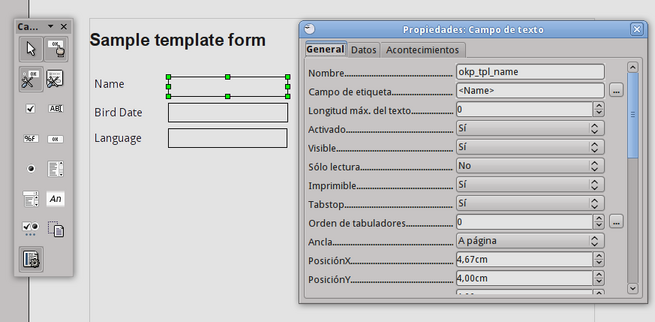
Una vez creado el formulario, vaya a File > Export as PDF para generar un PDF con estos campos de formulario. Este es el resultado final:
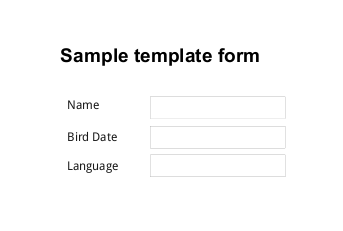
Puede descargar aquí el archivo PDF generado: tpl.pdf y este es el origen en ODT tpl_pdf.odt.
Formato de fecha
Sección titulada «Formato de fecha»OpenKM utiliza FreeMarker, por lo que puede aprovechar la flexibilidad de formato de FreeMarker. Por ejemplo, puede establecer el formato de fecha de esta forma:
${okp_tpl_birth_date?string("yyyy-MM-dd")}Más información sobre el formato en FreeMarker en: Built-in Reference.