Informes con parámetros
Cuando ejecuta un informe desde OpenKM, puede mostrarse un formulario que pide al usuario introducir valores con fines de filtrado. El caso más habitual es filtrar por un rango de fechas.
Entender el filtrado
Sección titulada «Entender el filtrado»Para entender el filtro del formulario utilizaremos el informe UsersLogin.rep (descargue UsersLogin.zip).
Archivo XML de parámetros
Sección titulada «Archivo XML de parámetros»En el ejemplo se han definido dos campos de filtrado:
| Campo | Tipo | Descripción |
|---|---|---|
| from_date | Input | Campo utilizado para filtrar desde una fecha. |
| to_date | Input | Campo utilizado para filtrar hasta una fecha. |
El archivo params.xml:
<?xml version="1.0" encoding="UTF-8"?><!DOCTYPE report-parameters PUBLIC "-//OpenKM//DTD Report Parameters 2.0//EN" "http://www.openkm.com/dtd/report-parameters-2.0.dtd"><report-parameters> <input label="From" name="from_date" type="date"> <validator type="req"/> </input> <input label="To" name="to_date" type="date"> <validator type="req"/> </input></report-parameters>Utilizar los campos en el informe
Sección titulada «Utilizar los campos en el informe»En el informe se crean dos parámetros:
| Parámetro | Clase | Descripción |
|---|---|---|
| from_date | java.util.Date | Fecha desde. |
| to_date | java.util.Date | Fecha hasta. |
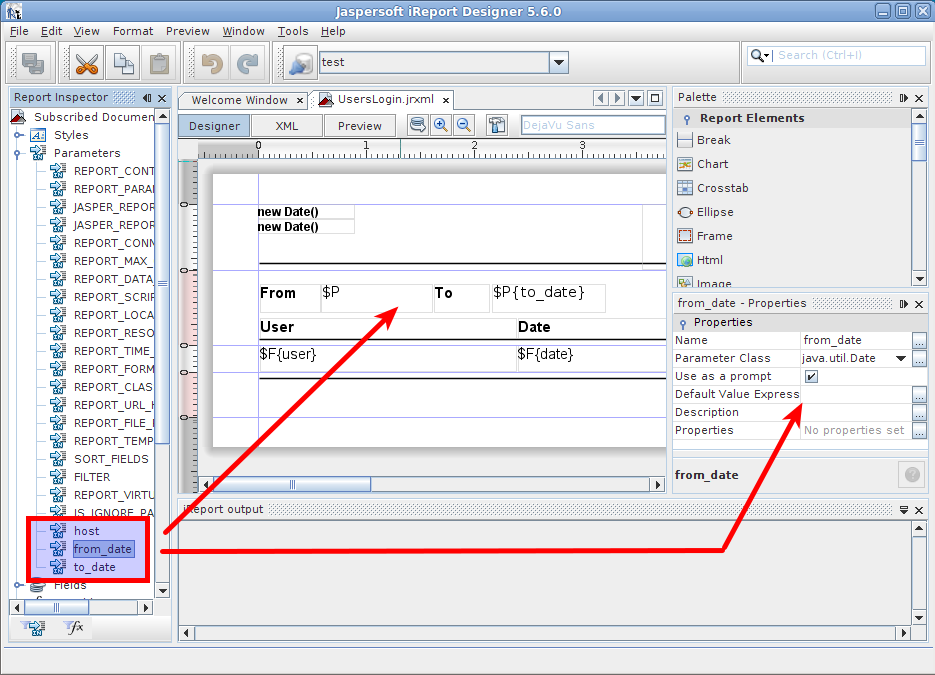
Los parámetros también se utilizan en informes SQL o Java.
Ejemplo en Java
Sección titulada «Ejemplo en Java»- Haga clic en el
 botón de consulta del informe.
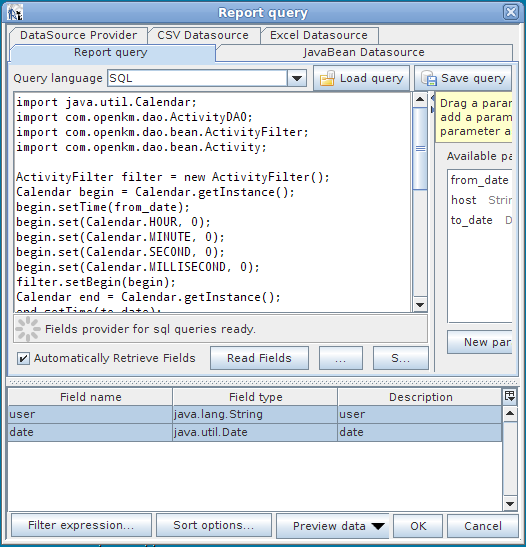
Las variables from_date y to_date se inyectan en la ejecución del código y pueden utilizarse directamente, como en el ejemplo siguiente.
import java.util.Calendar;import com.openkm.dao.ActivityDAO;import com.openkm.dao.bean.ActivityFilter;import com.openkm.dao.bean.Activity;
ActivityFilter filter = new ActivityFilter();Calendar begin = Calendar.getInstance();begin.setTime(from_date);begin.set(Calendar.HOUR, 0);begin.set(Calendar.MINUTE, 0);begin.set(Calendar.SECOND, 0);begin.set(Calendar.MILLISECOND, 0);filter.setBegin(begin);Calendar end = Calendar.getInstance();end.setTime(to_date);end.set(Calendar.HOUR, 0);end.set(Calendar.MINUTE, 0);end.set(Calendar.SECOND, 0);end.set(Calendar.MILLISECOND, 0);filter.setEnd(end);filter.setAction("LOGIN");List al = new ArrayList();for (Iterator it = ActivityDAO.findByFilter(filter).iterator(); it.hasNext();){    Activity act = (Activity) it.next();    Map actMap = new HashMap();    actMap.put("user", act.getUser());    actMap.put("date", act.getDate().getTime());    al.add(actMap);}
return al
Ejemplo en SQL
Sección titulada «Ejemplo en SQL» Haga clic en el botón de consulta del informe.
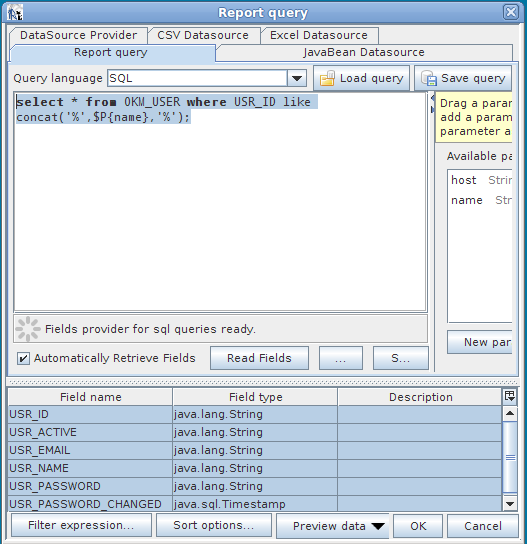
En el ejemplo hay un parámetro llamado “name” de la clase “java.lang.String” que se utiliza para filtrar la lista de usuarios.
select * from OKM_USER where USR_ID like concat('%',$P{name},'%')