Script para automatización - Establecer un nombre de documento único basado en metadatos
Cada vez que se sube un nuevo documento, el script establece un nombre de documento único basado en los valores de los metadatos.
Definición del grupo de metadatos:
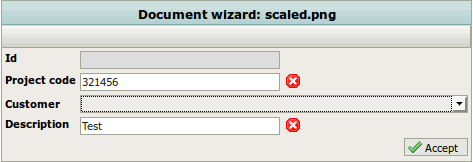
<?xml version="1.0" encoding="UTF-8"?><!DOCTYPE property-groups PUBLIC "-//OpenKM//DTD Property Groups 2.1//EN""http://www.openkm.com/dtd/property-groups-2.1.dtd"><property-groups> <property-group label="Datos" name="okg:data"> <input label="Id" type="text" name="okp:data.id" width="200px" readonly="true"/> <input label="Project code" type="text" name="okp:data.project.code" width="200px"> <validator type="req"/> <validator type="num"/> <validator type="maxlen" parameter="6"/> <validator type="minlen" parameter="6"/> </input> <select label="Customer" name="okp:data.customer" type="simple" table="customer" optionsQuery="select $cus_id, $cus_nombre from DatabaseMetadataValue dmv where dmv.table='customer'"> <validator type="req"/> </select> <input label="Description" type="text" name="okp:data.description" width="200px"> <validator type="req"/> <validator type="maxlen" parameter="150"/> </input> </property-group></property-groups>Definición de los metadatos de base de datos:
-- metadata typeDELETE FROM OKM_DB_METADATA_TYPE WHERE DMT_TABLE='customer';INSERT INTO OKM_DB_METADATA_TYPE (DMT_TABLE, DMT_REAL_COLUMN, DMT_TYPE, DMT_VIRTUAL_COLUMN) VALUES ('customer', 'col00', 'integer', 'cus_id');INSERT INTO OKM_DB_METADATA_TYPE (DMT_TABLE, DMT_REAL_COLUMN, DMT_TYPE, DMT_VIRTUAL_COLUMN) VALUES ('customer', 'col01', 'text', 'cus_nombre');
-- valuesDELETE FROM OKM_DB_METADATA_VALUE WHERE DMV_TABLE='customer';INSERT INTO OKM_DB_METADATA_VALUE (DMV_TABLE, DMV_COL00, DMV_COL01) VALUES ('customer', '0001','Customer 1');INSERT INTO OKM_DB_METADATA_VALUE (DMV_TABLE, DMV_COL00, DMV_COL01) VALUES ('customer', '0002','Customer 2');
El script:
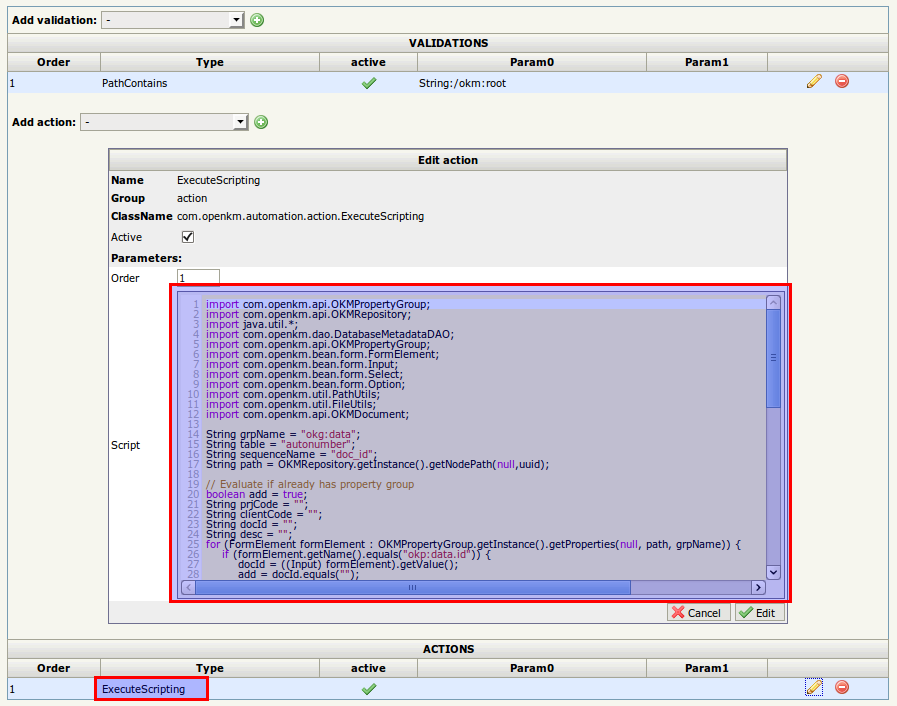
import com.openkm.api.OKMPropertyGroup;import com.openkm.api.OKMRepository;import java.util.*;import com.openkm.dao.DatabaseMetadataDAO;import com.openkm.api.OKMPropertyGroup;import com.openkm.bean.form.FormElement;import com.openkm.bean.form.Input;import com.openkm.bean.form.Select;import com.openkm.bean.form.Option;import com.openkm.util.PathUtils;import com.openkm.util.FileUtils;import com.openkm.api.OKMDocument;
String grpName = "okg:data";String table = "autonumber";String sequenceName = "doc_id";String path = OKMRepository.getInstance().getNodePath(null,uuid);
// Evaluate if already has property groupboolean add = true;String prjCode = "";String clientCode = "";String docId = "";String desc = "";for (FormElement formElement : OKMPropertyGroup.getInstance().getProperties(null, path, grpName)) {    if (formElement.getName().equals("okp:data.id")) {        docId = ((Input) formElement).getValue();        add = docId.equals("");    } else if (formElement.getName().equals("okp:data.project.code")) {        prjCode = ((Input) formElement).getValue();    } else if (formElement.getName().equals("okp:data.description")) {        desc = ((Input) formElement).getValue();    } else if (formElement.getName().equals("okp:data.customer")) {        for (Option option: ((Select) formElement).getOptions()) {            if (option.isSelected()) {                clientCode = option.getValue();            }        }    }}
// Setting propertiesif (add) {    // add unique document id    docId = String.valueOf(DatabaseMetadataDAO.getNextSequenceValue(table, sequenceName));    switch (docId.length()) {        case 1:            docId = "0000" + docId;            break;        case 2:            docId = "000" + docId;            break;        case 3:            docId = "00" + docId;            break;        case 4:            docId = "0" + docId;            break;    }    Map map = new HashMap();    map.put("okp:data.id",docId);    OKMPropertyGroup.getInstance().setPropertiesSimple(null, path, grpName, map);}
// rename documentString newName = prjCode + "-" + docId + "-" + clientCode + "-" + desc + "." + FileUtils.getFileExtension(PathUtils.getName(path));OKMDocument.getInstance().rename(null, path, newName);
Imágenes
Sección titulada «Imágenes»Registrar el grupo de metadatos
Sección titulada «Registrar el grupo de metadatos»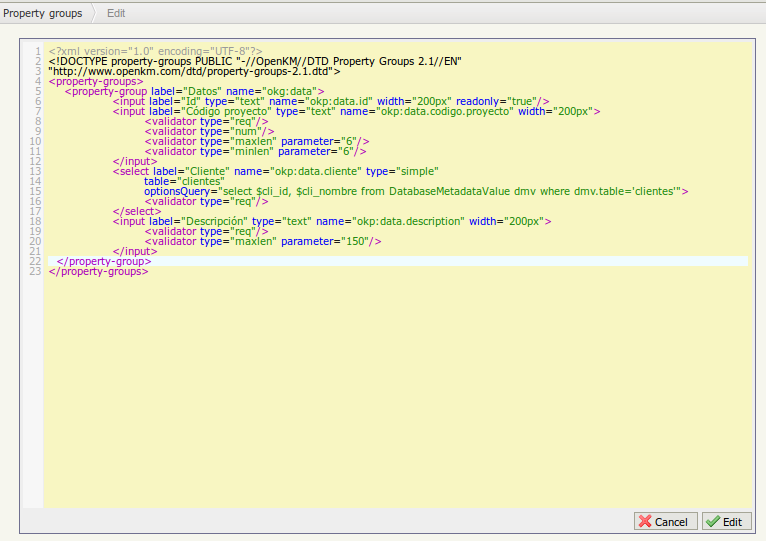
Registrar la regla de automatización
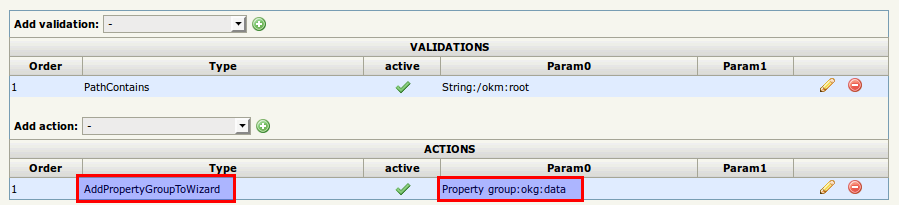
Sección titulada «Registrar la regla de automatización»Cree una tarea de automatización para mostrar el grupo de propiedades en el asistente de documentos:
Cree una tarea de automatización basada en el evento property_group_set:

Resultados
Sección titulada «Resultados»Suba un nuevo archivo:
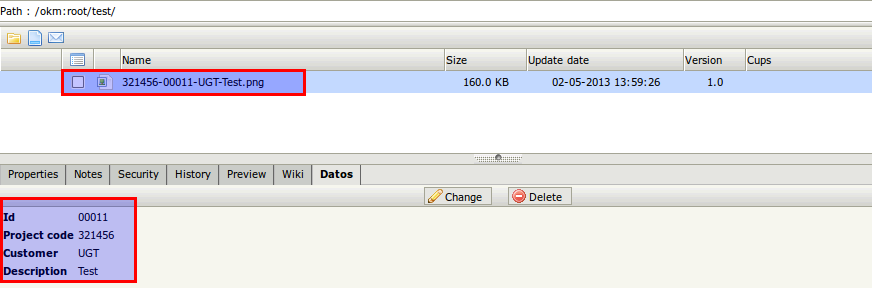
El documento se crea automáticamente a partir de los valores de los campos de metadatos: