Habilitar WebDAV
Una vez habilitado WebDAV, puede acceder al repositorio de OpenKM con esta URL:
http://your-domain.com:8080/OpenKM/webdavVaya a Administration > Configuration parameters:
| Campo / Propiedad | Tipo | Descripción |
|---|---|---|
| system.webdav.server | Boolean | Habilita el servicio WebDAV. Por defecto está deshabilitado. true |
| system.webdav.fix | Boolean | El carácter “:” puede causar problemas con algunos clientes WebDAV; al habilitar este parámetro se sustituirá en la URL el carácter “:” por “_”. Por defecto está deshabilitado. Se recomienda habilitar este parámetro para evitar problemas de compatibilidad con algunos clientes WebDAV. Una ruta como /okm:root/myfile.txt se traducirá a /okm_root/myfile.txt true |
Desde Linux puede utilizar:
Por ejemplo, en Ubuntu o en cualquier distribución de Linux basada en Debian puede instalar esta utilidad de esta forma:
$ sudo aptitude install davfs2Cree un punto de montaje:
$ sudo mkdir ~/okmdavY móntelo:
$ sudo mount.davfs "http://your-domain.com:8080/OpenKM/webdav" ~/okmdavPara facilitar el proceso, añada esta entrada a su /etc/fstab:
http://your-domain.com:8080/OpenKM/webdav /home/username/webdav davfs noauto,user,rw 0 0Y después, en el directorio home del usuario, busque ./davfs2/davfs2.conf. Allí encontrará una línea if_match_bug 1. Descoméntela.
Véase también:
Windows
Sección titulada «Windows»Instale un cliente WebDAV para Windows.
Aquí tiene varias opciones:
- http://www.netdrive.net/ (Gratuito para uso doméstico, pero no gestiona correctamente el versionado de documentos)
- http://www.webdrive.com/ (La opción recomendada; creará una nueva versión del documento al guardar las modificaciones)
- WebDAV Clients on Windows XP
WebDrive
Sección titulada «WebDrive»Probablemente esta sea la mejor opción si utiliza Windows, por su estabilidad y facilidad de configuración. WebDrive 10 (Version 10.00, Build 2521) se ha probado a grandes rasgos con OpenKM para mejorar la compatibilidad. Esta es la configuración compatible para trabajar con el conector WebDAV de OpenKM:
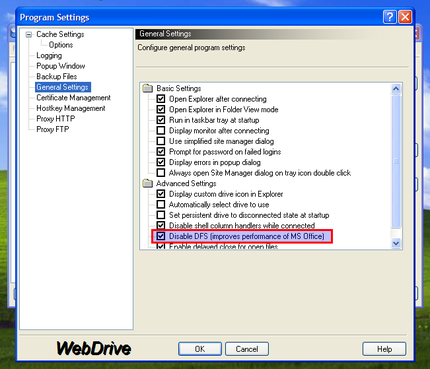
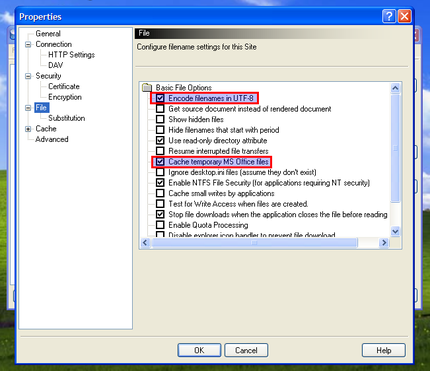
Windows Web Folders
Sección titulada « Windows Web Folders»Realice los siguientes pasos en Internet Explorer:
- Seleccione File -> Open.
- Introduzca una URL como http://your-domain.com:8080/OpenKM/webdav
- Marque “Open as Web Folder”.
- Haga clic en OK.
Windows XP’s “My Network Places”
Sección titulada «Windows XP’s “My Network Places”»Windows XP admite ‘Network Places’ en el cuadro de diálogo estándar de Archivo:
- Abra las conexiones de red.
- Conéctese como recurso de red.
- Escriba la url http://your-domain.com:8080/OpenKM/webdav
- Indique usuario y contraseña.
- Abra la utilidad Editor del Registro (regedit.exe).
- Vaya a HKEY_LOCAL_MACHINE\SYSTEM\CurrentControlSet\Services\WebClient\Parameters, busque TypeUseBasicAuth y sustituya el valor por defecto “1” por “2”, permitiendo BasicAuth a través de conexiones SIN SSL.
- Asigne su unidad utilizando esta dirección: \\your-domain.com:8080/OpenKM/repository/default/okm_root/
Más información en nuestro foro de OpenKM.
Otras herramientas
Sección titulada «Otras herramientas»Instale cualquier cliente WebDAV para Mac; aquí tiene algunas opciones:
- http://cyberduck.ch/
- http://www.webdrive.com/ (Hay una versión para Macintosh OS/X)
Finder de Mac OS X
Sección titulada «Finder de Mac OS X»- Seleccione en el Finder “Go” y “Connect to Server…”.
- Introduzca la URL de WebDAV http://your-domain:8080/OpenKM/webdav
- Introduzca un nombre de usuario y una contraseña.
- ¡Y el repositorio de documentos ya es accesible!
Resolución de problemas
Sección titulada «Resolución de problemas»Rendimiento lento de WebDAV en Windows
Sección titulada «Rendimiento lento de WebDAV en Windows»Si tiene una conexión webdav lenta en windows 7, siga las instrucciones de Fix Slow WebDAV Performance in Windows 7. Resulta ser un problema de windows, no de OpenKM.
Además, en Windows 7/Vista debe añadir su certificado (si no está emitido por una CA verificada) a windows si planea utilizar Webdav sobre SSL (y, como yo, no lo compensa con autenticación digest):
- Obtenga el certificado del administrador del servidor en formato CER o descárguelo desde Firefox.
- Inicie el Administrador de certificados de windows: en la línea de comandos escriba certmgr.msc
- Seleccione a la izquierda Trusted Root Certification Authorities.
- En el menú Actions > All Tasks seleccione Import y después Next.
- Busque la ubicación del archivo de certificado que guardó anteriormente en su equipo y haga clic en Open.
- Recibirá algunos mensajes de advertencia más. Acepte continuar hasta que se acepte el certificado.
Después asigne el contenido de webdav como unidad de red sin ningún otro software. La carpeta debería ser: http://your-domain:8080/OpenKM/webdav
Para asegurarse de que todo está bien con los certificados, abra la dirección con IE. Si no aparece ninguna advertencia, es correcto.
Desactivar el bloqueo de archivos
Sección titulada «Desactivar el bloqueo de archivos»Si necesita acceso de escritura sobre una unidad de red, debe deshabilitar File Locking (windows no admite el bloqueo de archivos de webdav).
Ejecute la herramienta del editor del registro; en la línea de comandos escriba regedit. Modifique o cree este parámetro de configuración:
[HKEY_LOCAL_MACHINE\SYSTEM\CurrentControlSet\Services\WebClient\Parameters]"SupportLocking"=dword:00000000