Consejos de desarrollo
Despliegue de la aplicación en Tomcat
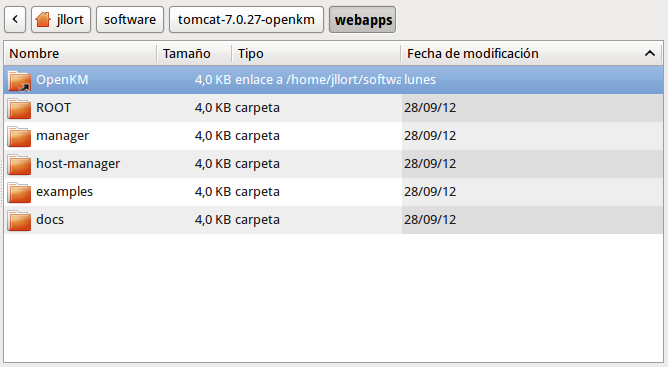
Sección titulada «Despliegue de la aplicación en Tomcat»Para un desarrollo más rápido recomendamos no desplegar OpenKM.war directamente, sino crear en $TOMCAT_HOME/webapps un alias de carpeta de target/OpenKM:
Compilar solo el módulo frontend de GWT
Sección titulada «Compilar solo el módulo frontend de GWT»Para compilar los módulos de GWT individualmente, ejecute el comando:
$ mvn gwt:compile -Dgwt.module=com.openkm.frontend.MainConfigurar la compilación de GWT desde Eclipse
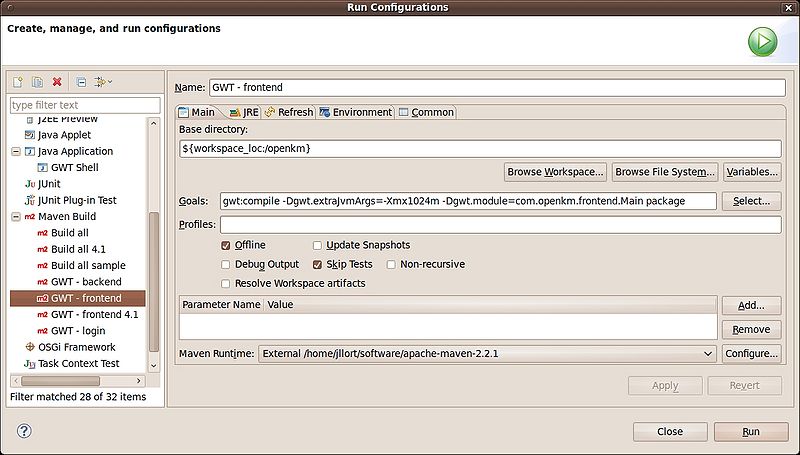
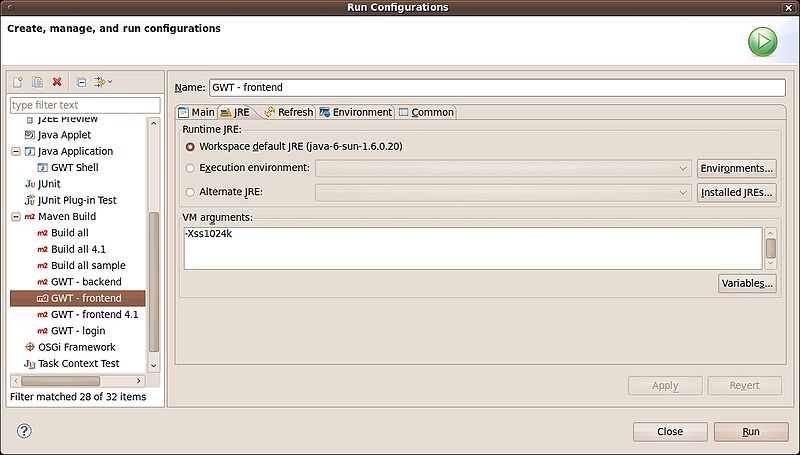
Sección titulada «Configurar la compilación de GWT desde Eclipse»Vaya a “Run configurations”, elija “Maven build” y haga clic con el “botón derecho del ratón” para “añadir” una nueva compilación de Maven.
Compilar solo una permutación del frontend de GWT
Sección titulada «Compilar solo una permutación del frontend de GWT»Por defecto, GWT compila seis permutaciones, cada una para un navegador distinto. Cada permutación consume muchos recursos de hardware (RAM y CPU).
Habilitar solo la permutación de Firefox
Sección titulada «Habilitar solo la permutación de Firefox»Edite el archivo main.gwt.xml del proyecto OpenKM:
<!-- Compile for Firefox only --><set-property name="user.agent" value="gecko1_8"/>Habilitar solo la permutación de Chrome
Sección titulada «Habilitar solo la permutación de Chrome»Edite el archivo main.gwt.xml del proyecto OpenKM:
<!-- Compile for Firefox only --><set-property name="user.agent" value="safari"/>Habilitar solo la permutación de IE
Sección titulada «Habilitar solo la permutación de IE»Edite el archivo main.gwt.xml del proyecto OpenKM:
<!-- Compile for Firefox only --><set-property name="user.agent" value="ie8"/>Configurar el número de CPU que se utilizarán para compilar el frontend de GWT
Sección titulada «Configurar el número de CPU que se utilizarán para compilar el frontend de GWT»El proceso de compilación de GWT puede utilizar más de una CPU. Puede establecer el número de CPU que se utilizarán con el parámetro “localworkers”.
Edite el archivo pom.xml del proyecto.
<plugins> <plugin> <groupId>org.codehaus.mojo</groupId> <artifactId>gwt-maven-plugin</artifactId> <version>${gwt.version}</version> <executions> <execution> <goals> <goal>compile</goal> <!-- <goal>generateAsync</goal> --> <!-- <goal>test</goal> --> </goals> </execution> </executions> <configuration> <runTarget>com.openkm.frontend.Main/index.html</runTarget> <modules> <module>com.openkm.frontend.Main</module> </modules> <localWorkers>4</localWorkers> </configuration> </plugin>Script de despliegue de ejemplo
Sección titulada «Script de despliegue de ejemplo»Puede utilizar un script de despliegue:
#!/bin/bash# @author: Kenneth Walter
#Cleans and re-compiles the source filesmvn -Dmaven.test.skip=true clean gwt:compile install $*
#Set the TARGET_DIRECTORY to the path of your tomcat installationTARGET_DIRECTORY=~/Downloads/tomcat-7.0.27/FILE_TO_MOVE=target/OpenKM.war#This will only attempt to replace the existing WAR if the new WAR existsif [ -f $FILE_TO_MOVE ]then   echo 'Deploying WAR to Tomcat Directory'   cp -v $FILE_TO_MOVE $TARGET_DIRECTORY/webapps/.   echo 'Done'fi