Script para automatización - Ejecutar OMR
El script procesa una imagen con el motor OMR desde Automatización cada vez que se sube un nuevo documento. Con cambios mínimos puede utilizarse junto con crontab.
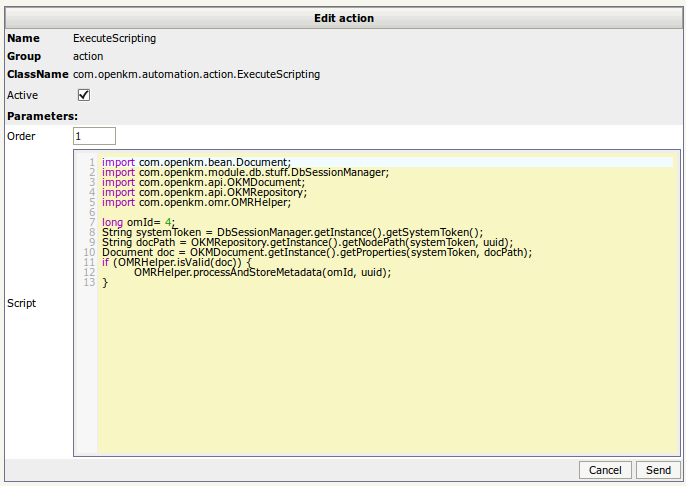
import com.openkm.bean.Document;import com.openkm.module.db.stuff.DbSessionManager;import com.openkm.api.OKMDocument;import com.openkm.api.OKMRepository;import com.openkm.omr.OMRHelper;
long omId= 4;String systemToken = DbSessionManager.getInstance().getSystemToken();String docPath = OKMRepository.getInstance().getNodePath(systemToken, uuid);Document doc = OKMDocument.getInstance().getProperties(systemToken, docPath);
if (OMRHelper.isValid(doc)) {    OMRHelper.processAndStoreMetadata(omId, uuid);}
Imágenes
Sección titulada «Imágenes»Registrar la regla de automatización
Sección titulada «Registrar la regla de automatización»
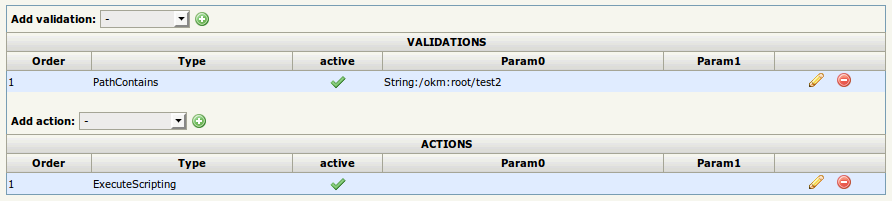
Con una validación PathContains y una acción ExecuteScripting.
El código del script:
Definición de plantillas
Sección titulada «Definición de plantillas»Obtenga el valor de omId de la plantilla.

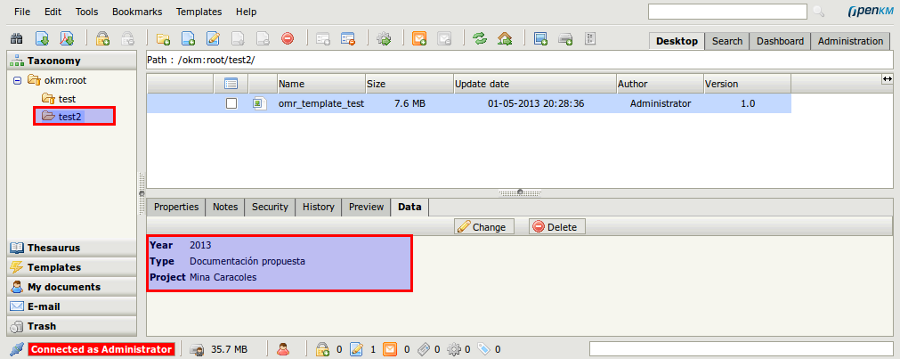
Resultado
Sección titulada «Resultado»Cada documento que se sube a la ruta de la carpeta (o a sus subcarpetas), cuando es un archivo de imagen válido, es procesado por el motor OMR.